

Your Browsing History


Jesse L.
Joined on 08/18/14
0
0
product reviews
- 10
For the extreme budget gamer
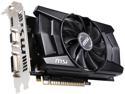
MSI N750TI-2GD5/OC G-SYNC Support GeForce GTX 750 Ti 2GB 128-Bit GDDR5 PCI Express 3.0 Video Card
Pros: Doesn't require an extra power connector Slightly overclocked out of the box Can fit into small cases Cheap
Cons: One of the hottest and loudest running non-reference cards
Overall Review: I picked up this card for my extremely low-budget gaming build (sub $450). Compared to other 750 Ti cards offered by various manufacturers, this version runs a tad hotter and louder. The reason I bought this card was simply because it was on sale and fit into my budget. At the time, I simply could not afford a more powerful GPU. However, that's not to say the 750 Ti is a BAD card by any stretch of the imagination. Paired with a decent CPU, it should be able to run most modern games on medium-high settings at 60 FPS. From my own tests, it was able to easily handle Battlefield 3 on high settings with max temps hovering around 65 C. Recommendation: If you have a mid-range budget, there are better performing cards for just ~$30 more. However, if you are on a really tight budget like I was and need a decent GPU for gaming (and don't mind playing on medium-high settings), then this card isn't a bad choice.
9/3/2014See more detail
Poor signal strength, poor build quality
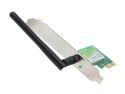
TP-LINK TL-WN781ND Wireless N150 PCI Express Adapter, 150Mbps, IEEE 802.1b/g/n, WEP/WPA/WPA2
Pros: Low price Small form factor, so doesn't impede air flow too much
Cons: Bracket holes do not line up with my case Very bad reception strength
Overall Review: I bought this card after hearing good things about TP-Link. However, after mounting the card, I realized that the holes on the bracket would not line up with the holes in my case. Meanwhile, my GPU has no problems at all lining up with my case. I also double checked that the standoffs for my mobo were installed correctly. This product has POOR quality control. On top of that, I am literally sitting 15 feet away from my router with NO WALLS in between and I am only getting 3-4 bars. Meanwhile my 2010 HP laptop is getting 5 bars at the same location. I have to say I am extremely disappointed in this product.
9/3/2014See more detail
Cheap, and still working
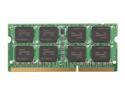
G.SKILL 4GB 204-Pin DDR3 SO-DIMM DDR3 1333 (PC3 10600) Laptop Memory Model F3-10600CL9S-4GBSQ
Pros: I used this to upgrade one of my old laptops from 4 GB to 8 GB of memory. After extensive use including several hours of MemTest, I can I am satisfied with this product.
Cons: None.
4/3/2016See more detail
Large, functional gaming mat. Nothing fancy.
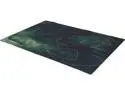
ROCCAT ROC-13-105 Sense Camo Charge 2mm - Military Edition High Precision Gaming Mousepad
Pros: Large surface area that seems to track well with optical mice.
Cons: Slightly curls on the edges. Smells like gasoline for the first few days after unpacking.
4/3/2016See more detail
Excellent budget mouse, but has some caveats
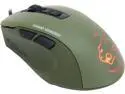
ROCCAT Kone Pure Military ROC-11-711 7 Buttons 1 x Wheel USB Wired Optical Core Performance Gaming Mouse - Camo Charge
Pros: - Good sensor capable of up to 5000 DPI. Playing FPS and RTS games, I never encountered skips or inaccuracies. - Satisfying buttons. The left and right mouse buttons on this mouse are easy to activate. As someone who hates overly stiff mouse buttons, this was a great feature. - Great build quality. The mouse feels solid in craftsmanship and I particularly enjoy the soft rubber finish for the thumb rest. - Built-in memory. After customizing the mouse, you can simply uninstall the software and the mouse will remember its settings. - Color. Personally, I prioritize the performance of the mouse over looks, so the "drab green" color does not bother me at all. The only thing I look for is the ability to turn off the back illumination (which the software thankfully allows).
Cons: - This mouse is very compact. The body of the mouse feels like it was originally considered as a portable, laptop mouse. If you use a palm grip, your finger tips will most likely extend past the front of the mouse. If you have large hands in general, you may need to slightly modify your grip. When I initially got this mouse, I found my hand cramping up after an intense Starcraft 2 match. I needed a few days to adjust to the smaller design. Claw grip users may be OK with this smaller mouse. - The software is a bit of a hassle to deal with. The customization software did not recognize my mouse at first. I had to restart it twice before it finally notified me to update the firmware (after that it started working).
Overall Review: All in all, this is a decent product at its price point. Because apparently few people like the color of this mouse, it goes on sale quite often. If you can pick this up for cheap, I firmly believe this is the best mouse you can buy in the $30 range.
4/3/2016See more detail
Good mouse... until you try to clean it
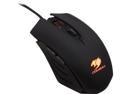
COUGAR 200M Optical LED Gaming Mouse
Pros: Decent and cheap mouse while it lasted.
Cons: Don't use rubbing alcohol on it Buttons a bit too stiff for my liking (opinion) The bright cougar logo on the back of the mouse is distracting. I eventually put tape over it.
Overall Review: Bought this mouse about 6 months ago. Initially, I was satisfied with its performance considering its price. However, when I tried to clean it using a light application of rubbing alcohol, the paint on it began to rub off in clumps. There was residue all over my hand and mouse pad. I threw it straight into the garbage can after that.
5/14/2015See more detail