
Your Browsing History


Shailesh P.
Joined on 03/07/04
0
0
product reviews
- 30
Solid CPU cooler
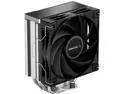
DeepCool AK400 Performance CPU Cooler, 4 Direct Touch Copper Heat Pipes, 120mm Fluid Dynamic Bearing PWM Fans, 220W TDP, Black
Pros: put this on a i5-12400F. added a 2nd Deepcool fan on the backside of the heatsink. CPU runs cool at 30c with both fans on silent. I have built a good number of PC's over the last 20 years and this heatsink/fan unit was one of the easiest to install. I used the thermal paste that was already on the heatsink as it was only a thin layer. You dont have the screw the fans to the heatsink which is convenient. The wire brackets it comes work perfectly fine for holding the fans in place as the Deepcool 120 mm fans have rubber feet where the screw holes are at to dampen the vibration.
Overall Review: very effective yet inexpensive cpu cooler. if you want a quiet running pc without spending a lot, this unit is a good choice.
12/5/2022See more detail
Re-review after RMA
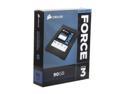
Corsair Force Series 3 2.5" 90GB SATA III Internal Solid State Drive (SSD) CSSD-F90GB3-BK
Pros: ok, the new replacement drive from Corsair actually reads slower than the previous drive by about 15 MB/sec which i can live with but the write speeds are actually much more consistent across the board now at 240 MB/sec.
Cons: 3 1/2 weeks. thats how long it took from the time i shipped (UPS) off the broken drive to Corsair until i had a new one in my hand again. Their website that shows you the status of your RMA does not work. I had to actually call Corsair back twice to find out what the status was.
Overall Review: The SATA connector on the drive is still poor. L-shaped SATA cables still fit loosely but at least this time its not slipping off as easily.
1/16/2012See more detail
Great for someone who doesn't have a 1440p or higher res screen
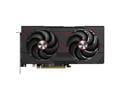
SAPPHIRE PULSE Radeon RX 9060 XT 16GB GDDR6 PCI Express 5.0 x16 ATX Graphics Card 11350-03-20G
Pros: Dont do much PC gaming at all, but this is a pretty impressive upgrade from an RTX 3060 8gb. For the few games I have installed on my PC, I was able to pretty much max out settings at 1080p with ray tracing on. COD Warzone on Max settings at 1080p with no frame gen was at 90 fps. My system is an i5-13600KF with 32 Gb DDR5-5200
Cons: The fact that all GPUs are absurdly priced these days and that people have to be willing to pay ridiculous amounts for them.
Overall Review: I would highly recommend the RX 9060 XT 16gb to every budge conscious gamer out there especially if you have a GPU that is 2 generations old. This is the most I have ever spent on a GPU. I figure it will last me at least 4 years considering most of my gaming is on the Xbox. Xbox game pass is the only reason I ventured a little bit back into PC gaming. For me the best part is being able to trade in the RTX 3060 8gb and get half of what I paid for the RX 9060XT 16gb back in return when that completes.
7/19/2025See more detail
Great bang for Buck CPU

Intel Core i5-12400F - Core i5 12th Gen Alder Lake 6-Core 2.5 GHz LGA 1700 65W Desktop Processor - BX8071512400F
Pros: at ~$160, this is a great budget CPU. more computing power than i3 processors, enough cores for multicore software and perfect for gaming as a lot of games are still single threaded. Uses very little power compared to its bigger brothers. Runs very cool. Idles at 31 C with a Deepcool AK400 Heatsink/Fan cooler with push and pull fans on both sides of the heatsink.
Cons: Does not have a built-in GPU. You have to purchase a separate video card to be able to use this CPU so budget properly.
Overall Review: a recommended buy for a budget pc build
12/5/2022See more detail
Lots of features and connections
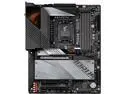
GIGABYTE Z690 AORUS ULTRA LGA 1700 Intel Z690 ATX Motherboard with DDR5, Quad M.2, PCIe 5.0, USB 3.2 Gen2X2 Type-C, WiFi 6, 2.5GbE LAN
Pros: First of all, the only reason I chose this board was because of the great deal there was on this board that came with 32 GB DDR5 5200 MHz ram for under $300. But you know what, this is a pretty solid board. Tons of connection options. Has 4 M.2 slots. 4 4-pin case fan headers. Came with 2 temperature probes and the board even has a decibel meter to measure noise output. Has a built-in wireless AX WiFi6 adapter which allows to place your computer anywhere in the house. Tons of USB 3.2 ports on the back panel of the motherboard along with plenty of headers to add more. The heatsinks on the motherboard function well and comes with metal heatsinks for 4 M.2 drives. Gigabyte's BIOS took a little getting used to as I have not had a Gigabyte board in a very long time, but it has all the options that other board manufacturers also have. Can control all your fans to make your computer super silent. Installing Windows 11 was a breeze. Took maybe 15 minutes on a Samsung 980 Pro. With Fast boot on, from the time you hit the power button, it takes 20 secs for the windows login screen to pop up.
Cons: 2 cons with board - 1) the SPDIF audio output does not work right. I simply can not get it to work. I had to install an old Sound Blaster Z just so I can use the SPDIF output on it. 2) updating the BIOS is a pain. You have to make a bootable flash drive with the firmware update file on it. I dont have any small flash drives sitting around so I ended up using the windows BIOS update software which I usually try to avoid.
Overall Review: I purchased a 12th gen Intel CPU with this board but I can handle a 13th gen if I ever feel the need to upgrade. Also has a PCI-e 5.0 slot for next generation video cards. My last PC build was a 4th generation Intel. I could see getting another 8 years out of this board and the DDR5 ram it came with as I dont PC game much at all anymore.
12/5/2022See more detail
Solid Bang for Buck GPU
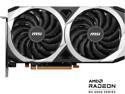
MSI Mech Radeon RX 6600 8GB GDDR6 PCI Express 4.0 Graphics Card RX 6600 MECH 2X 8G
Pros: The card runs quiet and cool. Only time I hear the fans spin up is when playing The Callisto Protocol. Game is playable at max settings with ray tracing off. Has 3 Display port and 1 HDMI output. Works well with my 2 monitor setup. Not a PC gamer here so this card is perfect for someone like me. Much better than any integrated GPUs. A little over $200 with 2 free games, cant beat that.
Cons: Ray tracing - if you want to play games with this feature on, FPS are going to take a big hit.
Overall Review: Supposedly can handle most games at 1920x1080 on highest settings without ray tracing.
12/5/2022See more detail