
Your Browsing History


John O.
Joined on 07/30/16
0
0
product reviews
- 10
Excellent, well crafted touchscreen monitor!
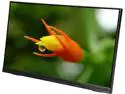
Planar PCT2235 22" (Actual size 21.5") Full HD 1920 x 1080 DisplayPort HDMI VGA USB Built-in Speakers Frameless Edge-Lit LED Projected Capacitive LCD Touchscreen Monitor
Pros: - Touchscreen, duh! - Very responsive - great picture quality - Touch buttons to go with a touch monitor (I see what you did there). Little difficult to find at night, but you'll get used to it and if not just swipe your finger across the bottom right and you're bound to hit it.
Cons: - None really other than the difficult to see buttons bit ultimately not a problem. - Some may say the price, but you get what you pay for and in this case that is a well crafted, slim bezel, very responsive touchscreen.
Overall Review: - I have bought 3, and have them mounted on a triple monitor desk mount if that tells you anything!
8/23/2017See more detail
Great cord to prevent extra cable length!
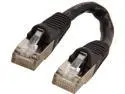
Coboc CY-CAT7-0.5- Black 0.5ft.(6in.) 26AWG Snagless Cat 7 Black Color 600MHz SSTP(PIMF) Shielded Ethernet Stranded Copper Patch cord /Molded Network lan Cable
Pros: - Great for two devices that are close together. (Router on top of a modem, or vice versa, for example) - no unneeded cable
Cons: - Short (read below)
Overall Review: - It is important to remember that the cable length is not measured from the wire itself but from tip to tip. So while the entire cable is 6 inches the actual distance between both Male plugs is more like 2-4 inches. While the entirety of the cord itself is 6 inches so the actual distance you can get from one connection point to another is less than 6. It isn't a bad thing it is just something to keep in mind.
9/24/2019See more detail
Great RGB Mechanical Keyboard!
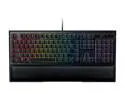
Razer Ornata Chroma - RGB Mecha-Membrane Gaming Keyboard with Mid-Height Keycaps - RZ03-02040200-R3U1
Pros: - Customized RGB (Not only can you have different profiles but you can link them to a file. So when ever you start your favorite game your customized lighting profile is switched to automatically.) - Nice and Satisfying Mechanical clicks. - Wrist rest included
Cons: - None really
Overall Review: - This is a mechanical keyboard so remember you will hear the click of every key, so if that would annoy you then it's best you not go with a mechanical keyboard.
9/30/2017See more detail
Best card on the market
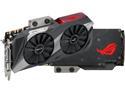
ASUS ROG Poseidon GeForce GTX 1080 TI 11GB Platinum Edition DP HDMI DVI Gaming Graphics Card (ROG-POSEIDON-GTX1080TI-P11G-GAMING)
Pros: - it is a 1080ti. - 11gb of Vram. - can be OC'd if you want to. - Water block or Fans.... Why not have both!
Cons: - Pricey (You get what you pay for which is the Best of the Best!) [Not complaining about the price because Hey I bought it and love it. Other may see it differently though]
Overall Review: - Discount if you by 2 at once. ( May encourage more sales) [Just for clarification, I only bought 1 as I didn't have the money.] - Replace the DVI with another DP or HDMI (I know others may still use it but most are moving away from it and I think over the next few years cards should do the same or maybe make 2 models on with an extra HDMI or DP instead or DVI and one with DVI)
8/23/2017See more detail
Great RGB LED Fan
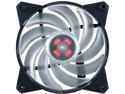
MasterFan Pro 120 Air Balance RGB with Hybrid-Design Fan Blade, Speed Profiles, Jam Protection, and Customizable Color Options by Cooler Master
Pros: - RGB Led! - Designed to provide a balance between Air Flow and Air Pressure. *Definitions for the two is listed at bottom under "Other". - 4 pin for pwm fans out there.
Cons: - none really unless you don't have a RGB header on your Motherboard then you can ether do Red, Green, or Blue on each individual fan via a switch. (They sell a RGB control hub for their fans but you will have to buy the 3 fan + Controller combo for $84.99 as of 8/24/17)
Overall Review: - Now if you have a thick fan filter or a Radiator then go with the Air Pressure model as you're more worried about static air pressure to get though the obstacles. Quick tip for those that don't know the difference: Air Flow - Maximum flow without any resistance (Radiator, Thick Filter and such) Air Pressure - maximum flow with resistance (Radiator, Thick Filter and such)
8/23/2017See more detail
Amazing Case!
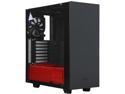
NZXT S340 Elite Black/Red Steel/Tempered Glass ATX Mid Tower Case
Pros: - Cable clips to help route cables - PSU shroud (Nice and clean)! - Top I/O VR friendly connections (2 USB connections and HDMI connecter via HDMI pass though. Cable fits though a slit in the cable storage section and can connect to your mobo or GPU!) [Future investment for when I purchase a VR headset] - Headphone/set puck for easy storage and cable management. - Removable front for easy fan installation and Improved airflow. (It doesn't look all that bad with it removed.
Cons: - 2 additional USB 3.0 top I/O connections to offset the 2 that can be used for VR Headsets (Works with other USB items to, not soley dedicated for VR). - Maybe should have made it an inch or two longer to account for thicker radiators on the front if water cooled.
Overall Review: - None ( and it has a $15 rebate at the moment. []8/24/17] So get what you want and save some money at the same time)
8/23/2017See more detail