
Your Browsing History


Ryan L.
Joined on 05/07/05
0
0
product reviews
- 15
This might be all you need, honestly
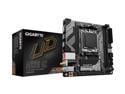
GIGABYTE A620I AX AM5 LGA 1718 AMD A620 Mini-ITX Motherboard, DDR5, Single M.2, PCIe 4.0, USB 3.2 Gen1 Type-C, Realtek Wi-Fi 6E, Realtek 2.5GbE, Q-Flash Plus, PCIe EZ-Latch
Pros: - Relatively cheap - Handles my 7800X3D with no issues, has enough power delivery for all current AM5 chips - None of the tiny noisy fans that some other boards have - Has all three of USB-C, HDMI, and DisplayPort, so integrated graphics works with any monitor - (FYI) ITX case not required, fully compatible with larger ATX cases and power supplies
Cons: - Lots of corners cut to achieve the low price - Just 1 M.2 slot - Not many USB ports - Cramped to work on, though not unusual for ITX - Very old BIOS version at time of delivery
Overall Review: If you're okay with the limitations, you can save a bunch of money on your board here and spend more elsewhere in your build.
12/13/2023See more detail
Not bad, far from perfect
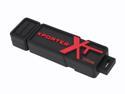
Patriot Xporter XT Boost 32GB Flash Drive (USB2.0 Portable) PEF32GUSB
Pros: Very fast 30MB/s read rate, rugged construction.
Cons: Just barely fast enough for ReadyBoost--you might have to retest a few times (it's random 512KB write rate is only 1852KB/s... ReadyBoost requires 1750KB/s). The slow random write performance hurts usefulness as storage for virtual machines. Sequential writes are better, at roughly 10MB/s, but that's nothing special.
Overall Review: The slow write speeds work against the large capacity--it'll take a very long time to fill it up. The cap attaches to the other end, but not very snugly--I lost mine within 24 hours of delivery.
12/18/2007See more detail
I had bad luck with the fan attachment
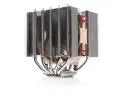
Noctua NH-D12L, Low-Height Dual-Tower CPU Cooler (120mm, Brown)
Pros: - Can handle my 7800X3D with no problems - Mounting bracket is easy to install, an ancient Noctua tradition - Included fan is relatively quiet at all speeds and has a low minimum speed via PWM, also an ancient Noctua tradition
Cons: - Have to remove the fan to screw in the heat sink. I had a difficult time and bent a lot of fins unclipping it, and after re-installation the fan hangs loosely. Still provides good cooling despite this. - Included fan has a non-standard frame so only replaceable with the same design from Noctua (should that ever be necessary).
Overall Review: I won't rule out user error for my trouble removing the fan for installation, but those clips were not letting go and I had to shove a flathead screwdriver in there to get it loose. Didn't have this problem with previous Noctua coolers.
12/13/2023See more detail
Best Gaming CPU
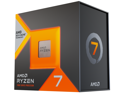
AMD Ryzen 7 7800X3D - Ryzen 7 7000 Series Zen 4 8-Core 4.2 GHz - Socket AM5 120W - AMD Radeon Graphics Desktop Processor - 100-100000910WOF
Pros: - Very efficient, low power usage - Low heat, any decent 120mm air cooler can handle it with no problem - Although considered a "gaming" CPU, it's very competent at production workloads, too
Cons: - Old motherboard BIOS versions may shove too much voltage into this CPU by default, update to eliminate the associated problems
Overall Review: There's so much speed here that games will probably still be GPU-bottlenecked at 4K even with unreleased next-generation GPUs.
12/13/2023See more detail
Not flashy, does the job
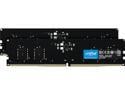
Crucial 64GB (2 x 32GB) DDR5 5600 (PC5 44800) Memory (Desktop Memory)
Pros: - Stays cool despite not having a heat sink - Low profile improves airflow across the motherboard - Low voltage helps efficiency - Not on the QVL for my motherboard but works perfectly despite that
Cons: - No RGB party lights or fancy heat sink design, so may not work for some build aesthetics
Overall Review: This product does exactly what it says it does. Although faster RAM exists, it costs more and that extra speed is only worth a few % in most benchmarks. Spending the money you save on this RAM can help move you up a notch in your CPU/GPU for a bigger gain.
12/13/2023See more detail
16 Months, It's Still Great
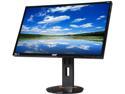
Acer XB270HU bprz Black 27'' 144 Hz WQHD G-SYNC Widescreen LED Backlight LCD Monitor IPS 350 cd/m2 1,000:1
Pros: G-SYNC is awesome beyond words. With the video card now telling the monitor when to refresh, instead of the monitor refreshing on its own fixed schedule, you get a level of smoothness unlike anything you've ever seen before. I initially used it with a GTX 680 and it helped extend its life a little bit, since lower frame rates weren't so bad. The GTX 1080 I have now delivers much higher FPS, but the smoothness benefits of G-SYNC are still obvious. USB 3 hub and integrated power supply (no external brick like many other monitors) are nice perks. I've used IPS panels for many years and won't go back. Slightly lower response times (which I'm not l33t enough of a gamer to notice) in exchange for much more accurate color reproduction and viewing angles.
Cons: The widely reported issue with back-light inconsistency of dark images is present on my monitor. Not noticeable in most situations. Costs it half an egg, though. Occasionally g-sync stops working when power-cycling the monitor, fixed by unplugging/replugging the DisplayPort cable. Also took off half an egg for this problem. You get 100 steps of brightness/contrast and it's slooooow to go up and down.
Overall Review: If you want IPS and GSync and 1440p at the same time, you don't have a lot of choices. I didn't have any RMA-worthy issues with mine in 16 months of ownership but it sounds like others have, so keep your documentation handy. Non-NVIDIA graphics cards can use the monitor at a fixed refresh rate. I've used my Dell XPS 13 (with a mini-DP-to-DP adapter) and my work laptop (with a dock) successfully. If you have an AMD GPU, this isn't the monitor for you unless you plan on switching to NVIDIA in the near future.
8/5/2016See more detail