
Your Browsing History


Johnathan B.
Joined on 05/29/16
0
0
product reviews
- 16
All the other monitors I have now look like junk.
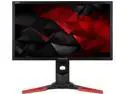
Acer Predator XB1 XB241YU bmiprz 23.8" 144 Hz TN WQHD LED Gaming Monitor, 2560 x 1440 (2K) 1ms Response Time, HDMI / DisplayPort, Tilt / Swivel / Height Adjustable
Pros: -Top to bottom; quality is amazing. Feels like a tank, has some mass to it. -Great packaging -Screen clarity is the best I've ever experienced
Cons: -Some adjusting needs to be made to get the "Black" colors up to par.
Overall Review: Monitor does several things that make it worth the purchase in my mind. Screen clarity being the most important. Quality being the other. You can sense when something is put together poorly due to lots of plastic pieces, or some of the panels are not very snug. This one doesn't feel cheap whatsoever... my bank account agrees. But you get what you pay for. Packaging, instructions are also great. It also comes with a DP and HDMI connector. I made the jump from a 1080p 144 hz LG monitor and the difference was immediately noticeable when I booted into Windows. I suddenly felt less blind. I can literally see the size 2 font on some of the icons. The level of detail in game is a big improvement over 1080p. In particular, Witcher 3 and Doom really look great. Not really a complaint, but the black colors are not quite up to snuff out of the box. Very bright blacks if that makes any sense. Upping the contrast and lowering the brightness a few notches mostly resolves this. I also don't really like heavily saturated colors... On most televisions and monitors I usually leave the color setting/number at default, and this monitor is along those lines. Colors are nice but not overkill. I prefer balanced colors rather than having everything look like a cartoon. It is a TN panel so depending on the angle, the colors go wonky. I tend to sit directly in front of my monitor when in use but I have seen it where the whites become yellow and reds become pink when I get up and am walking back to my desk. Screen has a matte, non-reflective quality which is nice. UI is a bit clunky with several buttons to control the settings, but it is very easy to learn after a few seconds. And best of all, the packaging is very snug so the monitor wasn't damaged. To be honest, while this monitor utilizes Gsync technology, I haven't really noticed it all that much. I did come from a 144 hz panel before this one, which maybe why. Little to no screen tearing either way. Very happy with the purchase. Will never buy another brand or model type again.
9/25/2017See more detail
Ryzen user with MSI B350 Tomahawk
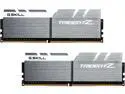
G.SKILL TridentZ Series 16GB (2 x 8GB) 288-Pin PC RAM DDR4 3200 (PC4 25600) Desktop Memory Model F4-3200C14D-16GTZSW
Pros: -Looks excellent. -Came undamaged. -Gskill has a pretty solid reputation.
Cons: -Not able to post anything higher than 2133 mhz. Not going 1 egg on it, as this is most likely bios issues rather than Ram issues.
Overall Review: Running the latest and "greatest" bios version for MSI B350 Tomahawk with a Ryzen 1700. Why am I going with this version of Gskill Ram rather than the Flare x? Because A. This specific memory is on MSI's site as being compatible at the 3200 speed it is advertised with. B. It's about the same price as the Flare X. C. I think it has a better design. D. MSI has had at least 6 bios updates since Ryzen has been released and has said that most compatibility/stability issues have been worked out. Most... but not all in my case. But that all being said, it's not the fault of the Ram. But if you are a Ryzen owner using the B350 chipset, then beware. None of the XMP profiles work at all for me, no sort of manual voltage tuning or latency changes do a thing for me. Even purposefully changing the timing to 2133 mhz will cause the computer to stall during boot and reset itself... to 2133 mhz??? Nothing seems to work right now with the Ram despite it being a Samsung die and only using 2x8gb sticks and being on the MSI compatibility list. Also own a set of Kingston Hyper Fury x's 2400 mhz that can overclock to 2933 stable on the same Mobo and bios. Finger's crossed that MSI gets this figured out for their next update coming at the end of June. Until then, good luck to you.
6/20/2017See more detail
Good stuff
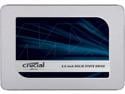
Crucial MX500 1TB 3D NAND SATA 2.5 Inch Internal SSD, up to 560 MB/s - CT1000MX500SSD1
Pros: - Works as intended. -Fast boot times for the games.
Cons: -Minor nitpick... Windows 10 did not recognize the drive on plug in. Not a big deal but worth noting.
Overall Review: Time will tell about it's durability compared to the Sung. But its cheaper and keeps up just dandy.
4/17/2020See more detail
3200 RAM that works with 1st Gen Ryzen
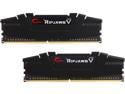
G.SKILL Ripjaws V Series 16GB (2 x 8GB) 288-Pin PC RAM DDR4 3200 (PC4 25600) Desktop Memory Model F4-3200C16D-16GVKB
Pros: -Very cheap right now. -Able to hit 3200 CL16 using XMP
Cons: -Nothing
Overall Review: MSI B350 Tomahawk QVL listed RAM. Works exactly as intended. Two clicks and running stable at 3200 CL15. No guess work needed on these sticks. Will likely dial in some tighter timings to try and improve latency.
2/18/2020See more detail
Another good Corsair AIO
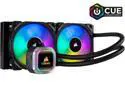
CORSAIR Hydro Series, H100i RGB PLATINUM, 240mm, 2 x ML PRO 120mm RGB PWM Fans, RGB Lighting & Fan Control w/ Software, Liquid CPU Cooler, CW-9060039-WW, Support Intel 1200/ 2066, AMD AM4/ TR4
Pros: -Fairly easy to install -Looks really good -Performs well on Ryzen platform -Comes with ML fans
Cons: -Cable management could be better
Overall Review: Outside of the plethora of cables involved with this thing, there really isn't anything bad to say about this AIO. Hooked this to a Ryzen R5 3600 with PBO and auto OC maxed. Keeps the chip in the low to mid 30 degree range at idle and in the mid 50 degree range while gaming. It maxes at 68 degrees when doing benchmarks. Allows it to boost to 4.2 fairly often so this cooler does it's job keeping thermals in check. ICUE software isn't too bad. You are able to setup custom fan curves and play with a few dozen lighting options. You are able to set the lighting and fan curves up and disconnect the USB if you are concerned about all the cables. I mounted this into a 570x crystal case. Mounts to the top no problem and obviously can mount to the front.
2/18/2020See more detail
2k Beast and 4k warrior
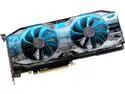
EVGA GeForce RTX 2080 SUPER XC GAMING Video Card, 08G-P4-3182-KR, 8GB GDDR6, RGB LED, Metal Backplate
Pros: -Maxest of the max settings at 1440p while still maintaining 100+ fps in games -Mostly max settings at 4k while staying near or above 60 fps in most games -LED's are nice and not over the top -Slimmer and lighter than the "Ultra" or "FTW" versions -Roughly 5-10% faster than EVGA's 1080ti at higher resolutions
Cons: -Louder (at max load) than the "Ultra" or "FTW" versions due to smaller heat sink and reference PCB. -EVGA's Precision X software works but is not as polished as MSI Afterburner
Overall Review: This is my 3rd EVGA card. Previous card was the 1080 FTW2. Very happy with the purchase. EVGA Precision X software is still hit and miss especially with the UI. However it is a mandatory download to unlock the voltage and change the LEDs. I download the Precision X for this purpose...close it completely... then use MSI Afterburner to do the actual overclocking and tinkering. Overclocks reasonably well. Can max out at around +150-160 at the core without artifacts popping on the screen and memory can be maxed out all the way without issue. You will run out of power limit before you can overheat the card via voltage and the core isn't stable to get to that point anyways. I run this card stable (Using Heaven, Firestrike, and UniEngine benchmarks) with +55% at the voltage / +150 at the core / +650 at the memory. Temp never goes beyond 75-80 degrees under load despite the smaller heat sink and factory PCB. While this causes the fans to spin up a little more, it can be remedied a bit by creating your own fan curve and/or having a case with excellent thermals. At worst the fans spin up to 80% of max at 80 degrees before these temps stabilize under full load. Buy this if you can. Better value than the 2080ti IMO unless you are strictly a 4k max, 60+ fps only, nerd. Even then, depending on the game, this card is up to the task. Probably don't buy this for anything less than 2k Resolution.
1/30/2020See more detail