
Your Browsing History


Christian P.
Joined on 12/23/03
0
0

product reviews
- 65
Look Again
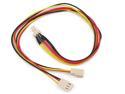
Rosewill RCW-310 - 12" Dual-Fan Power Y-Cable - 1 Male to 2 Female
Pros: Don't order this cable by mistake if you think you can hook 2 fans together and plug it into your mobo header. This will not work for that. The proper cable then is: Link Depot brand, 3 pin Fan Power Y Cable model POW-ADT-3PY, #N82E16812189063 (at $1.39 each).
Cons: Need to carefully look at the plugs, this one has 2x female ends and only one male end, opposite of what you'd need for 2 fans to one header.
Overall Review: Other than the above, I'm sure this product is fine for is different required use.
1/10/2009See more detail
Needs aftermarket heatsink
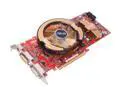
ASUS Radeon HD 4870 512MB GDDR5 PCI Express 2.0 x16 CrossFireX Support Graphics Card EAH4870/HTDI/512M/A
Pros: Previous price was decent and performance was good until the fan died and temps skyrocketed to 100C, creating BSOD's.
Cons: The stock fans commonly die at a high rate with this vga card. Customer service is slow, RMA's are very slow: 4 weeks and no card. The price of this card is now a joke, not competitive at all.
Overall Review: There are some good aftermarket coolers for this card but they cost between $30-50. and if you add that to the price of the card you could of had a GTX280 or a 4870 1G from a different manufacturer. The stock fan was a terrible choice by Asus. Look elsewhere.
3/11/2009See more detail
DIYPC ARGB-Q3-Black
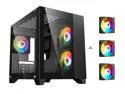
DIYPC ARGB-Q3-BK Black USB3.0 Tempered Glass Micro ATX Gaming Computer Case w/ Dual Tempered Glass Panel and 3 x ARGB Fans (Pre-Installed)
Pros: Not a bad looking case. Inexpensive on sale. RGB is bright. MicroATX fit just fine. MSI Ventus 4070 fit fine. Two sides of glass are nice. Plenty room behind the scenes, decent wire routing and psu.
Cons: No RGB controller so lights cannot be set, constant rainbow colors. Controller is only 10 bucks :) Motherboard will need ARGB 3 pin plug for any lights to work. Fans daisy-chained by molex, so have a power supply that has a molex feed or adadpter molex to sata. The 4070 gpu was restraint by the slotted area behind the case. Bars/slots that are typically removeable for a 2 or 3 high slot video card are not removable, had to bend one out to seat the video card, cheap. Out of sight, out of mind.
Overall Review: The case was boxed and shipped well with no damage. All plug ins worked. Comes with standoffs and protected glass. Case feels light, cheesy but firmed up with parts installed. Everything works but the RGB lighting has no way to control lighting colors without a controller ($10 part). See video on youtube review. Parts and pieces fit but have a feeling these stock fans won't last too long, on the cheap side. For the price I'm happy, customer happy. Case breathes decently after stress testing a 13600KF and a Silent Assassin, cpu never went over 70c without adding any other case fans. Hope the fans last. Replacement fans set of 3 around 30 bucks, not a biggey.
12/3/2023See more detail
Micro ATX mobo with WiFi
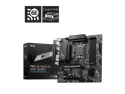
MSI PRO B760M-A WIFI DDR4 LGA 1700 (Intel 12th&13th Gen) SATA 6Gb/s Micro ATX Motherboard,WiFi 6,Intel,2.5Gb LAN
Pros: Had to shop for a microATX mobo with wifi to fit a certain case. Not all that many to choose from but have always had luck with MSI, and it was on sale. Easy to setup, has ARGB header, enough fan headers and decent audio. Everything fit snug (4070) without stand. The motherboard is straight foward and clean looking. My 13600KF was recognized at first boot, so was my Samsung Pro 990 SSD (without having to format at all). Bios flash was easy and successful first attempt.
Cons: Beware, mobo has an 8pin plug and a 4pin plug for the CPU. My Corsair 650TX only had a single 8pin, used it without filling the 4pin (read it's only for high end cpu's that run over 300 watts or overclocking). The verdict is out (but did pass a stress test without shutting down). No mobo manual, have to go online to the product site to read one. Had to flash bios from 1.04 to 1.08 to get wifi to be recognized. Windows didn't recognize. Need small fingers to access some plugs in a tight case.
Overall Review: This is among the most inexpensive mATX mobos with wifi, gave it a shot. Booted up first try. 13600KF with Thermaltake Silent Assassin heatsink MSI Ventus 4070 GSkill PC3200 DDR4 2x16 Samsung Pro 990 1 gb SSD Corsair 650TX (lacks the additional 4pin plug for the cpu but running fine. No overclocking planned yet. DIYPC Micro ATX case with ARGB (not my choice). Build went well, fired up first boot. No formatting required on SSD. 13 Gen cpu recognized. GPU recognized. Needed to run wired ethernet to install windows and update drivers. Wifi wasn't recognized by windows so had to flash bios which was quick and successful, wifi then recognized and working. All drivers updated, added some utilities , CPUZ, GPUZ, etc and stress tested for an hour. CPU stayed at 70C, motherboard temps normal, no issues. Mobo wouldn't be my choice for my own build but works for the case. So far so good, might swap out power supply to a Corsair 750TX with additional 8pin to 4x4 pin to fill in other cpu 4pin plug.
12/2/2023See more detail
As good as expectations
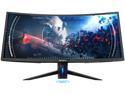
Westinghouse WC34DX9019 34" UWQHD 3440 x 1440 2K Resolution 100Hz 2xHDMI DisplayPort USB 3.0 Hub AMD FreeSync Technology Flicker-Free Ultra Widescreen Curved Backlit LED Gaming Monitor
Pros: Good monitor, 2k, refresh rates 100mhz as advertised. Sturdy stand with some screen adjustability. Includes quality 4' DP cord. Price cant be beat. Decent color for price. Easy assembly (unlike other reviews), will explain below. Had no issues after 2 weeks, no dead pixles, good packaging.
Cons: Requires philips head screwdriver to install 4x base screws. No assembly instructions but is straight foward. Requires down-loading drivers after plugged in (as expected). Silly rear rgb lights to dim to use, even in dark room. Just turn them off. Silly blue lighted "W" logo, also turned off.
Overall Review: This monitor was packaged well in a very padded box. One must install and tighten 2x screws for each leg, very easy, then must install the base to the back of the monitor. Lay face of monitor on table, insert base keys into back of monitor at top portion, then you'll see a handle that you pull up before you push the bottom portion in, when inserted, release handle. Done, easy. Took 10 seconds. I used the included DP cord, plugged it in and turned it on. In my Nvidia panel I set the resolution to 1440, then downloaded the drivers off the Westinghouse site. Everything worked fine. Refresh rate at 100mhz with ability to overclock (not yet done). The buttons are not as bad as other reviewers mentioned. I had no issue with them. The support button system isn't hard to navigate, not as bad as I imagined. Color adjustments were easy. The blacks on this monitor are not as dark as my LG monitor alongside it, but still happy with it. I'm quite pleased actually, would recommend this monitor, especially at this price.
12/15/2020See more detail
One slot between video cards, Works with MSI's
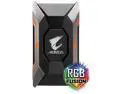
GIGABYTE AORUS 2-WAY SLI HB Bridge (One Slot Spacing) Model GC-A2WAYSLI
Pros: This is likely the most common connector size for sli (high bandwidth; for 144mhz and higher monitors). Perfect fits for MSI motherboards Z190A/M7 and Z390 Gaming Edge (likely others). Gigabyte product has built in lighting, likely fits many Gigabite mobos.
Cons: It took alot of research to figure out which size (slot spacings) was required. Explanation below. No cons, works, good fit.
Overall Review: Slot spacings: Most motherboards have 7 slots at the rear panel. Top slot is open. The top video card takes up the 2nd and 3rd slots down. The 4th slot down is open. The 2nd video card takes up slots 5 and 6 which means there is one slot open between the two sli cards. This 1 slot bridge works and fits perfectly if you have one open slot between sli video cards . Connectors to connectors are 60mm apart. Hope my explanation made sense.
3/13/2019See more detail