

Your Browsing History


James K.
Joined on 08/30/04
0
0
product reviews
- 81
I've used 2 in builds so far with no problems.
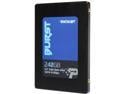
Patriot Burst 2.5" 240GB SATA III Internal Solid State Drive (SSD) PBU240GS25SSDR
Pros: - Fast enough to outperform any hard drive in random read/writes - Stable thus far - Cheap - Reputable Brand, kind of...
Cons: - Others seem to have had a high failure rate with this drive - Very slow Deep Queue speeds (Doesn't multi-task well compared to better SSDs) - Slow write speeds once buffer fills (Expected @ this price point)
Overall Review: This drive is appropriate for fixing up an older system or upgrading a budget laptop. I used one in an HP x360 and as a boot drive for a refurbished budget gamer for two separate customers. After a couple months, nether have failed or hiccuped. (Knock on wood) I would not use this as a boot drive on anything but a basic machine. However, they would make a descent cheap storage drive for games and the like. A lot of people seem to have reported failures with these, so I'm hesitant to trust them too much. But the systems I've put these in run great for normal usage. Other Drives I regularly use/recommend - Samsung /850/860 Series - Crucial MX300/500 - AData SU800/960 All of these drives are far better than this one, but also much more costly.
6/5/2018See more detail
Good For the money, but has several glaring issues...
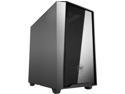
COUGAR MG120 Black Micro ATX Mini Tower Elegant and Compact Case
Pros: - Good overall layout, bottom mounted PSU - Easy to work in - Logical cable management - Good built quality for the price point. - Even has front, top and bottom filters - Has top Vents - Looks good, and feels more costly than it is.
Cons: - USB 3.0 Front port doesn't work, contacted Cougar for replacement part, we'll see how they handle it. (Will increase to 4 eggs if they send me a replacement piece) - Front of case has plenty of places for fans, but it's pointless, as there is almost nowhere for air to get in. Just a tiny slit at the bottom of the front, that's it. - Bottom SSD trays may become useless depending on where your motherboard connections are, as they're so close.
Overall Review: I was really excited building this case at first. The build went very smoothly, everything fell into place in this case nicely. I used it for a Ryzen 3200g APU build with an NVMe drive, so there was plenty of space. This case is great for these types of budget builds, as well as budget gaming builds, if you don't need much intake from the front. Assuming you don't get any defective front ports or have your mobo interfere with bottom SSDs, that is.
2/7/2020See more detail
Junk...
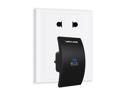
Wavlink Updated 300Mbps WiFi Range Extender. N300 WiFi Repeater / Signal Booster / Access Point with WPS and AP Function, Mini Size, Ethernet Port, Update Edition : 519N2 -- Work with Any Routers
Pros: Descent UI for setup Does kind of work...
Cons: Speed is horrible. Range is horrible. Jitter is all over the place. Tried with two different networks, which were completely different systems. This will NOT improve any network.
Overall Review: Bought it 2 years ago for when I'd need for a customer who needed a simple repeater. Finally had a good use case, and it couldn't even do a basic repeat setup with a FIOS router. Even when I ran it right next to the router, I couldn't get more than 1-5mbps and ping was all over the place. Brought it home and used it with my Netgear N7800 and same results. Just garbage, which I could get a refund.
7/16/2020See more detail
Fine for the price, but image quality is low
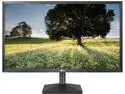
LG 24BK430H-B 24" Class TAA IPS FHD Monitor with Windows 10, Flicker Safe, On Screen Control, Eye Comfort: Reader Mode & Wall Mountable
Pros: - Cheap - IPS - 75Hz
Cons: - Really Bad Screen Door Effect - Subdued, inaccurate colors (especially for IPS) - Horizontal Viewing Angles horrible for IPS
Overall Review: This is IPS? Really? Can't be. I've never had an IPS panel look this mediocre. From the major screen door effect to the bad viewing angle, to the bad colors, I have a hard time believing this is really an IPS panel. For the price, my expectations weren't high. But I work with a lot of different monitors and LCD panels, and this is worse than many TN panels even at the same price point. Also, doesn't have Display Port, so no FreeSync with Nvidia cards.
6/1/2020See more detail
First time using OLOy, but couldn't resist the price for my new guest gaming PC
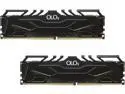
OLOy 32GB (2 x 16GB) 288-Pin PC RAM DDR4 3000 (PC4 24000) Desktop Memory Model MD4U163016CGDA
Pros: - Low Price - Looks Nice - Runs at advertised speeds
Cons: - Longevity unknown
Overall Review: If it's significantly cheaper than name brands such as G.Skill, Crucial, or Corsair and it works just as well, why not? Trying out the brand in a non-mission critical new gaming PC build for guests and when my 3 year old is ready to game. We'll see how it works long terms, but seems 100% stable now. Stable at 3066Mhz, but not 3200Mhz. This is using XMP timings and voltage on a B450 board & an AMD 2600.
1/24/2020See more detail
Great Gaming Monitor that can still multi-purpose
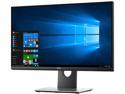
Dell S2417DG 24" (Actual size 23.8") 2560 x 1440 2K Resolution 165Hz 1ms HDMI DisplayPort NVIDIA G-SYNC Anti-Glare LED Backlit LCD Gaming Monitor
Pros: - Relatively affordable true gaming monitor - Simple design with great physical adjustments, very thin bezel, pretty good build quality. - Gaming Functionality works quite well (144hz, G-Sync, Minimal Ghosting, 1440p) - Acceptable Image Quality (Sharp, acceptable colors/DR/Contrast) - Descent OSD
Cons: - Many reports of color banding issues, especially in color banding issues. See notes... - Definitely Better Monitors out there for raw image quality, but that's not really the point here. - Very Plasticy for it's price range. - Does require tuning out of the box
Overall Review: After reading many reviews for the screen, I decided to take a plunge during the Holiday specials. Overall, I'm glad I did. I've never splurged on this high end of a monitor for my own gaming before, though being in the industry, I have experienced a lot of great monitors. Things like ghosting, color banding, bad contrast, etc. can really bother me. I'm not a total perfectionist, but I can't stand a glaring issue like that. At first, I thought mine had no issues with this. However, I decided to lower the Gamma further in the Nvidia settings, and this makes the banding issue more distinct. There are a lot of theories out there about how to tune this monitor. First, don't just assume a tune you find online is going to be good. Panels vary and need to be individually tuned. I tuned mine by eye manually, favoring a higher gamma for better competitive gaming at the expense of dynamic range and raw image quality. Either there are many bad samples of this panel out there, or people's settings are exacerbating the relatively low color range of the TN panels. I've worked with TN panels a lot, and you have to be careful to tune them within their capabilities. That being said, my sample seems to be one of the more forgiving TN panels I've used. Honestly, I was able to hone the settings to my liking within a couple of hours of tweaking/playing. Side by side, it definitely has an overall better image than my 5 year old $150 Asus 24" it replaced. The Asus had a bit more contrast and pop, but the Dell picture feels a bit more real. Even looking a photos, while the colors don't have as much pop, the shadow/highlight detail is far better. I didn't expect this based on the reviews, though the ole' Asus was never that great in this respect. For someone coming from a good IPS, the story would be different. The big issue here is that Gamma CANNOT be controlled from the monitor's OSD, which is a huge oversight on a gaming monitor. The default gamma is far too high, so compensating with the Nvidia settings is the main option, which causes the banding issue to manifest. Buy I've dwelt on image quality long enough. This was a great side effect that will help my hobbyist photo editing, but the meat of this monitor is gaming. For that, I was blown away. The increase refresh rate is great, sure, but what really got me was the lack of ghosting. Dragging windows around and trying to read the text on my old Asus was almost impossible, and I was getting sick of it. The dell completely fixes this. I've never seen a monitor this great at not ghosting. I'd hope some of the latest $1k+ monitors would match or exceed, but I haven't seen those lately. Overall, I feel perfectly comfortable recommending this as a great Gaming & Multi-Purpose monitor. It may not have the pop or wow factor of some monitors, both in terms of Image Quality & Design, but it's got it where it counts. Images feel real, motion looks fantastic, and the high DPI means running without AA is actually pretty good! My only complaint is not really the monitor's fault, but more how Windows 10 handles scaling. Some things just end up blurry when you inevitably scale the interface up. In this day and age, there shouldn't be this many issues with scaling. Running at the recommended 125%, a lot of apps & icons just get blurry. But it's worth it to have the great resolution.
2/19/2019See more detail
seller reviews
- 1
Excellent company with great support
I've been buying A-Data products for about 15 years, and they've always been fantastic! Great pricing and support. Once I had a 6 year old DDR2 2GB memory kit go bad. I guess they were out of that capacity, because they sent a DDR2 4GB memory kit to replace it! Some of their flash drives are pretty flimsy, but only the ones at super low price points, so it's expected. Their SSDs and Memory kits are fantastic and they actually tell you what' inside of them!
On-time
Delivery
Product
Accuracy
Customer Service
Satisfactory
7/1/2020See more detail