




 here!
here!
I’m your shopping assistant for PC builds, upgrades, and everything tech.
Got questions? Ask away!
Start a conversation
here!
I’m your shopping assistant for PC builds, upgrades, and everything tech.
Got questions? Ask away!
Start a conversation

Joined on 06/21/05
Simple Amazing Cooling
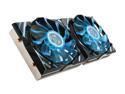
Pros: Amazing cooling, just installed it on a R9 290X and this thing is wonderful!! During 3dmark I use to get around 90c running at 40-%50% fan speed which is kind of loud. Now I run at 65c and the thing is just about as quiet as my case fans. More quiet than the fans that came with the H100i. BF4 use to cause the video card to run up to 85c, now I can't get over 52c in BF4 1080p ultra. Comes with all heat sinks, screws, thermal grease and thermal glue(paper thin pads of thermal glue) The thermal "tape" has held on my memory chips so far and doesn't seem as bad as people say. I'll keep monitoring them, but they seem secure!
Cons: Biggest con is the darn thermal pads. I bought some Article thermal adhesive but decided to try the thermal pads first and if any heat sinks fell off, I would then use the Adhesive as its permanent, conducts electricity and voids warrant. The VRM chips are VERY tiny and it would be scary to use conductive thermal adhesive on them. No bracket to help with video card sag, but my R9 290X gpu is close enough to where the screws are to mount it on the case so most weight is supported easily. Hardest part is separating the double side thermal pads, it will seem impossible at first but you will gain a rythme! I had 16 ram heat sinks to use, 6 vrm heat sinks in 1 area, and 2 vrm heatsinks for the other vrm area. The fan does not have any ability to control their RPM through software, but I don't care that much, they are quiet and I'm sick of freckin fan temp curves, just another thing to worry about failing!
Overall Review: Clean all areas well on your video card where you will be sticking on the heat sinks with rubbing alcohol to remove oil and also the old thermal grease on your gpu. I used Cool Laboratories Liquid Ultra for my gpu only, as it conducts electricity and will melt aluminum so please only use on processors that only touch copper heatsinks! Lastly on the R9 290X there is one ram chip at the bottom of the gpu, the block covers that ram chip. There is ONE very thin ram heatsink that is supposed to be used on that chip as the gpu heatsink block, covers half of it with not enough gap for AMD cards to have the heat sink fully cover it. So I just installed everything and the last item I installed was a normal size heat sink on about 2/3 of the memory chip that is showing. Turned the heatsink 90 degrees before I put it so less stuck out. There is a quick write up I believe on an overclockers forum of someone from Gelid showing you images of how to install this cooler. The upper left hand trio of vrms is the tricky part to figure out how to heatsink if you don't read the write up. Please be aware that you read instructions carefully on how to mount the cooler on the gpu block for AMD vs Nvidia, don't rush this. It took me 3hrs from start to finish from removing my factory cooler, installing this, and popping it in my pc. Don't bridge any metal connections. Enjoy your product, the other Gelid with the diamond cutout is NOT for the 290x as the 290x is flush with the gpu block, not indented like other cards that would require that.
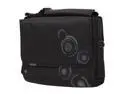
Pros: Cheap price, holds my 15" acer aspire 5532, has some padding to protect laptop, comes with shoulder strap.
Cons: Made in China, no rubber footing to stand case up when you put it on the ground, must lay it down. The padding is fairly thin, the large black outside flap does not secure the laptop. Instead, on the inside of the bag the small gray sleeve that you put the laptop into, has a small flap, with 2 small velcro pads to secure it in place. I would not trust it to hold the laptop if you turned the case upside and started to shake it.
Overall Review: I just needed some type of case to bring my $360 laptop around with me. With the promo, I got this thing shipped for $17 total on Tuesday, and it arrived Wednesday afternoon. Newegg is amazingly quick at shipping, and their customer service has always been great in the past. The reason I gave it 3 eggs was because the cheapness of the bag, I'm content though with the price I paid and the laptop I am storing. If you have an expensive laptop, or do alot of traveling with one, I'd recommend buying a better case. But if you are like me and just need a cheap solution to carry your laptop around once in awhile, this will work great.
Amazing graphics card. cool and fast
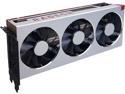
Pros: The card looks beautiful in the computer. Stock cooler, massive copper heatsink and pcb are a work of art. With the latest drivers it runs amazing and overclocking does work very well. I have a quality case with good airflow to keep it cool. Kept it stock for awhile and it runs great. But was very successful with overclocking memory and core, while also down volting to use less watts. I barely seen it go over 240w in the AMD on screen display. This is my 2nd XFX card, previously had a reference vega 56. Works great with my hdr freesync 2 monitor at 1440p, very impressed with speed.
Cons: The fan does start to get a bit loud as it ramps up, but not bad. Fan smoothness during temp changes on manual control need to be more smooth, too much fluctuating temps causes different decibel levels too often. Waiting on aftermarket software support or AMD to adjust.
Always quality and consistency with Seasonic
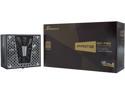
Pros: Love the size, the power and efficiency levels offered for this price. Can handle my overclocked vega card no problem. Long cables and more than enough for the build.
Cons: That when I flip it upsidedown the watts label is sticking up looking like an eye sore in the case, but thats about it!
Has potential, but asus disappoints this time around
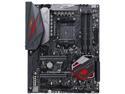
Pros: It has a nice VRM configuration and allows bclk overclocking. Good amount of fan headers and 2 RGB headers (when they work, see cons)
Cons: Cold boot issues, does not boot with OC, keeps on failing cold boots. And eventually after a few power cycles and visits to bios it will boot with your settings. I use the latest bios and even currently on the beta 9943 which gives extra ram frequency choices above 3200, does not fix cold boot failure cycling though The RGB headers and RGB on mother board are a piece of junk and stop working for no reason!!! I can not stress this enough!!! Read the asus forums about rgb stopped working. Only thing that will get it working is mass RMA's to asus or a class action lawsuit. The computer looked amazing with all the lights, rgb headers and AURA software. I didn't spend $270 for motherboard and $100+ for a clear case for it to be dark. Now only my GPU and Gskill ram work with the aura software. If anyone was interested in this board, save yourself $100 and get another brand that has the same features but actually works for you. I am considering dropping asus motherboards from all my builds, its not worth the premium for a broken piece of expensive hardware. Who wants to deal with RMA just because the RGB stops working, its very annoying but computer still boots up (after multiple cycles) Still considering RMA and might go with a better brand like Asrock. I wanted aura to match my asus gpu, guess no point in asus anymore.
Overall Review: no I would tell you to save $100 and go for asrock motherboard
Second card failed
Pros: No pros with the second card I had
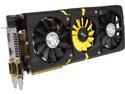
Cons: Bought a 2nd card to xfire and about after a week it went dead. Could not claim my $30.00 rebate because I sent it back to Newegg for replacement which won't accept it with cut out UPC label. If I sent it to MSI, I would of spent $20 at least on shipping, waited weeks longer and probably receive a refurbished r9 290x, rather than a brand new one I will receive with newegg since I only owned product for a week. I was having computer freezes and low fps performance, finally in device manager the 2nd card was not showing up. I took all cards out and put the 2nd one in the primary slot, the PC started up but no display ever came on. Card was defective.
Overall Review: When I had 2 of these, they take up 3 slots each, so there is zero space inbetween the cards with a standard 2 pci-e 3 slot spacing. The top card would heat up to 84c, the fan would shoot up like a rocket and become incredibly loud. This was at stock clocks, I had to downclock both cards to 800mhz and put voltage at stock. They did run both overclocked during testing, but having it close to 1180-1200mhz caused the PC to lock up randomly in windows due to the low power state voltage I believe, not sure if it was just the problem card, but I believe that is an issue that has been around for awhile if you clock cards very high. I ended up sending 2nd card for replacement, and buying a kraken x41 all in one water cooler for the top gpu, a kraken g10 to hold the cooler on and about 32 copper heatsinks for the ram chips and all the VRMS. I probably spent $180 for extra cooling for top card, to avoid the insane fan sound and heat it produces. The bottom card barely went any higher than it would if it was solo. Haven't received my replacement yet so not sure how my project work out, I think good with the 2 kraken devices and 32 copper heatsinks, but that just means more stuff to possibly have faults, we shall see, I'm very optimistic and should have a good system for awhile. One card would use 100% of its gpu, if I had two cards in they would both be around 60% usage, not good because I want a solid 144hz at 1080p ultra, and it would drop to 90fps a lot. I was told it could be my 4670k @ 4.5ghz bottleneck, but I've read online that they tested 3x 7970 with an i5 and i7 and it showed no difference with FPS (give or take a few). If you think you'll get magical overclocks because its a lightning without LN2, think again, the ram is what can overclock like crazy and doesn't make much of a difference in games. I can't wait to build my xfire system with the liquid cooling on top card, but beware of what I warned you about, just my two cents,


