
Your Browsing History


Christopher A.
Joined on 04/03/03
0
0
product reviews
- 10
Small and Effective
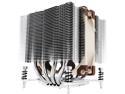
Noctua NH-D9DX i4 3U, Premium CPU Cooler for Intel Xeon LGA20xx (92mm, Brown)
Pros: Quiet. Keeps a i7-5930K @ 3.5GHz at 40-41C with virtually no audible noise at idle. Installation is nice--there are vertical holes all the way through the cooling fins at each corner, and they provide a long hex driver that extends down through the holes to engage the mounting screws, so no access at all from the side is required to get the thing on or off even for the "square" hole pattern where you usually have to get under the cooler to get to the mounting screws. Removing and replacing the fan would be trivial even with the unit in place--remove two wire clips that engage the heat sink fins, and pull the fan out vertically.
Cons: It's $60 for a $5 fan and a couple of pieces of metal, but hey, it's keeping a $600 CPU from melting down, so I guess that's not really a con. The fan is this peach-and-brown color scheme like the furniture in a 1970s singles bar, which if it's laboring away in the dark is no problem, but if you're building a flashy gaming rig in a case with a lot of windows, you may want to replace the fan with something more decorative.
Overall Review: It is set up to work with the "square ILM" hole pattern. It comes with two sets of brackets which convert it to the "narrow ILM" hole pattern (the one where the mounting screws are at two ends of the CPU footprint rather than at the corners). In either case it can be mounted so as to get airflow in any one of the four directions.
2/13/2016See more detail
No Problems
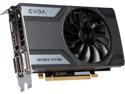
EVGA GeForce GTX 960 04G-P4-1962-KR 4GB SC GAMING, Only 6.8 inches, Perfect for mITX Build Graphics Card
Pros: Small size, quiet
Cons: None
Overall Review: There's a separate note about this slipped into the manual, but in case you're like me and didn't read it: the fan is temperature controlled and often isn't running at all. With no LEDs on the card and the fan stopped, there's no indication that the card is powered on. Not a problem, but it was disconcerting when I first powered it on in a new build. I have it in a Linux (CentOS 6.7) workstation driving two 1920x1200 monitors with the nVidia binary driver from elrepo and it works fine. Not using it for gaming so I can't comment on performance.
2/13/2016See more detail
Typical Lian Li--not cheap, but you get what you pay for
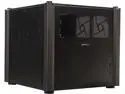
Lian Li PC-V359WX Black Aluminum Micro ATX Mid Tower Chassis
Pros: Like all the Lian Li cases I have seen, the fit and finish is great. Literally the whole thing comes apart--remove the 4 thumbscrews holding the acrylic cover on, slide the side and front panels up and out of their slots, and all you've got left is the base plate, the back, and the four corner posts, so assembly is trivial without the usual knuckle-busting. The top is totally transparent and about a third of the front is a window, so it's easy to see what's inside and whether the fans are spinning. At idle with the stock fans it's whisper quiet. I don't need the additional fans with this particular build, but there are room for four more fans--two on each side. The mobo mounts horizontally about halfway up, with everything else underneath--there's a bit of wasted space, but it means that you can stuff all the extra PSU and peripheral wiring down under the mobo tray where it's not visible and doesn't hurt airflow. And with nothing but the clear acrylic top above the mobo, there's over 150mm of headroom for a CPU cooler and plenty of room for two big GPUs. I just have one EVGA GeForce GTX 960 and a less-than-huge Noctura CPU cooler in there and it looks cavernously empty. Two USB3 ports on the front.
Cons: Only two minor annoyances: The only externally accessible bay is sized for a slim optical drive, which sits on the rock bottom of the case, about 1/2" above the desk--so you can't set anything on the desk in front of the unit or you won't be able to access the disc tray. And for almost 200 bucks, you'd think they could afford a reset button.
Overall Review: It's fairly big (about a 12" x 12" x 12" cube) so it eats up more horizontal desk space than even a big tower, but since it's only 12" deep it gives you more room in front of it (especially if you don't have an optical drive--see above). The mobo tray is removable but there's basically no need to do so, since with the front and side panels removed, everything underneath it is accessible from three sides. As another commenter noted it's flimsy when the sides are off but it's a rock solid cube when the sides and top are on.
2/6/2016See more detail
Works Fine
StarTech.com USB3SAUB3 Blue SuperSpeed USB 3.0 Cable A to Micro B
Pros: No problems.
Cons: None that I have found.
9/28/2011See more detail
Writes Data, Reads It Back
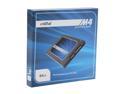
Crucial M4 2.5" 64GB SATA III MLC Internal Solid State Drive (SSD) CT064M4SSD2
Pros: Nothing wrong with it that I can tell. Installed in a 1U rackmount web server located in an unattended colocation site. Performance seems fine.
Cons: It comes with tiny tapped mounting holes, but no screws. Fortunately it's so small and light I was able to mount it with a couple squares of self-adhesive velcro.
9/23/2011See more detail
5 egg hardware, 3 egg UI, 1 egg manual
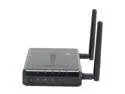
TRENDnet TEW-638PAP 300Mbps Wireless N PoE Access Point
Pros: It's cheap, it's small, it works. Actually came loaded with the most recent version of the firmware, which unfortunately seems to be a rarity in network gear these days. The UI seems pretty simple and pretty good other than the specific issues I mention under Cons.
Cons: (1) The manual indicates that the default IP address is 192.168.10.100, the default name is "admin" and the default password is "admin"...buried on the next-to-last page after the Russian translation as #5 under "Troubleshooting." (2) I set the MAC address filtering setting to "Reject All" and was surprised when all my wireless devices were able to connect even before I entered their MAC addreses. After some experimentation it appears that "Reject All" actually means "Reject the addresses on the list," whereas "Accept All" actually means "Accept the addresses on the list." So to do MAC address filtering you actually appear to have to choose "Accept All." Nice! (3) My first attempt at setting the Admin password didn't take, I think because I clicked the "Apply" button at the bottom of the page instead of the "Apply" button underneath the password. After you set this unit up, be sure to test it to make sure the settings are what you think they are.
Overall Review: The Windows-based setup software is 100% superfluous since the web interface seems perfectly good. I never took it out of the shrink wrap.
9/23/2011See more detail