
Your Browsing History


Thomas F.
Joined on 03/25/02
0
0
product reviews
- 19
Don't hesitate to buy it!
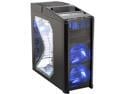
Antec Nine Hundred Black Steel ATX Mid Tower Computer Case with Upgraded USB 3.0
Pros: - The best airflow. Period. - Pre-drilled, pre-grommeted watercooling holes - 3 silent 120mm fans and 1 silent 200mm fan. The 200mm fan is even pretty quiet on max. The 120's get louder than I like on high, med is ok for most people I'd imagine. - Large storage space - Power supply goes on the bottom so cabling isn't all over the top of your case. Big plus. - Tray on the top for holding a gamepad or a beer (has a rubber "coaster" mat even!) - Build quality is incredible. Everything FITS, and no sharp edges at ALL! - High quality steel
Cons: - You'll pretty much need a modular power supply unless you want to have a pool of cables in the bottom of your case - It's too heavy for serious LANers and awkward to carry - Power supplies are designed to drop from the top down, so your cables will be upside-down when connected to drives - Adding and removing drives can be a bit of a pain - Mounting a front 3.5" drive is a hassle - The LEDs on the fans are always on, and they're bright. I am not a fan of blue night lights.
Overall Review: I checked this case out in person at BxxxBxx (they let me take it out of the box and examine it first) so I knew what I'd be getting. Was ready to buy it there, checked Newegg, saw it on special - got it here! Despite the "Cons" above, I do not, for a second, regret purchasing this case. It is large and has ample airflow for my overclocked Q6600. It is awesome looking, and what is more important than that in a case? Plus it's not flimsy aluminum, it's quality rolled steel. I have NEVER had a steel case rust, so if that's holding you back from buying steel, don't let it. Steel cases won't rust unless they get quite wet, in which case your case would be your last concern.
10/10/2007See more detail
Decent case
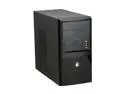
Rosewill RS-M288-BK Black SECC Steel MicroATX Tower Computer Case 350W Power Supply
Pros: It's a cheap case. I needed a cheap case for a new budget comp for my parents. It doesn't look too bad
Cons: The main reason I bought this case is the PS size was larger than other MFGs offered (350 vs 300 watts) and it had SATA power connectors. But the PS is the worst part of the case. It is LOUD. I think the fan is getting louder over the 2 months it's been in service. It's a super cheap PS - I am going to wind up replacing it more than likely. So in the end, the case coming with the PS didn't save me anything.
Overall Review: A whole system for under $250 (Intel Celeron D/C, 2GB RAM, 320GB HD, Zotac mobo) - the price was right.
3/31/2010See more detail
Amazing CPU/APU!
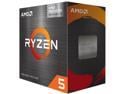
AMD Ryzen 5 5600GT - Ryzen 5 5000 Series 6-Core 3.6 GHz Socket AM4 65W AMD Radeon Graphics Desktop CPU Processor - 100-100001488BOX
Pros: Replaced an ancient i5 and GTX 560 and runs faster and quieter including in the games my kids play (Roblox and Minecraft).
Cons: The stock HSF is "Sufficient", but for $35 a Thermalright Peerless Assassin is a worthwhile upgrade. Some people complain about AM4 being "Dead" but every Intel platform I've ever bought into I never upgraded the CPU in, I have always had to buy an entire new system. AMD really has spoiled everyone with the lifespan of this amazing platform and it's not like you're giving up that much over AM5 outside of specific use systems.
Overall Review: Amazing bang for the buck and if you don't mind not being on AM5 it's hard to build a brand new system for less than this, AND it still performs well!
12/24/2024See more detail
Fast, reliable, great switch!
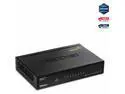
TRENDnet 8-Port Gigabit GREENnet Switch, Ethernet Network Switch, 8 x 10-100-1000 Mbps Gigabit Ethernet Ports, 16 Gbps Switching Capacity, Metal, Lifetime Protection, Black, TEG-S82G
Pros: I bought this switch on sale 6/28/2012. I received it the next day and promptly mounted it to a rafter in my basement and plugged it in. This switch has been faithfully serving my gigabit LAN needs for nearly 3 years now, non-stop, and shows no signs of slowing down.
Cons: Really? How can I complain about an 8 port gigabit switch that does its job well?
Overall Review: I see some reviews say it died soon so I had to chip in my two cents. Maybe the new ones are more cheaply built? I don't see how or why this thing would fail. It's mounted upside-down on a rafter in my basement for freak's sake, it gets very cold down there (30s) in the winter and in the 80s in the summer.
1/27/2015See more detail
Not perfect, but a great board
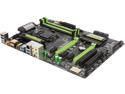
GIGABYTE G1 Gaming G1.Sniper Z87 LGA 1150 Intel Z87 HDMI USB 3.0 ATX Intel Motherboard
Pros: I bought this board during the pre-black Friday events on Newegg because it came with some free RAM and I have ShopRunner so shipping was free. This made it by far the best value overclocking board with more robust features. I did not need the high-end Sniper or Sabertooth feature sets. The board has been rock solid stable since I set up my system the week after Thanksgiving. I have not yet overclocked, so I cannot attest to its ability to do so. I have a 4770k so I may revise the review for 5 stars if the OC ability makes up for the con.
Cons: The sound driver leaves a lot to be desired. Creative's drivers aren't what I remember from my add-on soundcard days. Honestly, I haven't had Creative sound since I replaced it with my nForce 2 board, since that had the nVidia sound (GA-7NNXP) that was BETTER than the SoundBlaster series. It shows, IMO, in their drivers. My previous Gigabyte board's Realtek drivers were light years beyond Creative's, and I am still trying to get little things like mic boost and balance, as well as sound quality, sorted out on my 5.1 setup. I do not believe the tinny sound is the chip but the drivers. The Killer networking works fine but I notice tons of issues (AIM, IRC disconnects during downloads) if I let the Killer app/drivers handle QoS instead of Windows' QoS.
Overall Review: If the Creative and Killer drivers were decent, it'd be an easy 5 star review. If I find out the board OCs well, I may revise to 5 on that too. This is now my 3rd Gigabyte board starting with my Socket A build. Every one has been stable and lasted for 24/7/365 operation for years, and I am assuming this one will be no exception. I went with Gigabyte again after having my 775 Q6600 running at an undervolted OCed 3.0GHz for over 5 years. Some people pointed out the board's smaller footprint - it is smaller than the 775 board I replaced it with but it went in my Antec 900 case with no issues. I assume some lower-quality and/or older cases may not have all the mounting points but every mount is useable in my case. The board works well in the Antec 900 case, better than my old one, with the way I can hide and route cables better (SATA, ATX Power and Aux Power). The green LEDs can be turned off if you like in the BIOS. The new (to me at least) style UEFI BIOS takes getting used to. I still prefer the tried but true old-school AMI / Phoenix ones. But it does boot into Windows MUCH faster!
1/28/2014See more detail
Quet, stable drive
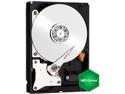
Western Digital Caviar Green WD15EZRX 1.50 TB 3.5" Internal Hard Drive
Pros: The drive is quiet and runs cool. It is quieter & gives off less heat than the 320 GB drive it replaced in my DirecTV HD DVR. I've had it in about 6 months now and with over 200 hours of programming (mostly HD) it isn't even 30% full.
Cons: None in my current application
Overall Review: Copying the programming from my dying DirecTV DVR drive took quite some time, but the end result was worth it. I lost only a few minutes here and there, but I gained so much more. My original drive had 30% free, and after copying, I had over 95% free on the new one.
7/15/2013See more detail