
Your Browsing History


Jeffrey M.
Joined on 02/26/05
0
0
product reviews
- 14
Nice upgrade to the 570

Logitech MX ERGO Advanced Wireless Trackball Mouse - 910-005177
Pros: Fits my large hand better (less arthritic pain) Grips surface better (Mine sits on the arm of my leather couch - my 570 was always falling off when my hand wasn't on it - popping the ball out and then a search commenced for the rolling ball...) This ERGO holds on nicely I like the dual angle base (great for relieving pain) see cons for how I think it could have been done better I like the grippy top surface better (see cons for concerns) As I do CAD work with this device the precision button is AWESOME. If you draw or need precise, pinpoint accuracy, this is the mouse for you.
Cons: Really the cons here are minor. First, the dual angle bottom plate should be multi-angle as we're all made a bit differently and getting just the right angle is important. This could be accomplished many ways - I'm going to try small wedges to get the angle just right. Next, I have used the 570 for years and periodically need to clean the skin oil build up on the top of the mouse. On the 570, the skin oil would literally melt into the finish and removing the build-up would also remove the finish in a tarry mess (sorry if that's gross.) Now the ERGO has a rubbery surface - I am hoping it's easier to clean and doesn't melt like the 570's did. Finally, unlike the 570, the ball clunks a little from time to time. I have not quite figured out why this is happening but there seems to be a tiny bit of slop in the ball cage which allows for it to 'clunk' but it strictly an annoyance; it does not affect how it works. PRICE. C'mon logitech.... this mouse is going for nearly $100 just about everywhere and that's just nuts. Fortunately I found it here on Newegg for less than $80 but still...
Overall Review: Ok I've owned this mouse now for nearly a year. The left switch is already worn out (this is a problem I've had with 570 mice in the past - I was hoping that this mouse would be better-built given the price) as it won't hold a selection. For instance, if I try to select something by holding the button down and dragging, it's nearly impossible. Pressing harder doesn't help. I am still in warranty so I'm hoping Logitech will have improved the switch when I get a replacement.
12/10/2018See more detail
DOA #2
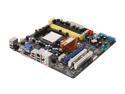
ASUS M3N78-VM AM2+/AM2 NVIDIA GeForce 8200 HDMI Micro ATX AMD Motherboard
Pros: Well laid out, good price point for features
Cons: Super I/O chip is either bad or incorrectly installed. Two DOA's with smoking chips. Unacceptable!
Overall Review: I spent over an hour on the phone with ASUS tech support and we went over the board carefully trying different power supplies, memory, etc., and they came to the conclusion there is a MFG problem with the board, perhaps a bad batch of boards. I've been using ASUS for many years as a system builder and haven't run into a Quality problem like this for about 10 years. I hope it isn't indicative of a problem at ASUS. On a positive note, Newegg was fair with me regarding all the hassles and shipping costs for two dead motherboards.
12/22/2009See more detail
Not recommended
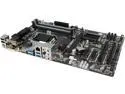
GIGABYTE GA-Z87-DS3H LGA 1150 Intel Z87 HDMI USB 3.0 ATX Intel Motherboard
Pros: Lots of goodies... plenty of USB ports, well laid out.
Cons: Unreliable. I've built MANY Gigabyte motherboards. I've been working with this one for over two years - it runs 24x7 but occasionally just shuts down or BSOD's on it's own. I can't reset it with the reset button (or by shorting the pins) so I have to force power down. It's got a lot of weird problems unlike other GB boards I've setup.
10/21/2016See more detail
Bang for the Buck
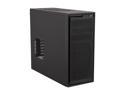
NZXT Source 220 CA-SO220-01 Black Steel / Aluminum-like finish ATX Mid Tower Computer Case
Pros: For the money this is an outstanding value. Thumb screws, lots of cooling, extra fans, easy in/out. As a builder of literally thousands of PCs this is one of my favs.
Cons: Can't think of any
4/2/2014See more detail
In theory a good board, but...
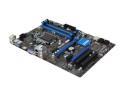
MSI Z77A-G41 LGA 1155 Intel Z77 HDMI USB 3.0 ATX Intel Motherboard with UEFI BIOS
Pros: Has all the bells and whistles for an inexpensive board. Seems perfect for a typical office computer or home machine.
Cons: Unreliable. I'm on my second replacement board and it just died within one week. Could be compatibility issues, but RAM/CPU used are listed by MSI as tested OK.
Overall Review: Currently I am working with MSI to solve the 'infinite reboot' problem. I am on my 2nd motherboard now MSI is testing #3 in house and they are going to ship me another one with tested RAM specs. I have over 30 yrs in the business and have only seen something like this one other time, and not with MSI. I have a customer that's ready to sue somebody if I don't resolve this soon, so hopefully we'll figure out what's the real cause of this reboot issue (it's not mechanical - loose RAM) and resolve it once and for all. When I have a working board, assuming I ever do, I will re-post results here. Current setup: MSI Z77A-G41 LGA 1155 Intel Z77 Motherboard MSI N610GT MD2/GD3/LP GeForce 2GB Video Intel Core i7 3770 Ivy Br. 3.4Ghz 77W CPU Kingston HyperX XMP BluRed Series 8GB 1600 KHX16C9B1RK2/8X RAM Kingston SSDNOW V+200 KR-S3020-3H SSD Drive Antec Kuhler H20 Liquid Cooling System Antec EarthWatts Platinum Series EA-550 550W Power Supply Let's hope we figure this out soon...
11/15/2012See more detail
Great RAM, but...
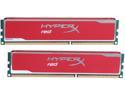
HyperX XMP Blu Red Series 8GB (2 x 4GB) DDR3 1600 Desktop Memory Model KHX16C9B1RK2/8X
Pros: Usual Kingston Quality, Speed, Performance
Cons: Fussy with low voltage
Overall Review: Be careful with this or any XMP memory and MSI Intel motherboards. There are memory sticks rated for 1600 XMP that will operate fine at lower settings - and sometimes there are reasons why you might need slightly lower voltage. This memory absolutely requires full 1.67v to operate reliably. It may work - for a time - on lower settings but eventually it will fail. The problem with MSI Mobo's is the way they check for overclocking in POST - which can lead to an infinite reboot loop - so be forewarned.
11/14/2012See more detail