
Your Browsing History


John J.
Joined on 04/29/05
0
0
product reviews
- 21
Great for use with an external antenna
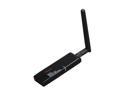
Rosewill RNX-G1 Wireless Black Dongle w/ External 2dBi SMA Antenna IEEE 802.11b/g A-Type USB 2.0 Up to 54Mbps Wireless Data Rates
Pros: My laptop has a built-in wireless adapter. I purchased this puppy specifically to use it with an external antenna. It comes with what is called a "rubber duck" antenna. With no antenna at all, it gives about the same range as my laptop (HP Pavillion dv9900). With the rubber duck, the range increases a couple of hundred feet. The real magic happens when you use a high-quality, high-gain antenna. I live in a rural, semi-forested area where each house sits on no less than an acre of land. Even with the rubber duck, I can only pick up my own wifi access point. With a 12db directional antenna (I'm using a directional cantenna) I was immediately able to pick up a half dozen useable wifi signals just pointing the cantenna out the window. Some of those signals were coming from hundreds of yards away.
Cons: Feels a little fragile. Take care if you plug it in directly to your laptop (especially if you are wardriving), you could bend the USB connector. A simple solution is to use a USB extension cable. This is actually preferable since a longer antenna cable reduces signal strength, whereas a long USB extension cable does not. So you could actually cable-tie this adapter to your antenna, use a really short antenna cable between the adapter and the antenna, then use a 6-foot USB extension cable to connect the adapter to your laptop.
7/13/2009See more detail
DOA here too
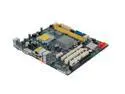
ASRock G41M-LE LGA 775 Intel G41 Micro ATX Intel Motherboard
Pros: This MB was used in Tom's Hardware for their budget OC gaming rig build. Layout is good. Features seem great for a budget OC (using jumpers to adjust FSB is a little retro, but I can live with that).
Cons: DOA. Asrock is based in Taiwan and their website indicated that there would be no one in the office to provide support for the week of June 28 - July 4, right when I needed them. Judging from the other reviews on this and their other MB offerings, I think their quality control needs some work.
Overall Review: Like the other reviewer who had a DOA board, I should have spent a little more money.
7/1/2009See more detail
Meh... They're Okay.
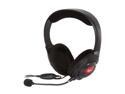
Creative Fatal1ty Gaming Headset
Pros: -Cheap (got them for $19.99) -Nice, long, single cord -Comfortable -Decent sound quality
Cons: -Too quiet! -Thin cord
Overall Review: I purchased these because they were on sale and I generally regard Creative as a good brand. My intent was to use them with an adapter for my Xbox One so I can "sound hor" (had to misspell because of the obscenity filter) on Call of Duty, and I wanted a mic. However, they are much too quiet for that, even at maximum volume. I used them for one match and decided that they weren't as good as the earbuds I was using up to that point. I'll keep them anyway and save them as a backup headset, but they are of no use to me on my console.
12/17/2015See more detail
Great firewall, but not for non-professionals
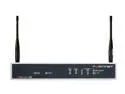
Fortinet FWF-50B-US FortiWifi-50B Unified Threat Management
Pros: This is a commercial grade security 2.0 UTM/firewall capable of handling 25,000 simultaneous session and scanning for viruses on the fly. It can perform routing and network functions, be configured for multiple VLANs and upto 2 WAN connections. This firewall can easily handle the perimeter security needs of a small business, and is probably overkill for most home environments
Cons: Does not come with the subscription services enabled. This device is capable scanning for viruses on the fly, as well as URL filtering, IDS/IPS, etc. However, the subscription for those services is an annual charge of $200, and it does not come with a free year. It is still useful as a firewall, routing device, multi-WAN router, traffic logging and monitoring, etc.
Overall Review: When you see devices like this on sites like Newegg, it is not uncommon to see them rated rather poorly. That is because the average person who considers their tech knowledge to be high, is still probably not an enterprise-level IT professional. These firewalls require a fair amount of technical knowledge to configure properly. This is not something that can be setup by even the average Nerd Herd techs; it requires someone with knowledge of enterprise-level networking, and experience with configuring commercial-grade UTMs. That being said, if you have the know-how then these are fantastic appliances. They are full-featured, security 2.0 devices that are affordable for even the home user. My home network has almost two dozen machines connected to it. I pay for a high-bandwidth Internet connection. However, using the average consumer based firewall/router, I was only getting 3Mbs down on any given machine. As soon as I installed my 50b, I was getting 20Mbs - 25 Mbs down!
10/27/2011See more detail
Very low-quality case
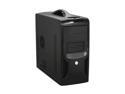
APEX TX-381-C Black Steel Micro ATX Tower Computer Case
Pros: - Inexpensive - Black - Nice location of front USB and audio jacks
Cons: I wish I'd received the case that everyone else was raving about because the one I received is a cheap piece of $#!*. The box showed no signs of abuse by UPS, yet the case looked like it had been slightly crushed towards the back (the styrofoam packing was completely inadequate). The thin, steel rails that the panels attach to are bent and deformed. The metal bends very easily and seems only slightly more rigid than aluminum foil. I used a pair of pliers to attempt to reform the case since I didn't want to pay to return it (tempting as it may be). Even after, more or less, straightening it out, I couldn't insert the motherboard faceplate in the back without the frame bending like crazy.
Overall Review: Take my advice and spend $10 - $15 more to get a decent quality case. Even if you luck out and get one that is in good condition, you'll quickly realize that this case really does not deserve the good ratings it has received.
9/24/2011See more detail
From a Former Nvidia Fanboi
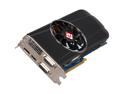
DIAMOND Radeon HD 5850 1GB GDDR5 PCI Express 2.0 x16 CrossFireX Support Graphics Card 5850PE51G
Pros: Great performance! Easy installation. DX11 support! Eyefinity with triple-monitors is really awesome! Did I mention great performance! I was expecting great things from this card, and it has not disappointed! TIP: Always download the latest drivers from the website. What comes in the box is almost always out of date. This is true of any video card.
Cons: This card is rather long and the PCI-E power connectors (it requires two 6-pin PCI-E connectors) are at the back of the card. This wasn't a problem for me since my 3.5" drive bays are mounted sideways rather than the traditional rear-facing. This might be a problem for smaller cases. Current ATI drivers aren't the greatest, but new ones are due out any day. If you leave the fan control on AUTO, it will tend to let the GPU get (what I consider) kinda hot before scaling up (60+ degrees Celcius). I don't mind a little noise if it keeps the GPU cool as this also helps to prolong the video cards life. I've been manually setting the card to between 30 - 45% of fan, and this keeps the card in the 45 - 55 degree C range even under load. At 40% fan, the increase noise is noticable, but not obnoxious. At 100% fan, it sounds like a hair-dryer, but I've never had cause to set the fan about 50%.
Overall Review: If you are upgrading from an Nvidia card, MAKE CERTAIN TO UNINSTALL THE NVIDIA DRIVERS AND ALL NVIDIA FOLDERS BEFORE YOU REMOVE THE NVIDIA CARD AND PUT IN AN ATI. 99% of the problems I've seen when doing such change-overs are a result of driver conflict. And I a lot of the people doing reviews for ATI cards end up deducting eggs from their review even though this is their own fault. I used to be a die-hard Nvidia fan and wouldn't even look twice at an ATI video card. However, Nvidia seems to have become complacent recently. Their cards command a premium price, but no longer deliver premium performance. They still have have no offerings with DX11 support. And worst of all, you can't have a multi-monitor setup if you have Nvidia cards in SLI meaning that you can't scale your performance if you want to have a multi-monitor setup. In the past 2 months, I have purchased two Radeon HD cards and have had terrific results from both. Sorry Nvidia, but ATI is my master now!
1/18/2010See more detail