
Your Browsing History


Chad J.
Joined on 02/19/08
0
0
product reviews
- 6
Review on 3-screen utilization.
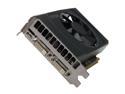
EVGA GeForce GT 640 2GB DDR3 PCI Express 3.0 x16 Graphics Card 02G-P4-2643-KR
Pros: Dual slot coolink sink, 30-38C normal idle/video playback operating temps. New version of Nvidia surround lets windows maximize within individual screens rather than across all 3. Now you must go full-screen for a spanned image which makes perfect sense, CCC has yet to match this feature in eyefinity (I wish they would). No tearing on any displays with all standard DVI and HMDI connections unlike AMD cards which require you to buy a $20-$30 active adapter only to experience tearing on one connection type or the other, although the tearing has finally been fixed for many cards with CCC 12.6 Regardless, not having to buy that adaptor is a huge plus assuming you don't have a DP compatible display.
Cons: Minor bug in current software version for 3 screen Nvidia surround causes windows to offset individual screens when maximized if the taskbar is on the right or left side of a screen rather than the top or bottom. Likely to be fixed in the future. Fan isn't the quietest, with such low temps I expect you could remove the fan assembly and still stay well, well under the maximum safe operating temps.
Overall Review: Previously the cheapest way to acheive 5760x1080 Nvidia Surround was to SLI 2 GTX460s. Now it can be done with a single low power, low temp, $110 GPU. It's a big step forward. AMDs comparable cards have better performance at this price point but for those doing 3 screens the GT 640 is ultimately a better buy.
7/28/2012See more detail
High RPM fan curve above 60% load
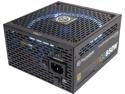
Thermaltake Toughpower Grand RGB 850W Smart Zero Fan SLI/CrossFire Ready Continuous Power ATX12V v2.4 / EPS v2.92 80 PLUS GOLD Certified Full Modular Power Supply PS-TPG-0850FPCGUS-R
Pros: Highest quality RGB lighting... flexible flat cables. Quiet at low loads.
Cons: While dishing out a load of 500-750 watts (same result with either 2 or 3 1080tis mining zcash) this PSU measured 10db higher on an SPL meter (twice as loud) as any of my other PSUs or GPUs on an open air mining rig rack. I do not have a defective fan, this is entirely the fault of Thermaltake's RPM curve. It spins up way, way too fast for no reason whatsoever. The PSU is not running warm, mine is completely open air. All they need to do is have a normal fan curve and it would be fine, but this is completely unacceptable, I have 4 other 850 watt PSUs from corsair and seasonic all of which are comparatively inaudible. All I can hear is the dumb thermaltake fan in ultra-high RPM mode 24/7 and it's driving me nuts even from 20 feet away, yes it is that stinking high of an RPM curve. The 24 pin mobo cable has a bad design, it is split into 5 pieces full length and bound together only on each end, making it a pain to route, it looks like a rats nest. The other cables are fine.
Overall Review: Because of the rebate UPC game I can't return this to newegg... sigh.
8/20/2017See more detail
Worthy successor to the 9900k
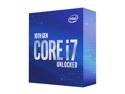
Intel Core i7 10th Gen - Core i7-10700K Comet Lake 8-Core 3.8 GHz LGA 1200 125W Desktop Processor w/ Intel UHD Graphics 630
Pros: 5.0ghz quick and easy all core overclock achievable with 83c temps on a Noctua NH-U14S air cooler.
Cons: Z490 platform is pricey and won't support PCIE-4.0 till 11th gen CPUs release.
Overall Review: Can't wait to see AMD duke it out with intel over the next year with Ryzen 4000 coming. Viva la competition!
6/13/2020See more detail
Another Home Run from the A Series!
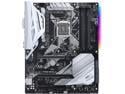
ASUS Prime Z370-A LGA 1151 (300 Series) Intel Z370 HDMI USB 3.1 ATX Intel Motherboard
Pros: I've owned the Z170-A, Z270-A, and now the Z370-A and have continued to have stellar results with both the UEFI and general stability / compatibility so I figure it's high time to drop 5 golden Newegg eggs on a review. Enabling XMP for my 3000mhz RAM and getting my i3-8350k to 4.8ghz. was a snap. I'm not greedy with OCing, I just want a reasonable, stable, system and Asus motherboards have delivered for me every time. Use this board for a 7-8 GPU mining rig with UEFI setting tweaks or a solid SLI Gaming rig, the choice is yours. The included newfangled HB SLI bridge is much appreciated for the latter! If you need neither of these useage scenerios then check out the Asus TUF or Z370-P and save a few bucks.
Cons: I preferred the LED strip on the bottom left like on the Z270-A vs the new top right posistion on this latest model.
Overall Review: Thermaltake Core X9 Asus Prime Z370-A intel i3-8350k @ 4.8ghz Noctua NH-U14S Gskill Ripjaw V ~ 2x8GB ~ F4-3000C15D-16GVKB EVGA GTX 1080ti SC2 Hybrid cooler (top GPU) EVGA GTX 1080ti SC2 Air cooler (bottom GPU) Corsair HX850i 1 TB 850 EVO SSD
10/12/2017See more detail
WARNING - LED Utility is Unreliable
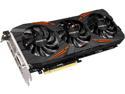
GIGABYTE GeForce GTX 1070 8GB GDDR5 PCI Express 3.0 x16 SLI Support ATX Graphics Card GV-N1070G1 GAMING-8GD R2
Pros: Nothing bad to say about the GTX 1070 itself, this is simply to alert buyers about Gigabyte's buggy utility which is required to change the LEDs color
Cons: Xtreme Gaming Engine 1.0.3.2 was released on July 1st by Gigabyte and with it installed it recognizes my G1 gaming model but is devoid of the LED tab therefore I am unable to change the LED color so it continually cycles between the full RGB spectrum which is the default. There are many reports similar to mine on the Gigabyte forum. BUYER BEWARE Currently this is not working as advertised for many users.
Overall Review: Hopefully this is fixed soon? The current utility version was released to fix these widely reported issues... it has not. If you see a newer version than 1.0.3 there may be hope.
7/9/2016See more detail
Don't hesitate because of the few reviews
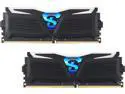
GeIL SUPER LUCE 16GB (2 x 8GB) DDR4 3000 (PC4 24000) Desktop Memory Model GLW416GB3000C15ADC
Pros: -Lights are great and flash faster or slower according to the temps, very practical and cool at the same time -XMP setup was quick and painless on my ASUS Z170-A motherboard, running 3000mhz no problem
Cons: -Don't press on the light strips/difusers when installing the sticks, they depress under pressure
Overall Review: I was very hesitant to buy this RAM in light of the very reasonable price for such an OC combined with the few reviews... I don't know how GEIL customer support as I hopefully won't ever need to find out but I can say their product is good. I'm running a multi-monitor stock trading rig and going from DDR4 2133 to 3000 made a HUGE difference in system responsiveness.
6/23/2016See more detail