
Your Browsing History


Benjamin R.
Joined on 10/10/06
0
0


product reviews
- 4
Good choice for a SFF build
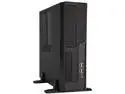
inwin bl040 matx desktop case with 300w tfx psu/black/ieee 1394 - bl040.ff300tb3f
Pros: Came with two USB2 and two USB3 ports, NOT IEEE 1394 (thankfully, not even I use that anymore) Lots of room for cables underneath the drive cage. Building in this case was not too unpleasant, you just have to be careful when reinstalling the cage that you don't pinch anything. It's hard to tell before getting the case, but there is indeed a dedicated 2.5" drive mount underneath the 5.25" bay. Max height is about 9mm if you have the 5.25" bay in use. Audio cable can be unplugged from the front ports and removed so it doesn't consume space. No optional CPU shroud which probably wasn't going to fit my application anyway Exterior coating seems pretty durable, it should hold up well
Cons: Power supply is not 80 plus No reset switch No dust filters Did not come with the optional tool-less drive mounts, so drives (other than the 2.5") can only be secured from one side A few sharp corners I needed to file/sand down to save my cables from damage and my drives from scratches 24 pin cable was a bit too short for my server motherboard, but most people probably won't have that problem Break-off slot covers are a pet peeve of mine and scream "cheap" Came with an 80mm cooling fan but it's 3-pin, had to replace to get PWM fan control It looks to me like installing two 3.5" HDDs would greatly restrict airflow to the fan. I recommend 2.5" disks, or using the 5.25" bay with an adapter. It would be really neat to build a giant SSD array in one of these, you could probably fit 11 total with the right adapters. There aren't many built-in cable tie-downs, but you can easily add more with adhesive-backed zip tie mounts.
Overall Review: I wanted a case for a small form factor server that I needed to mount in a specific location, and this is one of the few options available. It's not perfect but it's usable, and had a few nice surprises when it came to making everything fit. I think In Win sells these cases in bulk to resellers who request specific options, and it can be really hard to tell exactly which optional features on the BL series you're going to get.
4/13/2022See more detail
Just received
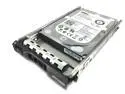
Dell (9W5WV) 1TB 7.2K SAS 2.5" Hard Drive
Pros: Low start-stop cycle counts (lowest 64, highest 146) One disk has very low load-unload cycles (818!) ECC logs look pretty good to me; one drive of three has a single delayed read correction, all the others are fast corrections and no write errors.
Cons: Disks manufactured in 2014 All disks have powered up hours around 50k Two disks have moderate (~15k and 82k) load-unload cycles. SMART says device life is for 300k
Overall Review: The disks do indeed come with the Dell sleds, but they are easily removed. No one else has reviewed these yet so I thought I'd give my initial impressions. Burn-in process is not yet complete. I don't know yet how long they'll last, but when buying old enterprise disks like these you should expect a few failures and most to last a good while longer. SAS disks are a bit cheaper than enterprise SATA, I guess because most people don't have the necessary gear to take advantage of them.
4/13/2022See more detail
Supports how many disks really?
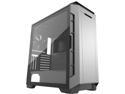
Phanteks Eclipse P600S PH-EC600PSTG_AG01 Anthracite Gray Steel / Tempered Glass ATX Mid Tower Computer Case
Pros: - See the other reviews. This is an awesome case for many reasons I don't need to repeat
Cons: - Advertises that it supports up to ten 3.5" drives. That's technically true, but you can't possibly load that many disks at once in the case without them getting uncomfortably hot (when I tried 9, the ones in the basement were around the 40s C IIRC, while the rest are comfortably in the high 20s to mid 30s). The problem is there's nowhere for the air to go down there, even with a third front fan installed and the front sound panel removed.
Overall Review: - I don't recommend more than 7 drives in this case: six above and one below. I'm using enterprise SATA HDDs for a zfs pool, I suppose other disks might run cooler but who would want that many cheap desktop disks? - I recommend using straight SATA and power connectors for disks as the connectors become somewhat recessed through holes in the middle panel, and most angled connectors don't reach without adding strain to the HDD. Plan accordingly. - If I ever find a satisfying way to get 8+ disks in here without thermal problems I'll update this review.
3/11/2022See more detail
Excellent low-cost board for modern CPUs
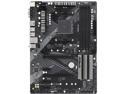
ASRock B450 PRO4 R2.0 AM4 AMD Promontory B450 ATX AMD Motherboard
Pros: - Worked with a Ryzen 5600G out of the box; came with BIOS version 4.90 - Cheap - Supported DDR4 3200 MHz after loading the XMP profile in the UEFI settings, super easy - Builtin audio is acceptable for basic playback. I plugged in my studio-quality headphones and didn't hear any noise, everything sounded okay to my untrained ear - 6x SATA ports is a great feature, and the main reason I picked this one along with cost
Cons: All these are small gripes that don't matter much to me, but it's worth knowing: - The board has lots of features but the chipset will limit you in terms of how many you can use at once. Plugging in M.2 drives will start to hobble other nice add-ons like the PCIe x4 slot or two of the SATA ports. As I plan for future expandability this is going to be a headache. - I didn't test the builtin LAN much but don't trust it for my purposes. Luckily good NICs are cheap - The board is a bit smaller than standard ATX size, meaning the right edge of the board where the SATA ports, USB 3 header, ATX power connector and memory slots are located is not well supported when in a case. Connecting and disconnecting things from this area flexes the board disturbingly! - The UEFI lets you control most of the fan headers using PWM or DC, which is nice for me because I'm reusing some old parts with 3-pin headers, but the CPU fan1 header must be controlled using PWM. I worked around this by connecting my old cooler to CPU fan2. - The IO shield feels pretty cheap to me - There's only one set of USB 3 headers, which is a bummer because I have a case that also has a front USB type C port I can't connect - Initial attempts to boot an old installation in compatibility mode caused serious usability issues with the keyboard; one keypress would get repeated 10-20 times. I had to turn this off and boot with EFI.
Overall Review: This board is a great value considering it supports the latest Ryzen CPUs and fast memory. I'm running Ubuntu 20.04 and was able to get lm-sensors working using a contributed config file for the previous version of the board, then made some minor tweaks for things like the extra fan header. Everything else I've tested works out of the box (I haven't played with the LED headers though).
10/27/2021See more detail