


Your Browsing History


Devin O.
Joined on 05/23/09
0
0
product reviews
- 56
Potent Motherboard - almost perfect
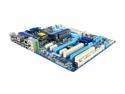
GIGABYTE GA-EP45T-USB3P LGA 775 Intel P45 USB 3.0 ATX Intel Motherboard
Pros: Wow. Where to start?! The board looks very well designed, at least on the surface. My large cpu cooler fit no problem, and my gtx 260 fit snug with space to spare next to the SATA ports. -Includes 6 sata cables!!! SIX!!! 2 of them are black, other 4 are yellow. -Heatsinks seem pretty well designed, chipsets are staying 35C and 27C idle (in a 19.5C room). They have a 120mm fan pulling air over them. -USB 3.0 ports can be set to Gen1 or Gen2 speeds -Color-coded & labeled I/O panel! -PCI express slots are 1 lower than usual, which means one extra slot above them. -4 onboard fan headers, including cpu. 2 are PWM. -Pretty blue PCB and matching heatsink covers -BIOS is very full featured.
Cons: (My wattages' are measures with a Kill-A-Watt -Takes 5W when turned off (but psu is on). My PSU takes <1W when it is turned off. Previous board took 2W. -S/PDIF header for the gpu (there are 2) is directly underneath the card (if you have a dual slot card). my S/PDIF cable managed to just make the height requirement. -BIOS is a bit chintzy, and even had occasional lag while changing memory settings. (waiting for update? It is brand new, give it a year.) -Memory slots are a bit close together, my heatsinked ram is touching one another. -Had lots of issues setting up memory first time through. Absolutely make sure you set the DRAM performance to "Standard"! Turbo just got me a ton of BSOD's, and it is a default setting! Also worth noting, the board got my rams' 7-7-7 timing right but messed up the 20 (it assumed 16), and it also ran it at the wrong voltage (1.5V instead of 1.65). -Memory voltage goes by evens, not odds. I can't set my memory voltage to exactly 1.65V, has to be 1.66
Overall Review: -LOOOVE not having fans on the heatsink! My last board (680i LT) had a twin set of whiny jet engines (that didn't do Jack Schmidt!) This board is staying much cooler, and it looks much cooler -Do not like the USB 3.0 advertisement in the main BIOS boot screen. You'll see what I mean... It's not for everyone. -I was not able to get my USB keyboard to work during the post-bluescreen boot menu for windows 7. The board (razer) just flashed whenever I pressed a key. Donno if that is the keyboards' fault or the mobo, but it worked fine in all cases on my 680i LT. : / Always keep a spare PS/2 keyboard around for any computer. Overall an amazingly fantastic board.
4/20/2010See more detail
Poor quality board
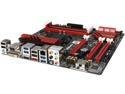
ASRock ASRock Fatal1ty Gaming Fatal1ty Z97M Killer LGA 1150 Intel Z97 HDMI USB 3.0 Micro ATX Intel Motherboard
Pros: So, my previous review went over a lot of the things I thought were great about this board. Sure, there's a lot of great features on this board, but after owning the board for a few months it was clear that there is some severe instability on the board that makes it nigh unusable.
Cons: 1 - The audio is much noisier than my old board, and the ALC1150 chip I paraded about in my last review only provides good quality on 1 single output, the rear green stereo out port. All other ports are sub-par and in fact are noisy with this motherboard implementation. Even the microphone in is noisy. And unlike my old ALC887, you cannot swap the ports around or use them for different purposes. 2. This motherboards' USB is either powered in an unstable fashion or randomly fails. Devices will randomly drop off and back on no matter what port they are plugged into. My mouse will register with the system almost instantly, but my keyboard takes a few seconds for the driver to kick in (and for the backlight to turn on). This is long enough to frustrate anyone in the middle of using the keyboard. And it happens again... and again... and again until you switch ports or restart the machine. 3. Absolute Zero customer service. Don't delude yourself into thinking they would reply to you if you asked enough. I've sent in 3 support requests over the last 3 months and I have not been replied to yet. This is my first ASRock board and it will be my last. Gigabyte was my previous boards' manufacturer and they responded to support requests within a few days. I guess I shouldn't have expected as much when trying to save a few bucks. Long story short. If you really can't afford a better board, this one is decent enough but if you have any problems with it, you're toast. Either sacrifice some features and get a more reliable board/company or shell out a few dollars more.
8/27/2015See more detail
Good graphical experience with some bad behavior
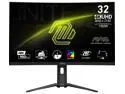
MSI MAG 321CUP 31.5” 4K UHD Curved Gaming Monitor – 160Hz, 1ms MPRT, VA Panel, AMD FreeSync Premium, HDR400, USB-C, HDMI 2.1, Anti-Glare, Frameless Design, Adjustable Stand, VESA Mountable
Pros: - Excellent colors once calibrated - 4k 144hz is awesome at this price - Customizable quick options on the D-pad (NaviKey) menus - UI is fast and responsive and easily navigated. - VESA mount points are near the bottom of the screen allowing you to get way more height off a standard arm. I use an 18" arm on a sit/stand desk and get more than enough lift to comfortably view the screen while standing!
Cons: - Curved screens are inferior to flat screens - fight me! The anti glare filter creates huge lens flare like effects, and my panel isn't perfectly curved which creates uneven spots especially on dark content and especially around the corners. - Monitor technically goes up to 160hz with DP overclocking but I had numerous issues doing so. Monitor behaved oddly and would often reinitialize/reset. - Often goes into a sleep so deep that Windows can't wake it up. The two LG monitors I have on either side of it have no issues whatsoever. Have to power cycle the monitor to use it. - Monitor will not boot up the display to allow you to configure settings without an input active. This is super, super dumb!!! - UI is laid out in a confusing way, with numerous poorly explained options and strange categories (what does Professional category mean? Why is the blue light option hiding there and not under Image?) - As with many HDR monitors, this monitor is exceptionally bright when displaying HDR, I run it at 0% brightness in a dimly lit room and I have to use software to drop the brightness more when I'm viewing bright content.
Overall Review: Totally recommend this if you need a fast 4k monitor for gaming on a budget. Visual properties are very good for a gaming monitor and is excellent for 80-90% of my computing tasks.
12/23/2024See more detail
Works great - mostly!
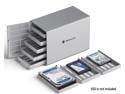
Yottamaster 5 Bay 2.5 & 3.5 Inch SATA Hard Drive Enclosure, 6Gbps USB C HDD/SSD Enclosure with Fan, Up to 80TB(5x16TB) Direct Attached Storage (DAS) for Data Backup NAS Expansion
Pros: - excellent bang for the buck - casing feels quite sturdy (but I wouldn't stand on it) - keeps drives sufficiently cool - online and activity lights for each drive, not unnecessarily bright when front is closed.
Cons: - extremely picky with USB-C cables. It seemed fine at first but now it will only give me USB 3.0 speeds if I use a Thunderbolt cable (the more expensive cables with insulation). - sharp rails scrapes plastic off the trays each time they are inserted, could eventually lead to loose fit. - very odd connector for the power supply, not sure what kind of replacement I'd use if I needed one.
Overall Review: Very good for adding extra drives to a home file server - just be sure to use a USB cable that gives you full speed, otherwise you're going to be running on USB 2.0 at a max of 30-50MB/s!
10/7/2024See more detail
Good but not without problems
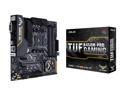
ASUS TUF B450M-PRO GAMING AMD Ryzen 3 AM4 DDR4, HDMI, Dual M.2, USB 3.1 Gen 2 and Aura Sync RGB LED Lighting Micro-ATX Motherboard
Pros: -Micro ATX for AM4 (a bizarrely rare form factor for AMD, that I happen to prefer) -Seems stable, good latency compared to other AM4 boards I've tried -Astoundingly good audio
Cons: -Thanks to the Type-C port, this motherboard doesn't have quite enough USB ports for gaming. I'm resorting to extra USB on my chassis plugged into the headers, because I don't like using USB hubs for devices like webcams, microphones, and VR. -Limited number of fan headers (1 Front, 1 Rear chassis + 1 CPU) -Fan controller in BIOS is highly limiting. On DC setting, cannot turn fans below 60%, and on PWM, cannot turn fans below 20%, for some stupid reason. I'm using powerful fans that need to be below 60% and don't support PWM, so this was a huge problem for me. I have no idea why they'd limit the controller in such a meaningless way. I require complete control over my fan curves! -In addition, the fan controller is pointlessly spinning up and down the RPM for no good reason. This results in audible changes in fan speed every 5-15 seconds despite temps being very low, and using silent fans. -The fans are also spinning faster than the controller says they are (should be at 60% when they are actually at 75-80%) -All of my fan issues occurred with the stock bios (1804) as well as the newest (2006).
Overall Review: In general this is a great choice for a compact AMD gaming rig - but if you don't want to be driven crazy by chassis fans plan on using MOLEX adapters or a separate fan controller.
4/17/2020See more detail
Seemed good - until it wasn't
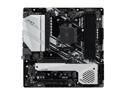
ASRock X570M PRO4 AM4 AMD X570 Micro ATX AMD Motherboard
Pros: Good balance of features for a modern gamer. 2 M.2 drives is great, one for OS and one to hold games, then you've got plenty of SATA for extra storage. GREAT audio. I can tell that it's better than the ALC1150 which I had before, but to what degree I cannot quantify exactly. Excellent amount of USB 3.0 ports for (proper) VR setups. I appreciate manufacturers who have the confidence to ditch the 2.0 ports.
Cons: Problem #1 This motherboard does not have the best drivers available for Windows 10, and I cannot recommend using them together. While it seemed alright idle or doing light computing tasks, I suffered from a very high system latency (DPC/ISR) that no combination of drivers could fix which would cause the audio to massively stutter when the gpu was under load. At first I thought it was me, but upon switching back to my old cpu+motherboard (booting the same SSD) the latency problem disappeared and there was no audio issue to speak of. Then one day my system crashed in the middle of loading Minecraft. I got a CRITICAL_PROCESS_DIED bluescreen. My hard drive would then not show up in an Ubuntu live CD. The crash had wiped out the partition. I lost a week's worth of work as the motherboard seemingly passed any stability test I threw at it so I mistakenly trusted it. I'm very disappointed with this outcome and would like to know why this motherboard seems to be so unstable. Problem #2 Oh my, the fan. Such an annoying fan. Before the Bios update (came with 1.50) it was consistently the loudest part of my build. Ran around 4600rpm according to the bios. After the 1.92 bios update it was a little lower, around 3300-3400. I could turn it to silent which would result in 3150-3250 rpm but it then produced an audible whine, probably the fan was not tuned to be quiet at that rpm. Chipset running around 65C in a room temperature room. To make things worse it audibly spins up and down during certain relatively light workloads, like file transfers. I'm especially disappointed by the pointless slats covering the fan intake, which are flat and wide and thus block a ton of airflow and add extra strain and RPM to the fan as the static pressure is reduced. I would have rather seen a bare exposed fan than this mess. I am considering cutting off the slats and then clamping on an extra fan to try and improve the noise, it's definitely unpleasant in my case, a Thermaltake V21.
Overall Review: Forget the stupid ALC892 and 887 showing up on a lot of motherboards, those are ancient tech and sound noticeably worse. The ALC1200 blows them out of the water and provides what subjectively sounds like tighter and more powerful bass than the ALC1150. Previous chip was running on an ASRock Killer Z97m for reference.
10/30/2019See more detail