
Your Browsing History


Ryan V.
Joined on 09/04/04
0
0
product reviews
- 21
sleek and professional
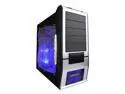
APEVIA X-SUPRA G-Type X-SUPRAG-AL Black / Silver SECC Steel ATX Mid Tower Computer Case
Pros: Setting up hardware inside this case is very simple, intuitive, and as an added bonus, the only tool you'll need is a philips screwdriver - and only to bolt down the motherboard. With some zip-ties, it's easy to have a cleanly wired inside. The fans are 120mm, so they move a lot of air, and don't sound whiny either. Though some people dislike the power-buttons and external ports being up top, but for a tower that sits on the floor, this is optimal, as can look right down and see right where everything is.
Cons: One of the plastic buttons on the window-side (the ones that look like metal bolts) was broken off on arrival. However, a little bit of superglue made it look good as new again. The paint finish is a fingerprint magnet, but this is a common problem with cases. Finally, the PCI expansion slot clamps are of a cheap plastic material that breaks easy when clamping down.
Overall Review: The only thing that could possibly make this case stand out even more is a removable motherboard tray. The few issues are far outweighed by the value and good features. Also, I set up the case so the airflow was directed straight front to back, so I moved the side fan instead to the front as an intake.
4/27/2009See more detail
Doesn't hold up in 2019 anymore
ASUS VS Series VS247H-P 24" (Actual size 23.6") Full HD 1920 x 1080 60Hz HDMI VGA DVI-D SPLENDID Modes Widescreen LED Backlight LCD Monitor
Pros: Works the same after several years of use. Fine if all you need is "a-working-monitor" and don't care about extra features like higher refresh rates, better panels, color accuracy, hdr, newer inputs, monitor usb hubs, etc.
Cons: Slight light bleed around the edges, poor black and grey colors, a lot of tweaking required to get a decent color accuracy, 60Hz is bare minimum for a monitor in 2019, poor viewing at wide angles, a huge foot on the stand takes up an annoying amount of desk real estate, and limited inputs that are quickly becoming dated.
Overall Review: When I got this monitor a couple years ago, this was a decent monitor. However, the features just don't hold up in 2019. Far better monitors can be found close to this price point that have much better bang for the buck.
8/13/2019See more detail
Make more AM4 brackets CM
Cooler Master Hyper 212 Plus - CPU Cooler with 4 Direct Contact Heatpipes
Pros: The cooler itself is(was?) really good for the money. I've gotten many years of use out of it with no problems, and appreciate the minimalist but functional design.
Cons: CM has replaced this with the 212 Evo, which is basically the same thing as the 212 Plus, but it came with updated brackets. They made some brackets, but they were very limited in quantity, and most made you orient the cooler with the fan horizontal. Good luck finding one in 2020. Basically, I now have a cooler that would technically work on a build I've planning, but I literally have to buy a whole new cooler which is exactly like this, just so I can get the bracket that could work with the cooler I already have....
Overall Review: Would be 5 stars if you could still get a bracket to make this compatible for new gen hardware.
1/27/2020See more detail
Bought this in 2014 and it has held up to the test of time admirably
AMD FX-6300 - FX-6000 Series Vishera 6-Core 3.5 GHz Socket AM3+ 95W Desktop Processor - FD6300WMHKBOX
Pros: I can still play most newish games at decent settings in 2020 with a GTX 770 at 1080p. You will for sure get some throttling with more intensive games, but that goes for pretty much any CPU from this era. It's also held up much better for multi-tasking and applications that take advantage of more than 2 two cores (even though it's debatable whether this is a 'true' 6-core). The same can't be said for all of Intel's duo cores from this same time period.
Cons: The only recommendation I would make for buying this is if you can only afford to upgrade an older AM3+ platform motherboard with this if you're running something much slower.
Overall Review: I love this CPU and it was a great investment years ago, but it's not the best use of your money in 2020. I would definitely not recommend it for a new build. If you're looking at this for a new build, I would advise you to look at the Ryzen 1600 AF (12nm Zen+ refresh) instead on a B450 board if you are on a tight budget. Don't build a computer in 2020 with a cpu released about 8 years ago. The FX-6300 is nearing the end of it's usability.
1/27/2020See more detail
Windows 7 disapointment
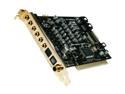
HT OMEGA STRIKER 7.1 Channels PCI Interface Sound Card
Pros: I've used this card on two different OS's - XP and 7. On XP, this card was incredibly solid, and I never had any problems. On Windows 7, however...
Cons: Windows 7 drivers are very unstable. I have many games (Stalker series, Oblivion, Baldur's Gate II to name a few), which crash regularly unless I disable hardware sound. Looking into the cause of the crashes, it seems that hsmgr.exe (the card's software) is the cause. The worst part, when the crashes occur, the sound that was playing at the time loops infinitely, and the only way to get rid of it is by rebooting. Also, the ports are not color coded, with many cases blocking the etched writing that labels each port, so have fun figuring out what cord goes where. Until I memorized the configuration, I had to reference Newegg's images of the card to see what they were.
Overall Review: The sound configuration software could be more streamlined for easy usage. Also, Windows 7 has been released for more than enough time for HT to develop and release more suitable drivers for Windows 7.
12/14/2010See more detail
one word - tough
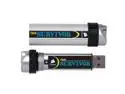
CORSAIR Survivor 8GB USB 2.0 Flash Drive CMFUSBSRVR-8GB
Pros: I'll be honest, I'm pretty hard on things. Even a good pair on jeans will only last me up to 6 months before I shred them. So, you can only imagine how hard I am on electronics. However, this flash drive has gone to hell and back, and it's still just good as new after 7 months. Heck, I even ran it over with a 1 ton pickup the day I got it just to make sure it was up to my standards, and there wasn't even a scratch. If that doesn't convince you
Cons: It might be bulky for some people.
Overall Review: The good part about a bulky flash drive is you'll know when you forget it. Also, it was a bit squeaky when screwing it into it's container at first, but this went away after a couple days.
4/27/2009See more detail