
Your Browsing History


Raymond M.
Joined on 03/27/09
0
0
product reviews
- 7
great cooler, especially with limited space
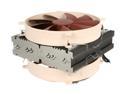
Noctua NH-C14 140mm x 2 SSO CPU Cooler
Pros: •this is a great alternative to the D14. while the performance isn't quite as good, it is one of the best if you clearance issues with the tower style HSF (in my case, the GPU placement on my motherboard is the limiting factor for tower style units) •as expected, great Noctua quality •comes with Noctua's thermal compound (only a quarter tube though), which is one of the best on the market •good, easy to install, mounting hardware
Cons: •Noctua fans are not pretty, and it is very visible through the side window of my case •included fans aren't PWM
Overall Review: tests on other websites show that there is little difference between running 2 fans and using only the top fan (bottom fan only shows a more significant difference). so, if you have RAM with top fins, its not a big deal to remove the bottom fan (which has the added benefit of being somewhat quieter). Alternatively, you could remove the fins from the RAM, if allowed (such as on Trident-X RAM) and get extra RAM cooling from the fan blowing over it.
1/11/2015See more detail
Good board overall, but some serious drawbacks also
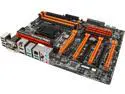
GIGABYTE GA-Z97X-SOC Force LGA 1150 Intel Z97 HDMI USB 3.0 ATX Intel Motherboard
Pros: •4 full size PCI-Express slots •Good On-Board Audio (no audible noise with decent speaker, due to high SNR) •lots of fan connectors (but, see con below) •pretty HD-BIOS, but you need to go to classic BIOS mode for some settings •useful on-board buttons (even for non-overclockers - not having to short pins to reset stuff is nice)
Cons: •default BIOS applies way too much voltage at stock settings •CPU is too close to first PCI-E slot to use the best air heatsinks on the CPU •location of PCI-E x1 slot renders it useless with any decent GPU •bad placement of SATA connectors - a large GPU will cover them •fan controller is kinda bad - it can't control non-PWM fans (a downgrade from previous fan controllers) and manual BIOS fan control isn't easy to understand. On top of that, SpeedFan can't seem to see/control the fans •Gigabyte's software is notoriously buggy
Overall Review: Be sure to update your BIOS ASAP if you get this board, before it fries your CPU. If you don't need 4 PCI-E slots, there are better boards in this price range. Because of the bad fan controller and layout of this board, I can't recommend it.
1/11/2015See more detail
excellent PSU
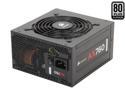
CORSAIR AX Series AX760 760W 80 PLUS PLATINUM Haswell Ready Full Modular ATX12V & EPS12V SLI and Crossfire Ready Power Supply
Pros: •stable •quiet •modular
Cons: •cables come out a little too easily (just a little wiggling, such as when need to move the wires)
Overall Review: hybrid mode keeps this very silent.
6/18/2017See more detail
overrated
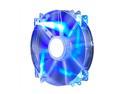
Cooler Master MegaFlow 200 - Sleeve Bearing 200mm Blue LED Silent Fan for Computer Cases
Pros: •cheap •looks good •pushes good air, while it works
Cons: •it was the loudest fan in my case, including the PSU and GFX fans •not durable - every one I've had failed in about a year of use
Overall Review: I've had several of these over the years. I used to get them, listening to other reviews and looking at the 5 egg rating, but consistently disappointed. It might be that I'm using them along side high end fans (Noctua, Corsair hybrid PSU, MSI GFX card)... I suppose theses are comparable to the stock Thermaltake fans that came with my case... But, these aren't worth it. If you want cheap, get Apevia. It is just as cheap, but performs better, quieter, and lasts much longer. If you want the best, Noctua released their 200mm fans finally.
6/18/2017See more detail
Much better than CM!
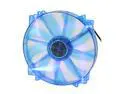
APEVIA CF20SL-UBL 200mm Case Fan
Pros: •quiet •decent airflow •looks good •hasn't failed after a couple years
Cons: •not Noctua :P (jk, different price range. for the price, these can't be beat)
Overall Review: previously used the popular CM 200mm fan. they were always loud (there is no reason the largest fan in the case should be noticeably louder than every other fan in the case) and failed in about a year. these Apevia fans have been a great replacement. I'm getting the new Noctua 200mm now, but will likely keep these Apevia fans in also.
6/18/2017See more detail
best looking performance cooler
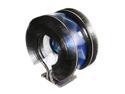
ZALMAN CNPS9900MAX-B 135mm Long life bearing CPU Cooler Blue LED
Pros: •of all the top performance coolers, this is the best looking one, in my opinion •not too huge, especially considering the cooling performance. I doubt that anyone will have GPU/RAM clearance issues with this
Cons: •fan is rather loud at medium to high speed - it is very noticeable with the current trend of bottom mounted PSUs. It is much less noticeable with a top mounted PSU, but still louder than other good alternatives. •fan is not swappable •mounting system isn't great. It uses double side tape to hold the back plate on until you install the HSF itself. The bolts can be difficult to get to and slightly strip when holding the tool at certain angles.
Overall Review: I can't really comment on the quality of the thermal compound, because I used a compound from another manufacturer.
1/11/2015See more detail