

Your Browsing History


Michael F.
Joined on 01/04/14
0
0
product reviews
- 18
Perfect for an ASUS Crosshair III Formula
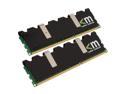
Mushkin Enhanced Blackline 4GB (2 x 2GB) DDR3 1600 (PC3 12800) Dual Channel Kit Desktop Memory Model 996657
Pros: Set timings and voltage as specified, passed over a day of continuous stress testing without a hiccup. Compared to the RAM I was using before, it has tighter timings and can reach specified 1600 DDR3 speed. Also allowed a lower CPU-NB voltage on my CPU for the configuration I was running.
Cons: Runs a somewhat highish voltage, which may limit it's usefulness in other systems ie Intel i7's with their 1.65v max limit.
Overall Review: Should have checked my motherboard's QVL first, now I have two sticks of RAM just lying around.
1/23/2010See more detail
I got a lemon...
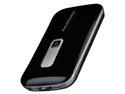
RAVPower RP-PB04 10000mAh 3A Lithium Polymer External Battery Power Bank for iPad, iPhone, Samsung Galaxy, Note, HTC One (M8), Google Nexus, Moto X and other Mobile Devices
Pros: Sleek design, comes with a carry bag and multiple tips for the charging cable. High capacity for the size and weight.
Cons: Sounded like something was flopping around, it would stop for a while if I gently squeezed the top and bottom and the sticky tape would secure whatever was loose. Ignoring the minor surface scratches, I noticed that one of the labels for the ports was scratched prior to the clear coat. Major problem was I could not get it recharge at all. Used the included cable and tip on a PC as well as an Android phone charger putting out 5V 1A for over 12 hours on each, indicator lights would flash as if charging but no increase in level afterwards. Used the battery till it stopped charging devices, attempted to recharge and LED's stopped lighting up at all.
Overall Review: Although package was factory sealed, the device appeared very dirty with lots of fingerprints and a few scratches on the glossy surface. Charger is listed as included in upper part of Overview Features but is then mentioned as not included further down.
1/30/2013See more detail
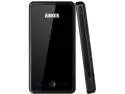
Anker Astro 3E 10000mAh Portable Charger Dual USB External Battery Power Pack for most Smartphones, Tablets and other USB-charged devices (Apple adapters - 30 pin and lightning, not included)
Pros: Micro USB port for easier recharging (PC, most Android phone chargers etc.). Can be recharged and used at the same time. Carry bag is included as well as a coiled charging cable and 4 of the more popular phone charging tips. Design is slim for the capacity and output, very solid feeling and has a 4 level indicator to show approximate charge level. Ports for Android/most USB devices as well as Apple devices and can output up to 3 amps total for easy charging of larger devices like tablets.
Cons: Recharging rate limited by using micro USB. Fingerprint magnet shiny finish. Printing on the back side isn't clear coated. The included carry bag is only really big enough for just the battery alone.
Overall Review: I thought it was plain gloss black, but the sides and back are actually a metallic flake. Thankfully they ditched the chromed plastic and mirror face of the older Astro3, though I do prefer the matte black finish of it even if it wears out a bit ugly. The older model also had a dedicated charging port using an included adaptor which recharged it faster.
2/8/2013See more detail
Follow up from 5/26 review
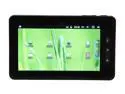
iView 760TPC Tablet - Android 2.3 upgradeable to 4.0 ARM Cortex-A8 1.00GHz 7" TFT Capacitive Touch Screen 512MB Memory 8GB Flash
Pros: I want to start off by saying I upgraded to ICS with the mods suggested from eyeoncomputers on the tabletreplublicas soon as I got the tablet so I don't know if any of this applies to stock form running Gingerbread. The tablet can handle micro SDHC up to 32GB. for those who want to have files over 4GB in size on the microSD card, format to exFAT or NTFS, both can be read HOWEVER you may not be able to mount the drive when the tablet is already running (definitely for NTFS, it will say drive is corrupted/needs to be formatted), card has to be inserted before booting up. Copying to the SD card via computer-USB-tablet and copying files from internal storage to SD card works for exFAT formatted cards, didn't really test with NTFS since it's a bit more CPU intensive and the aforementioned mounting issues. I've had no problems using any external USB drives (flash or HD/SSD based), my Logitech wireless keyboard and mouse combo works fine as well.
Cons: I've noticed the tablet will stutter occasionally playing mp3 files on the stock music player, this seems to happen regardless of it being the only application running or if it's being run in the background though it happens more in the latter scenario (I've actually noticed this on my Droid Incredible as well so maybe it's an android issue?). I have an external battery/charger that can power the unit via USB, however when it's being used the headphone output is disabled and the built in speaker automatically resumes. This issue doesn't always resolve itself even after unplugging both USB and headphone and restarting whatever was playing (noticed this during music playback). Not being able to mount exFAT or NTFS formatted microSD cards without a reboot is annoying if you have several of them. MKV files play fine with MX Player as long as it is h264 using the 8bit profile, hi10p is too CPU intensive for smooth playback.
Overall Review: If you turn off the wifi, sometimes the tablet will have issues turning it back on. I've noticed I can usually get around this by turning airplane mode on and off and then turning the wifi back on again.
7/15/2012See more detail
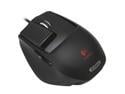
Logitech G9x Black Two modes scroll USB Wired Laser Gaming Mouse
Pros: I have medium sized hands and the smaller textured grip body fits me very well for my gaming use where I claw grip for the most part. The larger, smoother grip body I don't use but I've tried it and could see it working better for those with larger hands or more of a palm grip style with it's filled in palm support area and more defined thumb rest. Having the two buttons on the thumb side has been useful for games with extra character actions that are used often but usually tied to the keyboard. The weight system is a nice addition, I like the feel of a heavier mouse since it feels smoother to move around to me for some reason. Microgear wheel feels nice and precise. I've rarely used the programmable features other than fine tuning DPI settings and changing the LED color, but you can have a ton of profiles saved onto the mouse which can be useful if it is on a shared computer, you use the mouse on other systems or you have custom configurations for various program.
Cons: The middle button is a bit harder to press, though I've pretty much gotten used to it. I can hear a high pitched whine from the mouse when it's not being moved, it is very directional so I don't notice it much especially if there is BG noise (games, music, air conditioning etc.) The weights can be a bit hard to insert into the holder, but after you've found your preference you probably won't mess around with it. The grip body has slight play between it and the mouse body, especially noticeable when lifting and putting down the mouse. Left button is less tactile/springy than the right, I've accidentally pressed it when resting both fingertips on their respective buttons (pointer on left, middle on right) usually when I'm a bit tired or resting for a sec.
Overall Review: I find using my pointer for the middle/wheel button easier than using my middle finger, though I still scroll with the middle. I don't use the free spinning mode of the microgeared wheel but it'd be good for scrolling through long documents etc.
9/13/2011See more detail
Great on a 6870
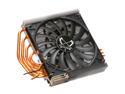
Scythe USA SCVSG-2000 VGA Cooler
Pros: Massive temperature drops on my 6870! OCCT GPU stress test at 1024x786 res, shader complexity set to 8 would bring the stock cooler with fans on auto to 41% fan speed (forgot what fan rpm that was) with temps at 89-90C after five minutes! Running the same test for way longer with the Setsugen installed and at minimum fan speed (~650 rpm on the one I got) the gpu core temps are 76-77C, 1000rpm brings it down to 66-67C and maximum fan speed (~1875 rpm) brings it down to 59-60C! Even the fan on max speed is quieter than the stock cooler at roughly 35% which was what my card usually hit during gaming. Minimum fan speed idle temps are at 31C, max fan speed is only 1-2C lower. Manages to maintain a dual slot form factor both below and above the card, most aftermarket coolers make the card nearly 3 slots large hanging lower than the stock cooler, and the mounting hardware above the card sometimes adds another 5mm ie. Scythe's Musashi which I have on a 4890.
Cons: Total pain to install. Although lower profile above the card than the Musashi with it's threaded posts and thumb nuts, you're basically poking screws through the mounting holes blind. There are no heatsinks included that properly fit the VRM section of the reference 6870 because between each chip is a pair of surface mount components that are taller. I had to cut two of the 10x22mm wide heatsinks in half to properly cover each one. Like nearly all aftermarket coolers, it doesn't exhaust hot air out so make sure your case has good airflow. It also sticks out further from the motherboard than the stock cooler so I can't use the side case fan hole unless I use a slim 12mm fan, this can also be a problem for narrower cases (fits my CM 690 II Advanced).
Overall Review: VRM temps under load are pretty similar to stock, seems the 6870's don't need as much cooling there since the fan doesn't even sit directly over them. I was able to reuse the stock mounting bracket vs using the included one which has a rubber bumper that rests directly over the back of the card (and on top of a bunch of small surface mounted parts!). I was NOT able to reuse the stock heatsink plate, there are too many areas which have to be trimmed which I discovered after cutting the area around the power ports =/ The heatsink can shift around a bit when installed due to the diameter of the screws and the holes on the card, heatshrink tubing or maybe a ballpoint pen ink tube on the screws might work to take up the play(used this trick for the Musashi)l. Crossfire/SLI setups still work best with 3 slot space between each card so there is one slot gap between the two dual slot cards, which luckily my motherboard does.
3/7/2011See more detail
seller reviews
- 1
Great Customer Service
Had problems with something that I ordered from this seller. Emailed on Saturday morning expecting a reply on Monday. Surprisingly someone got back in touch with me Sunday evening and I was able to start the refund process. They even refunded me the cost of shipping the item back to them! Special thanks to Elsa and Fendy who where the two people mainly responding to my emails.
On-time
Delivery
Product
Accuracy
Customer Service
Satisfactory
1/30/2013See more detail