

Your Browsing History


Dane Y.
Joined on 03/11/07
0
0
product reviews
- 8
Pinnacle of new X570S boards
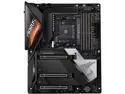
GIGABYTE X570S AORUS MASTER AM4 AMD X570 USB 3.0 ATX AMD Motherboard
Pros: -performance -features -layout is great. Really convenient placements for fan headers, RGB headers, external temp sensor headers, etc. -Same VRM as the Aorus Xtreme. Real fin array heatsinks -Seems very stable, good RAM support -Daisy chain RAM topology - Running 2x16 3600 c14. May try 3800 C14 when i get to tweaking -4 M.2 slots - Crazy - I am only using 2 of them currently
Cons: - The rear IO cover should just have an Aoros logo that can be lit up rather than the Aorus lettering -UEFI doesnt seem to like low DPI setting mice. I run 400dpi in my mouse and it barely moves when in UEFI. My previous z370 board was fine with low DPI
Overall Review: -Really great board. Not sure what happened with the other peoples who gave 1 egg reviews. -Paired it with a 5900x, 32 2x16GB 3600 14-15-15-35 ram and a rtx3080ti. Currently in the process of bending all the piping for my hard line liquid loop.
8/5/2021See more detail
Ive seen better.
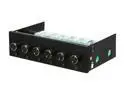
Rheosmart 6 Fan Controller 5.25" Bay 6 Channel 30W Fan Controller Panel (Black)
Pros: Looks good and feels solid as a whole, average performer i guess
Cons: knobs feel cheap. You need the knobs turned half way to get the fans to start turning. Also when i turned on the system the fans wouldn't start spinning again so i had to turn the knobs some more.
Overall Review: I'll be looking at a new lamptron FC-6 now that i have shipped this one back. Definitely not the product i through it would be after hearing such good things about Sunbeams Rheobus Extreme.
5/30/2011See more detail
Awesome memory. Love G. Skill!
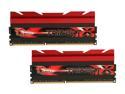
G.SKILL TridentX Series 8GB (2 x 4GB) DDR3 2400 (PC3 19200) Desktop Memory Model F3-2400C10D-8GTX
Pros: This memory is great. I upgraded from Corsair Dominator Platinum 8GB kit at 2133mhz to this, and I bought 2 kits for 16gb. I knew going into it that XMP was not going to work, and manual settings were going to have to be set. It was very easy to do with my Asus Maximus VI Hero Z87 and 4770k. Just went to the SPD Information section in the bios and then set the timings manually to match what was under XMP Profile 2 and set DRAM voltage to 1.65 and System Agent to 1.06v and it has been stable as a rock. Can finally play Star Wars Battlefront without my system memory being maxed out. And it is a bit snappier during general use due to the 4 sticks used instead of 2 which makes things a little bit faster overall according to some tests ive done. Increase of about 1500mb/s in the AIDA cache and memory benchmark with 4 sticks vs 2. The memory looks beautiful in my Red white and black themed rig. Overall this is fantastic memory, I have always bought memory from G. Skill for my personal builds other than the one time I bought Corsair Dominator Platinums, and G. Skill memory has always been solid. Not a single problem.
Cons: Nothing so far.
Overall Review: If your motherboard does not have a SPD section in the BIOS that shows the important timings youll need to set, you will have to figure it out yourself. This is assuming you get 2 of these kits. It is not very hard and make sure you bump your system agent voltage to around 1.0v.
12/5/2015See more detail
amazing case. New fan of Corsair cases
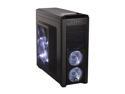
Corsair Carbide Series 500R Black Steel structure with molded ABS plastic accent pieces ATX Mid Tower Computer Case Compatible with ATX (not included) Power Supply
Pros: Where should I start? This case is amazing in everyway. Looks extremely nice. Not the over the top gamer look with a bunch of plastic thrown all over to make it "out there." Spacious interior and the black powder coat is definitely a plus. Awesome cable management capabilities. My rig looks so clean. USB3.0 on the front panel is a nice addition as well, 8 expansion slots, and great air cooling and water cooling options. Overall this case has everything. Corsair quality in one of the greatest constructed cases ive ever had. Corsair is really bring it in and dominating all case segments.
Cons: What are cons? honestly this case has none.
Overall Review: I have gone through four cases before this Corsair 500r, and i must say this is by far the best one. I had all gamer looking ridiculous cases and I decided i wanted a classier and sleaker case with good construction and a pre painted black interior. And this fit the bill nicely. I had a HAF 932 before that i painted black inside, but i was starting to dislike the gamer look with a bunch of plastic thrown together in a box form. So i got this case and im glad i did!
12/18/2011See more detail
Great Power supply
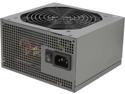
Antec NeoECO C NeoECO 620C 620W ATX12V 80 PLUS BRONZE Certified Active PFC Power Supply
Pros: Awesome PSU. Its a Seasonic unit so its obviously solid. Bought this for a clients photoshop rig since we upgraded the graphics card. He had a 400w before now to a 620w. Not only can we run the graphics card now, but it seems his system is more stable overall. AWESOME!
Cons: zero
Overall Review: great PSU for the price. If your in the market for a 600w+ PSU for a budget rig. this is your PSU
10/24/2011See more detail
amazing laptop for college!
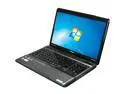
TOSHIBA Satellite 15.6" AMD A6-3400M 6GB Memory DDR3 1333 Windows 7 Home Premium 64-bit P755D-S5266
Pros: Awesome laptop! I got this laptop for college and for some light gaming when im bored in class and whatever else. When i was looking for a laptop i wanted a AMD APU A6 model or higher(A8) 15.6" screen, a decent GPU, a bonus would be a Blu Ray Drive and HD Webcam for $700 and under, and this fit the bill nicely.
Cons: First thing i recommend that you do is if you have a windows 7 Home Premium disc boot from that disc(64 bit version) and format the hard drive and reinstall windows 7. Toshiba likes to load their laptops with a ton of bloatware. I think i counted like 30 or more worthless programs before i formatted.
Overall Review: With the Format you will need to know your way around and reinstall all the drivers you may need(Chipset, Display Driver for HD6520G, touchpad, webcam, etc.) Like other reviewers have said they prefer a standard Driver installation program that lets you install it all in one go, but really you do not need that unless your that lazy to go onto Toshiba website or AMD to get the drivers.
9/20/2011See more detail