

Your Browsing History


David H.
Joined on 12/23/05
0
0
product reviews
- 7
Feeding to Apple LED Cinema Display, works well for attached MacBook Pro and attached Digital Audio G4
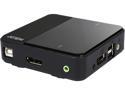
ATEN CS782DP 2-Port UHD 4K USB DisplayPort KVM Switch - allows to access two 4K-enabled computers from a single USB keyboard, USB mouse, and DisplayPort video console
Pros: PC1 on the CS782DP is connected to an Early 2011 MacBook Pro; the MBP's output shows fine at 2560 x 1440 on the Cinema Display whenever PC1 is activated via the CS782DP's remote Port Selection Pushbutton. PC2 is connected to a 2001 Mac Digital Audio G4 via a Gefen GTV-DVIDL-2-MDP Dual Link DVI to Mini DisplayPort Converter; the G4's output shows fine at 1280 x 720 (the CS782-compatible limit for the G4's graphics hardware/driver) whenever PC2 is activated via the CS782DP's remote Port Selection Pushbutton.
Cons: If I put the MBP to sleep while it is connected through the CS782DP to my 27-inch Apple LED Cinema Display, the display goes into deep sleep mode and won't wake up when I switch the CS782DP to connect it with the G4. (In the previous version of this review, I reported that the Gefen GTV-DVIDL-2-MDP Dual Link DVI to Mini DisplayPort Converter lost Sync after 15 minutes connected as PC2 through ATEN CS782DP KVM switch. That eventually turned out to be caused by a forgotten default System Preferences setting in Mac OS X 10.3.9 on the G4.)
Overall Review: There is a workaround for the above Cons problem, which works only because my MBP is USB-cabled to the CS782DP via an external keyboard rather than the laptop itself. The workaround—suggested by a second-level Apple Support person—is to _first_ activate PC2 via the CS782DP's remote Port Selection Pushbutton, and _then_ to put the MBP to sleep via Ctrl-Shift-MediaEject or Ctrl-Shift-Power entered on the _laptop_ keyboard. Also note that, because CS782DP's PC ports are DisplayPort but G4's Radeon output is DVI (also has VGA output, but this didn't work when tried—before CS782DP arrived—directly connected to Cinema Display through converters), a DVI-to-DisplayPort converter such as the Gefen—plus a Mini-DisplayPort-to-DisplayPort adapter for the Gefen's output to the CS782DP—is needed.
8/24/2016See more detail
Need to "flash" the card, isn't same size as one it would replace
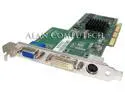
ATI Radeon 7000 64MB DDR VGA DVI-D TV Out 1028310100 AGP Video Card 109-83100-00
Overall Review: Bought the card to replace a possibly-failing 1027490101 model that came in 2001 with my Mac Digital Audio G4. This one's model number is later, but—because it wasn't pulled from a Mac—I'd have to "flash" its ROM. The code to do that on a Mac is difficult to find, and besides this card has a smaller cross-section than the one it would replace—possibly because the new components are more power-efficient. I've since bought another used card pulled from a Mac, with a slightly newer model number than the old card but a cross-section that looks the same. After that I bought a new DVI-D-toDVI-D cable that works OK, and the problem with my old card may have been the cable. My G4 has only one AGP slot, so I'd have to pull the old now-working card to do _anything_ with this card; I'm just saving it in case I need a replacement later.
8/22/2019See more detail
I already wrote a review submitted 4/28/ or 4/29/2020
Brother MFC-L2710DW Wireless Duplex Compact All-in-One Monochrome Laser Printer
Overall Review: I already wrote a review submitted 4/28/ or 4/29/2020
5/5/2020See more detail
It seems to have solved my problem
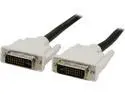
C2G 26912 DVI-D M/M Dual Link Digital Video Cable, Black (3.3 Feet, 1 Meters)
Pros: I have an old G4 Digital Audio Mac connected to a GefenTV Dual Link DVI to Mini DP Converter, which is in turn cabled to an ATEN CS782DP KVM switch. Lately, when I switched my KVM switch to the G4 once a week, the video on the G4 failed to connect to the KVM switch—as shown by the EDID Sync LED on the Gefen failing to light. The KVM switch works fine connected to my other Mac, and swapping GefenTV converters (I have two because of a drown-instead-of-return RMA that didn't disable the "drowned" Gefen) didn't make any difference. I thought the old ATI video card in the G4 might be failing, but decided to try a new DVI-D dual link cable. For the last month I have had no further G4 video problems.
Overall Review: I would purchase this product again, in the unlikely event that I need another cable of this type. I recommend it to others who need it.
10/1/2019See more detail
They work great so far, with no timeouts such as may have been caused by my old switches
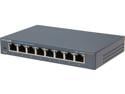
TP-Link 8 Port Gigabit Ethernet Network Switch | Ethernet Splitter | Sturdy Metal w/ Shielded Ports | Plug-and-Play | Traffic Optimization | Unmanaged (TL-SG108)
Pros: Every Saturday I run full backups of 3 drives and a subvolume over 7 hours, beginning with a 4-hour backup-and-compare of a MacBook Pro over my LAN. For a period of 4 weeks earlier this summer, the Mac Pro "backup server" computer was getting a "network connection timeout" after about 2 hours of backup. With this pair of Gbps switches replacing my old Netgear Gbps switches, the LAN backup-and-compare runs to completion.
Cons: The LEDs on these switches are smaller than the LEDs on the Netgear switches, so it's more difficult to see them blinking from across my bedroom to know whether the LAN part of the backup is running. Fortunately I also have a Motorola MoCA adapter with larger LEDs in the bedroom, so I can see those blinking instead.
Overall Review: These were a temporary bargain I snapped up. NewEgg should make that bargain permanent, because Gbps switches are being obsoleted by 5Gbps and 10Gbps switches for LANs that are through-cabled for those speeds—which my LAN is not because it has a MoCA segment.
8/22/2019See more detail
This arrived promptly, but it turned out not to be what I needed—so I haven't used it
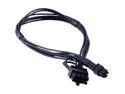
Mini 6-pin to 8-pin PCIe PCI-e Video Card Power Cable for Apple Mac Pro Tower
Pros: Not applicable
Cons: Not applicable
1/10/2019See more detail
seller reviews
- 1
Alexnld doesn't keep all products in a Hong Kong warehouse; instead it orders them shipped by worldwide suppliers
(This replaces an earlier review of Alexnld, written around 16 January 2019. I deleted that review after the package finally arrived, replacing it with another review—which has not yet appeared on NewEgg's website as of today.) E-mail 15 December 2018 from Alexnld said: "Unfortunately we cannot trace the parcel as we ship the items via economy int'l shipping without registration fee (no tracking) to save on price for buyers. Tracking is added for items above $25 only. Usually it takes about 10-20 business days to arrive from Hong-Kong, but could be delayed by 1-2 more weeks sometimes due to postal/custom services delays/bad weather conditions." Meanwhile ordered equivalent cable from modDIY, also a Hong Kong company, received it in 8 calendar days. I have another e-mail, also dated 17 December 2018, from Alexnld concerning NewEgg order 436880193. It says “Shipped from 27/P, B Wing, Windows Building Shipping Time:12/15/2018 12:12:51 AM”. The tracking number on that e-mail doesn’t work (understandable; I didn’t pay for tracking), but the item number 9SIA6RP7Z55206 on it links to a NewEgg Web page. That page says “In stock. Ships from Israel. Most customers receive within 9-18 days. Sold and Shipped by Alexnld”. The package arrived 23 January 2019, after a voyage of 39 calendar days—24 business days by my calculation. The label pasted on the outside of the package—complete with Customs declaration—says it was sent 15 December 2018, but from Gilmore Wright in Bangkok. The inner cable package says “Made in China”—not Israel, and Bangkok is not a part of China so far as I know (although Xi Jin Ping may have an ambition …). The cable looks OK, and looks like the picture for item number 9SIA6RP7Z55206. However I have no plans to test it, because that would require pulling the video card out of my Mac Pro and substituting Alexnld's cable for modDIY’s cable. Instead I’ll keep it as a spare. I got a total of 6 e-mails from Alexnld. The third-from-last, on 24 January 2019, said: "we are glad that you have received our order, the shipping logistics routine is decided by our shipping partner depends on the product characters. Initially It was shipped from our China warehouse as we have stated before in order confirmation message that we sent you on up making the order. Also we never mentioned that our products are made in Israel, it is made in china (like most of the products worldwide nowdays). Feel free to keep the product as spare part and you do not have to re-pay us for the delivered product. We would appreciate if you can revise your feedback to atleast 3 stars for the delivered product. "
On-time
Delivery
Product
Accuracy
Customer Service
Satisfactory
1/28/2019See more detail