
Your Browsing History


Shahriar G.
Joined on 04/01/03
0
0
product reviews
- 19
Decent USB 3.0 Add-on Card
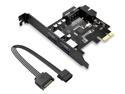
ORICO USB 3.0 PCI Express Card Hub Controller Adapter Card with 2 Rear USB 3.0 Hosts and Internal USB 3.0 with 15PIN Power Connector -Black
Pros: This is a decent USB 3.0 add-on card. It has 2 USB 3.0 ports plus a 20-pin header for adding 2 more USB 3.0 ports ports. It includes a power header which allows the card to provide power directly to connected peripherals (e.g. 2.5 external hard drives, USB charging cables, etc.)
Cons: A few things about this product packaging made me deduct 1 star: 1. The included documentation is useless. 2. The driver CD contains drivers for a lot of different Orico products, and it's not clear at first glance which directory on the driver CD contains the appropriate drivers for this card. 3. There is a Excel spreadsheet which does list Orico products and the corresponding driver directory on the driver CD, but it's in Chinese. 4. Orico's Support page doesn't provide a copy of this card's drivers for download.
Overall Review: The drivers for this card are located in the VLI directory on the driver CD. They are quick and easy to install and get you up and running in no time. Despite the documentation shortcoming, it's a decent card and well worth the price.
10/28/2012See more detail
Not Reliable; Excessively high failure rate.

ADATA 16GB UV128 USB 3.2 Gen 1 Flash Drive (AUV128-16G-RBE)
Pros: Inexpensive when sold in packs of 3.
Cons: Unacceptably high failure rate. 2 out of the 3 thumb drives that I bought as a 3-pack failed on first use. I would not recommend purchasing this model thumb drive.
Overall Review: Until now, I've had a good experience with ADATA memory products, so I was surprised and disappointed when 2 out of the 3 thumb drives that I bought failed the very first time that I tried to use them. I will have to contact ADATA support and see what my RMA options are.
3/19/2018See more detail
Thermaltake Silver River 5G ST0025U USB 3.0 External Hard Drive Enclosure
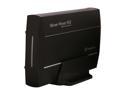
Thermaltake Silver River 5G ST0025U Aluminum 3.5" Black SATA I/II/III USB 3.0 External Enclosure
Pros: This is a well-designed, good quality external hard drive case/enclosure. The outer shell is solid aluminum. It has a toggle power switch instead of a slide switch like some other less expensive enclosures. The enclosure's firmware will allow you to create one continuous 3TB MBR partion on 3TB hard drives. This is particularly useful with older devices (e.g. Netgear WNDR4500 Router) which don't recognize GPT partitions. The other external enclosures that i have tried limit MBR partition sizes to 2TB as per the MBR specifications and force you to create two partitions in order to use the hard drives full capacity.
Cons: 1. Possible incompatibilty with other hard drive enclosures: 3TB MBR partitions created with this enclosure won't be recognized by other external enclosures. If you put the drive into another enclosure brand/model then connect it to your Windows PC, Windows will prompt you to initialize and format the drive. I've tried 3 different enclosure models and brands, all with the same result. I had a similar issue with a 6TB GPT partition created with this enclosure. If the enclosure fails, it will have to be replaced with the exact same model. Otherwise, you'll have to delete, re-create and format the partition(s) on the drive from scratch. 2. Mine didn't come with the hard drive mounting screws. It only had the two screws for fastening the outer shell to the inner drive tray. Some buyers have had the same issue with missing screws. Others seem to have received their enclosure with the full set of screws.
Overall Review: Were it not for the two Cons listed above, I would have given this product 5 stars. If you're OK with these limitations, then I would highly recommend this enclosure.
10/17/2018See more detail
Not for AMD Quad Core Phenom CPUs
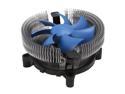
SilenX EFZ-92HA2 92mm 3rd generation fluid dynamic bearing Effizio CPU Cooler
Pros: This is a very quiet fan. It's easy to install on an AM3 Motherboard. CPU Thermal paste is included in case you don't have some on-hand. The low price makes it a good deal if you're looking to cool an AMD CPU with 65W or lower power consumption.
Cons: I should have read the product description more closely before buying this item. They really mean it when they say "...for those with more moderate cooling needs". This heatsink/fan is definitely not meant for a quad-core AMD Phenom processor. When idle (i.e. in the BIOS Setup screen), the CPU temperature quickly climbed to over 150 degrees Fahrenheit. By comparison, the stock AMD heatsink/fan keeps the idle temperature below 130 degrees.
Overall Review: The fan power connector is 3-pin, not 4-pin. The aluminum fins are easy to bend, so use caution while installing this item.
5/10/2017See more detail
Corsair Hydro Series H80i V2 Water / Liquid CPU Cooler
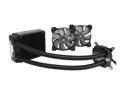
Corsair Hydro Series H80i V2 Water / Liquid CPU Cooler. 120mm CW-9060024-WW
Pros: This is a very well-designed and well-built CPU cooler. It looks and feels very sturdy and keeps my Vishera 8350 Black Edition CPU's idle temperature around 15 to 20 degrees Celsius. It comes with two 12cm fans for a push-pull configuration. Installation was fairly easy and the included instructions and illustrations were clear and simple to follow. I'm very happy with this product and would highly recommend it.
Cons: None.
Overall Review: The only issue that I ran into was that the pre-installed Intel bracket was really hard to remove. I'm not sure if this is design flaw, or if it was simply the case with the CPU cooler that I got. Once I finally got the Intel bracket removed, installing the AMD bracket was quick and easy. Removing and re-positioning the AMD bracket was also a breeze, so it may just be the Intel bracket that was the issue. I almost deducted one Egg for this, but then I decided to give the product the benefit of the doubt.
7/7/2016See more detail
CORSAIR Hydro Series H55 Quiet Edition Water / Liquid CPU Cooler
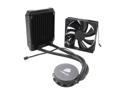
CORSAIR Hydro Series H55 Quiet Edition Water / Liquid CPU Cooler 120mm (CW-9060010-WW)
Pros: This liquid CPU cooler works very well. It keeps my AMD FX-8350 (Vishera Core) 8-core CPU at around 33 to 35 degrees Celsius while idle, much cooler than the stock AMD CPU fan & heatsink cooler. I'm very pleased with it's performance so far.
Cons: I deducted 1 Egg due to the fact that the user's guide is a bit vague for some of the more critical installation steps. The diagrams, although helpful, are not always very clear and can even be slightly misleading as to the order in which some of the parts in the kit should be assembled. As a result, it can take anywhere from 30 minutes to one hour to install the cooler. Also, you have to remove the stock CPU cooler mounting bracket and back-plate from your motherboard and install their mounting kit. Similar liquid CPU coolers from Corsair and other brands have much better mounting brackets which connect directly to the stock CPU cooler mounting bracket on the motherboard.
Overall Review: Overall, this is a good product, despite its documentation and installation short-comings. If you're patient and don't mind removing the stock CPU mounting bracket and back-plate, then this cooler should be on your list of liquid coolers to consider for purchase.
6/5/2014See more detail