
Your Browsing History


Tate A.
Joined on 09/27/03
0
0

product reviews
- 15
Refurbished iMac is a winner!

Apple iMac 21.5" - Grade A - Intel Core i5 2.5GHz Quad - 4GB RAM - 500GB HDD - DVD/CDRW - Wifi - Webcam - MacOS High Sierra v10.13 - Wired Keyboard & Mouse - A1311 MC309LL/A
Pros: 30 yrs ago this year I bought a new Macintosh SE with dual floppies and paid the $2900 bucks for it! Now I have a refurbed iMac for $550 that blows it out of the water. It's nice getting back into Mac with so little expense. This refurbed unit is perfect for my needs and is actually more than I needed! Extremely clean and very few scratches or scuff marks. LCD display is perfect. I've been wanting to do Xamarin development and saw these on New Egg and decided to take a chance on an A grade model. The seller's packaging was fantastic and had reinforced edges and stickers to indicated not to crush or throw around - far better than most new stuff gets packaged. All told this was a great deal and I'm extremely happy with the purchase.
Cons: None on this purchase whatsoever. It was way better than I expected for a refurb.
Overall Review: Props to the seller - I can't get over the level of care and effort they went to in packaging up a refurb. Double boxed, foamed on the outside of the inner box and foamed on the inside of the inner box and totally sealed. Wow
3/3/2017See more detail
From 64 to 128
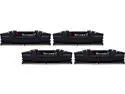
G.SKILL Ripjaws V Series 128GB (4 x 32GB) 288-Pin PC RAM DDR4 3200 (PC4 25600) Desktop Memory Model F4-3200C16Q-128GVK
Pros: Pros are lots of ram and excellent price. Had 64GB in my original build. That was really expensive at the time (3 yrs ago) and now the same model but for 128GB was less than the price of 64GB...so it was a no brainer. Runs wonderfully in my MSI x570 with XMP enabled. No glitches or hiccups. Fantastic upgrade.
Cons: Zip, zoom nada as in no cons from this reviewer...at least so far.
Overall Review: Yes these are and have been wonderful for my system...if you use DDR4 then the upgrade is way worth it. Adds some longevity and allows Visual Studio to load up fine business. The massive amount of ram really lets everything I normally load continue to load without any issues.
6/24/2023See more detail
Eggcelent Upgrade for the Raspberry Pi 4 - see what I did there!
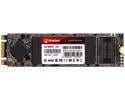
KingSpec M.2 2280 1TB SSD NGFF M.2 SATA III 6Gb/s Internal Solid State Drive Hard Disk Data Storage for PC Desktop Laptop Ultrabook
Pros: B + M Keying, 1TB at a great price. Dead simple to use. Don't know much about the manufacturer but their product works as advertised. Photos: #1: shows stacking of hardware and USB bridge. The bottom board is the 862 and holds the 2280 drive. #2: No SD card though not easy to see - because it's booting off of the 1TB 2280!!!! #3: Mounting of this drive hardware. #4: The nifty little USB 3.x hub that is nearly same size as the Pi - that hub is worth the buy for sure (New Egg p/n in the overall review)
Cons: None that I can see or have experienced so far. One thing I did notice is boot time is longer but that's not due to this drive it's an issue with the Pi. So if you go down this road you may experience the same thing but don't blame the drive. If you research and follow directions and do it right then it usually works.
Overall Review: So, for some background - I upgraded my Pi using Geekworm hardware (X735 for power control, X862 for USB 3 booting). The X862 says only B keying for an SSD SATA but the B+M keying of this drive works fine - they should upgrade their documentation to reflect this (note this is only for Geekworm expansion hardware - caveat emptor - for other ones). The X862 cannot boot using PCIe style 2280 drives from what I gather - just standard old SATA SSD. Overall simple test results with dd and onboard diagnostics: 246 - 300MB/s sequential write speed and around 120MB/s random read (with a 600Mb file). Compared to the SD card it's no comparison. I pretty much use this Pi for ham radio digital modes, Node-Red and Python so it's not under a lot of stress. I didn't bother with graphics tests because that's not my need here. Maybe later if I feel like it. Btw - the Pi no longer has an SD card installed. Everything boots off of this drive...yippeee!!! I got a small Raspberry Pi sized powered 3.x USB hub (New Egg #9SIBDYVHYJ2298) too because the X862 uses a hardware USB bridge which leaves 1 open USB 3.x port. I ran that port out to the 3.x hub to handle the outboard sound card and usb2serial cable to run the ham radio for FT8 and I still have 2 open USB 3.x ports on the hub. The Geekworm stuff came with a 60W power supply and provides 12 volts and whatever the Pi needs. I also overclocked my Pi out to 1.9Ghz (and bumped the GPU up too). I ran it for a while at 2Ghz before the hardware addons but it would occasionally reboot. I think I'll play around with that again now that I can USB boot and have real cooling. But WOWZER!!! what a difference in performance on my Pi 4 (4GB). So now I'm going to have to print a case for this monster. Peace.
5/9/2023See more detail
Completely Stable and Works Great
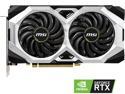
MSI Ventus GeForce RTX 2060 SUPER 8GB GDDR6 PCI Express 3.0 x16 Graphics Card RTX 2060 SUPER VENTUS GP OC
Pros: My prior Radeon RX580 card was completely unstable - usually would have driver timeout errors. Really bad during Zoom calls with work. This card has been a lifesaver. Utterly stable and fast. Plays Destiny 2 as well as my Xbox from what I can see. Super quiet. Nvidia drivers have been fantastic.
Cons: So far I have experienced no problems with this card. It has run everything I've thrown at it without a hiccup
Overall Review: 5 stars in my book. YMMV but it was a good purchase for me and would highly recommend.
9/5/2022See more detail
Big case! Personal caveats
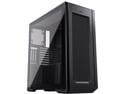
Phanteks Enthoo Pro 2 Full Tower, High-performance Fabric Mesh, Tempered Glass, Dual System/PSU Support, Massive Storage, Digital-RGB Lighting, Black
Pros: A good manual. Yep, it has a really good manual that describes all of the features and options available for the case. This was refreshing. Hardware comes in a sorted little box that keeps things together and apart. Space is one of the biggest pros. It's big enough for a dualie system - that's on my radar. I really like the side mounted power supply design. I have an MSI Tomahawk x570 and the Ryzen 9 3900. I wanted to try an AIO radiator so I moved up from a mid-tower to this guy. The AIO fits fine at the top of the case...it's actually a little small at 240mm for this case but it keeps the cpu at a decent temp. There's plenty of room for a bigger radiator. Front panel USB-C. I bought the case because of this and the dual system capability. Few other cases provide at least a single USB-C port and those that did I didn't like where it was positioned. Having this one front and center was a selling point for me. Vertical GPU mounting is really straight forward. There is space for some really big cards if you need it. Plenty of space for fans, radiators and drives. Included are cages for 3.5" hard drives or with adapters more SSDs that snap fit together. You can put an insane amount of drives in this case. Velcro cable wraps make holding down cables while bundling them a good feature but they weren't strong enough to hold cables without also tie wrapping them. Particularly the PSU cables. Magnetic grill on the top. This is a nice feature for cleaning but be careful when moving the case and make sure you don't have a hand on this because it will slip right out from under you really fast. Any lateral force will cause the grill to slip. There's a bottom removeable grill too...nice feature. Several options can be purchased that extend the functionality of the case.
Cons: There's a lot of personal "cons" that I've found so far - they don't make me sorry for buying it but they lessen my overall satisfaction with it: #1 - No hinged side doors. The thumbscrews at the back of the case are insanely hard to turn with your thumb. I've literally torn skin off my fingers trying to either tighten or loosen them. Magnetic hinged side panels would be much appreciated or just make the thumbscrews less physically dangerous (I've resorted to having a #2 phillips around at all times). Door alignment is iffy at times too. The glass door is heavy and tends to fall off the case anytime you attach/detach. The other side door is a bit flimsy feeling. #2 - The front panel door to USB ports and such. Ok this is another questionable design feature - if you have external USB out front for easy access this design is a pain. All of the ports are behind a hinged upward door that doesn't allow you to see the ports when it's open. If you want to insert a USB cable you have to get down at the same level it is. The disk activity light is also located on this panel and you can't see it unless it is opened and you are on the same level. The USB ports seem pretty low quality. I have at least one USB 3 device that has to be fiddled with to maintain a consistent connection. Not cool. #3 - The utterly useless 1/4" backward L channel in the front panel. While probably a stylistic element, it is utterly useless and distracting from symmetry. The least you could do is to have put an rgb diffuser in it (like the one you put in around the power supply shroud), shrank it down and allow us to hook that up to the MB or whatever. #4 - The short power supply shroud. This is another strange design decision but probably related to some stylistic element on the case inside. I love the side mounted power supply design and the fact that it is stored inside the shroud. But the shroud is too short and makes storing cables and such a tough call. Doubling the length of the shroud would fix this issue immediately and allow you to hide more cables. I have enough cabling in there now that I can't use the panel that covers where the power supply cables are bundled up and I have to leave that off. Unfortunately, the side is a bit bowed out due to cabling. #5 - No vertical channel for cabling. This one is maddening - no matter what you do the vertical cabling is completely visible if you remove the solid side panel. There's no place to hide vertical wiring. A channel here 2" by 1.5" deep wide that descended into the enlarged PSU shroud would immediately fix this issue and please make sure there is a panel to conceal wiring. #6 - The cheapness of the SSD mounts. The case has room for lots of SSDs. There are 3 mounts behind the motherboard tray that are compression fit. These are nice. But there are these plastic mounts just behind the front panel that are really cheap though they hold 8+ SSDs. They are also not very secure. They snap fit with hooks into the open channel and mine will actually detach with flex so I don't mount anything on them. For now, they act only as baffles. #7 - Pop rivets that aren't cleanly finished and lend an air of lesser quality. This one is pretty bad as I can't stand pop rivets. In my example, there are a lot of pop rivets with sharp points on them. This is a physical hazard inside the case and an aesthetic one. Hazardous because moving your hands about can result in cuts. Aesthetic because the bright aluminum reflects against the black color. On a few of them I used a sharpie to try and reduce that shiny aspect. The pop rivets I think need to be filed down as a quality control issue. #8 - Front panel cables. Good grief the front panel USB 3 cables are insanely rigid. I tried running them behind the motherboard tray, but they physically bent my USB 3 motherboard jacks upward and I was afraid they would stress the board too much and break it. They had to be run inside the motherboard area and are visible. They also are very difficult to insert into the motherboard jacks. I don't know if it's an alignment issue, an issue with the specific jacks on my motherboard or what but I had to be extremely careful trying to insert them. #9 - If you have a lot of fans with RGB and such, running the cabling for them can be a nightmare. Be aware that it will take some creative bundling to get them all to bundle up consistently. Ultimately there's not enough room to bundle them and hide them. Again, doubling the length of the PSU shroud would fix this instantly. Running out of space so I'll cut this short.
Overall Review: Overall, I like the concept of the case and it's a keeper. There are some things I think I'll mod after living with it for a while, just to make it more friendly to my needs. I can't mod the sheet metal issues without doing some serious changes to the case. Time will tell what I wind up actually doing. It has plenty of room for any kind of cooling you might be interested in. You can put a whole other computer in it for a dual system. The basic fit and finish are good. It appears that I am missing a couple of things from the hardware box that should have been included. Overall at $170 I think there could be better overall quality control and some more human friendly design elements incorporated that would make this case utterly killer.
12/24/2021See more detail
Using for System Task Swap

Mushkin Enhanced RAW Series 2.5" 250GB SATA III 3D TLC Internal Solid State Drive (SSD) MKNSSDRW250GB
Pros: Pros: It's an SSD, it's cheap and fast and perfect for swap drive usage.
Cons: Cons: None
Overall Review: On my windows pc's I use 2 SSD drives for the OS: 1 for system/date and 1 for swap. I use a 128 or 256 GB SSD for swap to offload the swapping process from the way more expensive system SSD (and using an SSD for swap is like having a ram cache). The swap drive then gets all the thrashing but since the small SSD's are cheap I don't worry about them failing from use. I haven't figured out how to do the same in a Linux or Mac machine.
9/14/2021See more detail
seller reviews
- 1
Fantastic, Just Fantastic
The iMac came double boxed, with reinforced edge supports top and bottom. Generous amounts of foam padding inside as well on the inner box and the iMac further in. The refurbished iMac was in far better condition than I expected. Few scratches and it booted up and finished loading in a jiff. But the packaging demonstrated a level of care and professionalism that you don't see to often these days. Packaging measured almost half the total shipping weight but you could literally stand on the shipping box and not deform it so in my book that's an A+ on customer service and care. Wish more companies had that level of care and concern for new stuff!!! Keep it up. Oh and thanks New Egg for the great targeted ad that day that got me to buy my iMac refurbed.
On-time
Delivery
Product
Accuracy
Customer Service
Satisfactory
3/3/2017See more detail