




 here!
here!
I’m your shopping assistant for PC builds, upgrades, and everything tech.
Got questions? Ask away!
Start a conversation
here!
I’m your shopping assistant for PC builds, upgrades, and everything tech.
Got questions? Ask away!
Start a conversation

Joined on 09/11/08


Beautiful looking case - Almost perfect
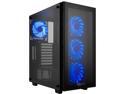
Pros: - Beautiful looking - Perfect tint to allow some light through but dark enough to hide what you don't want to show off - Quiet even with all the fans on - USB 3 and USB 2 ports on top. You can never have enough IMO. - Cable management design (more below) - Magnetic mesh covers for easy removal and cleaning - PLENTY of room for water cooling - Lots of room for long graphics cards - All drives and PSU are hidden from the primary viewing side (left side)
Cons: - Heavy (glass, obviously) - Some of the area around the PSU can be tight when dealing with larger than standard power supplies (1200 W PSU in my case)
Overall Review: I have to give up to Rosewill. This is a beautifully made case. Well built. Sturdy. Lots of extra screws. While a bit on the heavy side, and understandably so since it's made of glass, it really does scream room center piece. It looks beautiful next to my desk and while it's not perfect, it's pretty darn close. I saw that someone say this supports E ATX. I'm not really sure how that's possible given that I put in a standard ATX motherboard and it literally barely fits with less than a few millimeters of space between it and the PSU shroud. Something to keep in mind. There is plenty of room for water cooling so no concerns there. The shroud for cable management on the front of the motherboard is a nice touch and since it's removable makes it easy to get everything in place before placing it over everything for a nice clean look. In my opinion, the tint on this is perfect. It's dark enough that you can't see wires or parts of the case that you don't want to see but lets out enough light that you can see a pleasant glow from the inside. Very nice. All in all this is a beautiful case. Some minor drawbacks but if someone I know is looking for a case that looks great, has plenty of room, and doesn't quite break the bank (although not exactly cheap), this would be on a very short list.
Ok but not great. Their AC version is MUCH better

Pros: Good packaging AC outlet Performs as it should (was able to get around 6 megabytes a second or so) for large file transfers at a distance of about 50 feet through walls into my garage Firmware is easy to use and navigate Stable Fair price
Cons: 2.4 GHz only Design is not as elegant as others from TP-Link See other thoughts.
Overall Review: This is the second time I've had the chance to review this product so I won't bore you with the same information. However, both times I have felt the same. It's works well for being a 2.4 only device but there's nothing to write home about. After reviewing this one the first time, I reviewed their AC version and that one is not only a beautiful piece of technology but it's also dual band in a similar form factor (no AC outlet though). For the price, that's what I would go with, IMO. Still, this does have a place and it performed adequately.
Doesn't have to be perfect to be great
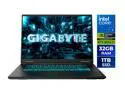
Pros: - Excellent gaming performance - Decent battery life for a gaming laptop - Fast refresh screen - Nice touchpad - Compact charger - No pre-installed bloatware!
Cons: - Single-zone RGB keyboard - Screen has some noticeable backlight in dark situations - Some minor keyboard flex, but really not that bad compared to others - Power cord is on the middle side rather than towards the back - Power cord would be better if it was 90 degrees--it is easy to bump since it sticks out - Power cord is short--would like to see it be a few feet longer
Overall Review: Even though this laptop isnt perfect, it gets a lot of things right. I wouldnt call it light or thin, but for a 16-inch plastic gaming laptop, it does pretty well. The cooling system is solid and keeps performance steady, though the fans do get loud under full load. Its not a big issue if youre wearing headphonesyou can still enjoy a gaming sessionbut it is a bit loud if youre relying on the speakers alone. Speaking of which, the speakers are just okay, which is pretty typical for PC laptops in general. All of that said, where this laptop really gets it right is where it counts: performance. In the screenshot above, you can see Marvel Rivals running at nearly an 80 FPS average with everything maxed out and DLSS set to Quality. Turning the settings down pushes performance even higher and easily hits the displays refresh rate. Cyberpunk defaulted to Ray Tracing Ultra with DLSS enabled and ran beautifullyno gimmicky frame generation needed. I also tested Baldurs Gate 3, which is a very CPU-demanding title, and it performed excellently as well. Bottom line: this laptop will play anything you throw at it. Add in the included 32 GB of RAM (which feels like a small fortune these days), the 1 TB SSD, and the high-refresh-rate display, and its a great system to game on. Its not perfectbut it doesnt have to be to be great.
Excellent performance - Good warranty
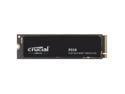
Pros: - Speeds as advertised - Really solid queue depth 1 performance--I've seen lots of drives struggle here - Good price
Cons: - None
Overall Review: The first picture showing 7000+ reads and 6000+ writes is the P310 drive while the other is a Crucial P3 Plus drive. Really nice drive. Cloned the OS drive (SATA SSD) of my wife's computer and still achieved great performance with the drive about half full. My wife says everything feels snappier and Windows boots quickly. I was honestly mostly shocked with just how small/minimalist this drive is from a chip standpoint. It's really light on the PCB clutter and I feel like the drive shouldn't perform as well as it does given that it's probably missing all sorts of caching chips and the like. Very impressive. My P3 Plus is no slouch, but that does come with QLC NAND so I wasn't surprised to see the performance be a bit worse (plus that drive is 75% full). Really satisfied with the drive and I would absolutely keep this on my short list of devices to pick from. Relavant system specs: Ryzen 7800X3D Gigabyte B650 Gaming X AX V2 motherboard 32 GB DDR5 6000 CL30 RAM
Super fast, light weight, and most of all priced right
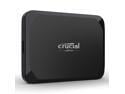
Pros: - Very snappy - Compact package and design - Pre-formated with only 4 links to Crucial sites and no bloatware
Cons: - None
Overall Review: The price, the weight, the size, and the performance are all excellent. I honestly can't think of anything to say negatively about it. Speeds are exactly the same as the Pro in a plastic finish and a shorter warranty. If that matters to you, the Pro is right there. Compared to NVMe drives at the 2 tb capacity that is of any decent quality, you'll spend a little bit less, but would still have to purchase an external enclosure etc. This checks all the boxes and is a fantastic portable drive to take anywhere you go. Highly recommend.
Excellent Airflow, Support for 2.5 slot GPU, Dead Silent
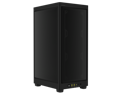
Pros: - Extremely quiet due to excellent thermals - GPU will accommodate 2.5-2.75 slot coolers. Technically it has three "slots" available, but most three-slot GPUs will bump up against the side of the case. It might fit, but be aware. - Fairly straightforward to build in - Magnetic top is a nice touch
Cons: - It's an ITX build so it can get a bit tight when trying to cable manage properly. - The magnets on the top are a bit too weak IMO. I wish they were a bit strong as the top would come off just moving the case around. - It didn't come with fans. - HDMI/DP ports require a pretty tight angle to fit. I tried a few different cables and there was some flex required that was a bit more than I was comfortable with. I wish the spacing was just a tiny bit more so it wouldn't be so hard on the ports or the cable itself.
Overall Review: This review is a few weeks in the making while I waited for a few parts to arrive. Once that was done, I went to work building the system and it took me a little longer than it normally would given my unfamiliarity with the case and my failed attempts at cable managing well enough to put the CPU fans on the underside of the radiator in a pull config. System specs as follows: Ryzen 7800X3D Corsair H115i ELITE CAPELLIX 32 GB DDR5 6000 MT 30 CAS WD 850X NVME Gen4 2 TB drive EVGA GTX 1080 Ti FTW3 (what I had on hand) Corsair 1000W SFX-L PSU All in all, I did like this case. It looks REALLY clean when finished and makes an excellent PC for my living room. A few nitpicky things here and there, but overall pretty pleased. I am still stunned by how quiet this thing is even during heavy load. Lots of direct access to fresh air which I'm sure makes all the difference. For an ITX build, I would definitely have this on your shortlist.


