
Your Browsing History


John D.
Joined on 04/08/03
0
0
product reviews
- 16
Works with PS3 when passive extension doesn't
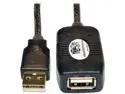
Tripp Lite USB 2.0 Hi-Speed Active Extension Repeater Cable (M/F), USB Type-A, 5M (16 ft.) (U026-016)
Pros: My Thrustmaster Ferrrari F1 wheel controller is USB only, no wireless, and would not work with a passive 15 foot extension cable. Much to my relief, this cable makes the controller work perfectly with the PS3 so I sit across the room from the TV/PS3 to play. Although "made in China", the cable is quite flexible and substantial. An LED lights up when the cable is powered by the PS3, and it's USB 2.0 so I can use in other situations.
Cons: None so far, well, okay, it could always be less expensive.
12/28/2011See more detail
Horrible RMA support (Mushkin, not NewEgg)
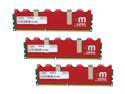
Mushkin Enhanced Redline 6GB (3 x 2GB) DDR3 1600 (PC3 12800) Desktop Memory Model 998805
Pros: Looks pretty
Cons: Within the first week of building a new system, I started getting Windows 7 errors and occasional blue screens WHILE RUNNING AT STOCK DEFAULT SPEED AND VOLTAGE. During the fifth week I had 4 blue screens in 5 minutes and finally realized the problem might not be Windows 7. One of my 3 modules produced all sorts of errors with Windows Memory Test and with memtest86+. It was too late to return/exchange with NewEgg, so I am trying to get Mushkin to answer their on-line support requests - which they have not after several days. The telephone support line just rolls over to an answering device. Some "lifetime" support...
Overall Review: Run Windows Memory Test and memtest86+ often during your burn in period so you can exchange with NewEgg if your memory goes/is bad!
9/14/2010See more detail
Forgive me, but I really like it!
Microsoft Windows 7 Professional 64-bit 1-Pack for System Builders
Pros: Forgive me, but I actually like a Microsoft O.S.! I've built two systems in the past few weeks. One replaced a Vista box, the other replaced an XP box. My son had the Vista box but had all sorts of problems communicating with his Window 7 laptop, and he needed a new system. Both of us had a lot of Vista, XP, and all that came before experience. He has a lot of Mac experience, and we both have used Fedora from the beginning. We both like this O.S. I especially like the XP virtual machine which I use to run my old Adobe Acrobat with a scanner. This old Acrobat won't run on Windows 7 because it can't install the pdf pseudo-printer, but it runs fine on the XP virtual machine within Windows 7. Why don't I upgrade Acrobat - 300 reasons.
Cons: Hummm... None so far. Oh, wait, install DVD was a bit scratched (in sealed package), but still loaded fine.
Overall Review: Both systems are running this off Intel SSD's. One system is the new Intel i7-930, and the other is an older AMD 64-bit, but I forget the exact model. Both systems are ready to use about 25 seconds after power-on to the boxes. Windows 7 does support SSD TRIM function (if your MOBO does with the SATA AHCI mode).
8/20/2010See more detail
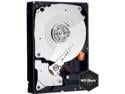
WD Caviar Black WD1002FAEX 1TB 7200 RPM 64MB Cache SATA 6.0Gb/s 3.5" Internal Hard Drive Bare Drive
Pros: So far so good. The failure rate on reviews scared me until I compared to other drives from WD and drives from other manufacturers, and until I remembered, yeah, I have had drive failures before. These things just are not perfect by any means, and failures, early and late are going to happen. I'm running Win 7 on two boxes using SSD for the system and these for data, and so far, fabulous. Both are dual boot, and I've partioned these 1 TB drives for Fedora which runs fast but not like Windows 7 - so the SSD's are for blazing performance, but these are quite good for rotating machinery. One is in a 6 GB/s SATA MOBO btw, the other in an older MOBO.
Cons: None so far.
Overall Review: Like with any HD, hoping for reliability.
8/20/2010See more detail
Get rid of those seek/rotational delays!
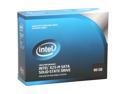
Intel X25-M Mainstream 2.5" 80GB SATA II MLC Internal Solid State Drive (SSD) SSDSA2MH080G2R5
Pros: Getting risk of those hundred's of thousands of 3-5 msec seeks sure speeds up a system. This is the single best way to speed up your system. I've upgraded two systems. Yeah, Windows 7 is clearly faster than XP but not a huge amount faster than VISTA. Both the AMD VISTA system and the Intel XP system required about 2.5 minutes from power on to full boot with 3 GB/s SATA drives. Going to Winows 7 and these SSD drives has reduced full boot time to about 25 seconds for both boxes. Some of that improvement no doubt is due to Windows 7, but Photoshop loads in 15 seconds compared to 1.5 minutes, and that is solely due to the SSD.
Cons: TRIM support required at MOBO SATA level, and some older boards don't. Just be sure your SATA modes clude AHCI.
8/20/2010See more detail
Glad to be back
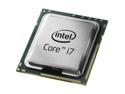
Intel Core i7-930 - Core i7 Bloomfield Quad-Core 2.8 GHz LGA 1366 130W Desktop Processor - BX80601930
Pros: I'm back to Intel after two generations of AMD. Both are find companies, but I think Intel has moved back into the lead. Yeah, they cost a little more, but they are the bleeding edge again. This model currently has the best BANG for the BUCK in the i7 series.
Cons: None so far.
Overall Review: Boxed heat sink more than adequate for non-overclockers.
8/20/2010See more detail