




 here!
here!
I’m your shopping assistant for PC builds, upgrades, and everything tech.
Got questions? Ask away!
Start a conversation
here!
I’m your shopping assistant for PC builds, upgrades, and everything tech.
Got questions? Ask away!
Start a conversation

Joined on 05/06/02
Only game in town, works like a charm so far
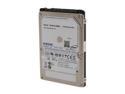
Pros: 1TB. Runs cool. Same price per GB as 750GB 5400rpm drives, and this will only get better with time. Was able to fit it into my Thinkpad X220 by modifying my laptop's chassis slightly.
Cons: 5400rpm, so slower than 7200rpm drives. Around 90MB/s sequential read/write. 512K random read write around 32MB/s. Still - not a huge issue for me, though, because I'm using an 80GB Intel Soda Creek SSD in my mSATA port for my OS and programs. Just know that this drive is no speed demon if you plan to use it is as your main drive.
Overall Review: Right now, this is the only game in town if you want a 1TB 2.5"drive that will fit in most computers without making any modifications (9.5mm). It's a great feeling knowing that you've maxed out your laptop :)
Good quality for very little money.
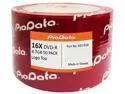
Pros: I tested this using Opti Drive Control at 6x, 8x, 12x, 16x with a variety of relatively new drives: Lite-On iHAS124 F, Sony Optiarc AD-7280S (basically the same as the 5280S that is still being sold at Newegg) and Pioneer BDR-2208 (BDR-208M). ODC measures parity errors and failures across a given disc, as well as how well-defined the pits and lands on the disc are (a.k.a. jitter). Basically, you want consistent low numbers - pay attention to the average amount of parity errors; maximum amount of parity failures; and jitter across the board - with no sudden spikes. It's best to use a variety of scanning drives and burning speeds to get a good idea of burn quality, since writing drives, reading drives, and media all vary. Given how awful some of the cheaper, more marginal optical media can be in these tests - for example some of the Ridata and especially Moser Baer discs (the latter sold right now under the Sony label) - I was pleasantly surprised by how well these performed. Even at 16x, quality is pretty solid, especially on the iHAS124F, but also on the 7280S. (The BDR208M had a parity failure maximum of 5 in a few of the tests so I'd say it didn't keep up; average parity error rate was still OK though.) I found there to be a quality advantage when dropping down to a burn speed of 8x, but the difference between 16x and 12x seems to be marginal (or even sometimes detrimental). There also seems to be little advantage of burning at 6x instead of 8x. In general, for all the drives, the average parity error rate didn't really change much as I used faster burn speeds, but the max parity failure number usually went up when jumping from 8x to 12x and above. In case anybody's interested, I've posted screenshots of my tests online that can be found by googling "Optodisc DVD-R myce" and looking at page 3 onward. In any case, if burn quality is important to you, you're on a budget, and have a relatively new burning drive, these appear to be a good option. tl;dr - no coasters, burns quickly and reads great.
Cons: Like many el cheapo discs these days, this does not come with a spindle - it's just held together with plastic. I prefer inkjet printable discs, whilst these are branded. However, at a price of $8/50 discs - that's 16¢/disc and 3.66¢/GiB - these are acceptable limitations, and I didn't remove any eggs for it. At regular price of $13, the lack of a spindle becomes more annoying though.
Overall Review: The MID code of these discs is OPTODISCR016. PioData is one of many imprints of Vinpower Digital - others include PlexDisc and Optical Quantum, for example. These particular discs are also sold at Newegg under the PlexDisc label, with a very similar part number, in both branded and inkjet printable versions. If you're burning DVDs for viewing in DVD players, particularly older ones, it is unclear how compatible these are. I don't have legacy DVD players anymore, and compatibility with them is not important to me - I am not burning movies. If you want maximum compatibility, you might want to invest in some quality DVD+Rs (Verbatim MCC-004 or Taiyo Yudens) and a burning drive that can set the DVD+R booktype to DVD-ROM. Also, as always, it is unclear how well discs with this MID would perform in older (7+ years) burners. Dye compositions change, even as media ID codes remain constant, and burn strategies have to change to accommodate this for burn quality to keep up. Burn strategies are updated via new firmware, and usually drives only get firmware updates for two or three years.
Does what it has to, but extremely expensive.
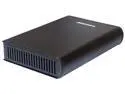
Pros: eSATA interface Std SCSI bracket so you could switch that out if you want Sturdy aluminum Comes with aluminum placeholder bracket that can be used elsewhere No fan - the only noise will come from your drive. May be good for weird HTPC purposes, e.g. with a NUC.
Cons: Like almost all Addonics products, the price is absolutely unhinged from reality. The only real competition, the Vantec optical drive enclosure, has basically the same body and comes with a USB 3.0 daughtercard, fan, and internal power supply - but costs $44.99. That one has downsides (USB 3.0 can't be easily swapped out for something else, weirdly uses A-type USB 3.0 port, internal PSU refuses to turn on without detecting a fan, built-in fan is loud and pointless) but if you could put up with them, then it's definitely an option.
Overall Review: Mid-tier full-blown computer cases cost this much, and less on Black Friday. Heck, optical duplication towers can be found on the regular for ~$15 less than the current cost of this item of $76.99. All that said, this really is the only product in its class that offers some flexibility in terms of the ports it uses by using a standard SCSI bracket on the back, and the only one that is dead silent out of the box. If those things are important to you, then this may be worth it.
Works well, quiet.
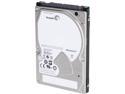
Pros: Have had this drive for a month, before Newegg finally started to sell it. It's a solid drive, replaces an HGST 1.5TB drive that was the previous behemoth in the 9.5mm category. Sitting in a slightly modified ThinkPad X220 laptop with about half capacity used. Fast enough, for the most part - not really doing large-scale data transfers all at once on a regular basis. Quiet - you don't hear clicks and nervous-making head loads/unloads.
Cons: None that I know of. Some might cite speed, but I don't consider that an issue.
Overall Review: I previously have the SpinPoint M8, which was made by Samsung before the HDD division was acquired by Seagate. Lasted about two years. Hopefully this one will do better.
Works pretty well for stick.
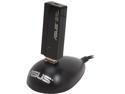
Pros: Works well - nice upload/download speeds. Can in fact do 300Mbps when close enough and AP is set to 40MHz width. Thoughtful inclusion of USB extension dongle for those hard-to-reach spaces. Nicely styled.
Cons: This is the USB-N13 B1. The drivers for the earlier revision will NOT work. Newegg should have pointed this out and saved me a few BSODs.
Solid, and Free
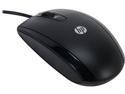
Pros: It's free (if you got it last wk with the $10 rebate and have Shoprunner). It works well. It's comfortable. Does what it needs to do, no more, no less.
Cons: I can't think of any. I guess it isn't free if you buy it now, but for $10 it's still a solid, relatively comfortable, full-size optical mouse, which is what most people want. Go for it!


