
Your Browsing History


Tim O.
Joined on 10/22/02
0
0
product reviews
- 13
Amazing monitor
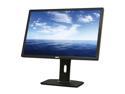
Dell UltraSharp U2412M 24" Full HD 1920 x 1200 60Hz 8ms DisplayPort VGA DVI-D 4xUSB 2.0 Pivot Swivel Height Adjustable LED Backlit IPS Widescreen LCD Monitor
Pros: Great gaming performance 1920x1200 (I know its in the specs, but 16:10 monitors are getting hard to find) TN Panel performance out of a IPS Panel (8ms response time, sub 10ms input lag, which is delay from mouse click to monitor response, this can be a problem on some IPS monitors) excellent viewing angles (no color shift on the edges) good stand with tilt, swivel, etc (should proably go without saying but my last samsung had a horrble stand) Good controls. Like most LCD monitors the default brightness was waaaay to high. this one scaled down nicely. no backlight bleed :) no dead pixels :)
Cons: price (a little more than I wanted to spend but you definately get what you pay for with this monitor)
Overall Review: Normally I would select a TN panel for gaming due to faster response time and lower input lag, but I worried about viewing angles and color shift in the corners on such a large monitor. I ended up going with IPS, and it was a great decision, this monitor has amazing performance and color I highly recommend it.
1/30/2012See more detail
Great Product
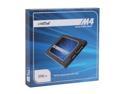
Crucial M4 2.5" 256GB SATA III MLC Internal Solid State Drive (SSD) CT256M4SSD2
Pros: This may be the fastest component on my new computer. 7.9 out of 7.9 on Windows Experience Index. Detected correctly on my SATA 6Gb/s controller, windows 7 installed FAST, and auto-cofnigured itself for the drive (by auto configure I mean turned off degrag, prefetch, and enabled TRIM, etc)
Cons: Requires firmware update please visit Crucials site for more information. No eggs removed, just a warning/reminder. I updated mine before installing the operating system (you can download a bootable update utility from Crucial). This was not worth docking a star but something to be aware up.
Overall Review: My case didn't have a 2.5" bracket mount, but with a solid state drive, I just set it on the frame until I can pick one up. You may want to order a braket mount if when you order this SSD (I wasn't aware that 2.5" brackets were not mainstream yet).
1/30/2012See more detail
Excellent product
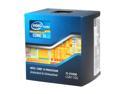
Intel Core i5-2500K - Core i5 2nd Gen Sandy Bridge Quad-Core 3.3GHz (3.7GHz Turbo Boost) LGA 1155 95W Intel HD Graphics 3000 Desktop Processor - BX80623I52500K
Pros: 7.5 out of 7.9 on Windows Expeirence Index default settings.
Cons: none.
Overall Review: This was the first component I selected on my new PC it was a no brainer. I don't think there is a better bang-for-the-buck CPU.
1/30/2012See more detail
Quality Product
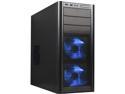
Antec Three Hundred Illusion Black Steel ATX Mid Tower Computer Case
Pros: Bottom mount PSU (this is my first bottom mount, but i really like it so far, it solves a lot of cable managemetn issues with my rats next of PSU cables). Lots big very quiet fans for great airflow Mesh front case for great airflow
Cons: Bright blue LED on fans. I didn't take away an egg since it is obvious from the picture, and hey they were free. front audio connectors are 'spongy'. my headphone jacks don't snap in securely like they do on the back, however they still connect and work. No 2.5" drive mount for my SSD.
Overall Review: Overall very good product I would not hesitate to recommend.
1/30/2012See more detail
Quality Product
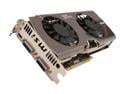
MSI GeForce GTX 570 (Fermi) 1280MB GDDR5 PCI Express 2.0 x16 SLI Support Graphics Card N570GTX Twin Frozr III PE/OC
Pros: Ultra Quiet 7.9 out of 7.9 on Windows Experience Index using a 1920x1200 monitor. card has no trouble in my current games on high settings, can't wait to try it out in Diablo3. Factory over-clocked (but even more important factory improved cooling)
Cons: not a fan of mini-hdmi. I didn't remove a star since I use DVI but would prefer to see a Display port connector.
Overall Review: I was not looking for a Factory over-clocked card, but after reading about the robust hardware and cooling on this card I knew it was worth the small price differnce. I was really torn on this card vs. GTX 560 ti, I selected the $100 more expensive GTX 570 because I heard the 1920x1200 taxes the 560 heavily, while the 570 still has gas in the tank so to speak.
1/30/2012See more detail
Quality product
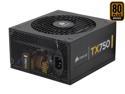
CORSAIR TX Series CMPSU-750TX 750 W ATX12V v2.3 SLI Ready CrossFire Ready 80 PLUS BRONZE Certified Active PFC Compatible with New 4th Gen CPU Certified Haswell Ready
Pros: Lots of cables, and adequet length for a bottom mount PSU to reach top mount components. Very quiet.
Cons: Lots of cables, kind of a rats nest, but not as much of an issue on a bottom mount PSU case (no stars deducted since I was aware this was not a module PSU when I purchased).
1/30/2012See more detail