
Your Browsing History


Matthew M.
Joined on 09/24/02
0
0
product reviews
- 10
Amazing bargain, almost perfect.
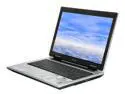
ASUS A8 Series 14.0" Intel Core 2 Duo T7200 1GB Memory DDR2 667 Windows XP Media Center A8JP-4S029M
Pros: The price. A comparable Dell system would be $2000+ This thing is the best balance of portable and powerful you could hope to find. The size is just right, not ultraportable but not too big. It's nice and light too. And the WXGA+ screen is very hard to find in a laptop priced this low. Full size keyboard makes typing very easy. The ATI X1700 video card is very capable when paired with this system - I ran Battlefield 2 and Battlefield 2142 on it at high settings without a hitch... high FPS count. And on top of that, while the side exhaust was hot, the laptop itself stayed cool! Comes with a 2 year parts and labor warranty. The extras are nice... a decent case, and a decent mouse. Windows CD is included, which is nice because I hate dealing with recovery partitions. Excellent laptop for the price.
Cons: While I can't stress enough how happy I am with this laptop, nothing in this world is perfect, so here's the downside: -Battery life: only lasts about 2-2.5 hours. -Screen: Bright, crisp and beautiful - but the viewing angle isn't great. -Keyboard: full size is nice, but the row of keys bordering the outside of the keyboard's right side is annoying because I usually automatically go there for the backspace key (which is just inside of that outer row)... and like everyone's mentioned, the function key is in the bottom left corner, with the ctrl key next to it. Irritating. And then the windows key is right next to the smallish ctrl key, meaning I hit it by mistake sometimes when gaming. Also irritating. -Touchpad: looks cool being flush with the rest of the laptop, and with it's integrated buttons... but I'd rather have a pad where I can really feel the outer borders. Right now I tend to hit it with my palm when I'm typing, which makes my cursor move around. Distinct buttons
Overall Review: Ran out of space... continuing here. Also, while built well, the chassis does seem a bit flexible, so this isn't a beater... treat with care, at least somewhat. And the outside tends to scratch easily. Other downside: 1GB of RAM, 2GB max. This is the ONLY downside in the specs. It runs great now but I'm still planning on buying 2GB of RAM and selling my current sticks. Overall though, this laptop is GREAT, with an amazing price and specs and great extras. Amazing capabilities and a really great balance of portability and performance. I bought it and don't regret it.
1/24/2007See more detail
Fan lasts for 2 months
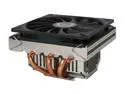
Scythe SCSK-1000 100mm "SHURIKEN" CPU Cooler
Pros: Really quiet, pretty efficient, the fan is very slim, can fit into a HTPC case
Cons: The fan died after a month or two. Then I got a replacement fan. It died less than two months later.
Overall Review: Their customer service has been nice so far... after providing my NewEgg invoice they shipped me another fan. But it died too. I have a hard time recommending a cooler whose fan has died TWICE in a few months.
5/21/2009See more detail
Works fine! Runs hot and fan whines though.
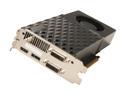
PNY GeForce GTX 670 2GB GDDR5 PCI Express 3.0 x16 SLI Support Graphics Card VCGGTX670XPB
Pros: Great performance, you know what you're going to get when you buy it - stock GTX 670 performance. I run everything on high and ultra settings with no issues on a new i5 rig. I got it for under $300 after rebate, so I can't argue with the value. Lifetime warranty though you must register within 30 days.
Cons: Runs hot. I think I saw mine go over 80C, though I've had zero issues with crashes or artifacts. Fan is quiet at idle but whines under load. Poor cooler design in my opinion. Don't even think about overclocking with the stock cooler. And without the stock cooler, I've heard your warranty is invalid.
Overall Review: If you can get this one on sale, it's a good value. If it's within $20 of a 670 with a better cooler, I'd lean towards the more expensive one.
1/18/2013See more detail
Paint rubs off of keys
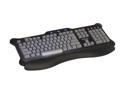
Saitek PZ30AU 104 Normal Keys 4 Function Keys USB Wired Standard Eclipse Blue Backlit Keyboard
Pros: Looks cool. Works well. Pleasing touch and bounce to the keys. Adjustable lighting is nice.
Cons: Paint rubs off the keys after a year or so. There's about 8 keys where the paint is noticeably rubbing away. No USB ports. 1 year warranty.
Overall Review: Overall I like it but the fact the paint rubs off is a little annoying, so minus one egg.
4/19/2012See more detail
Happy so far
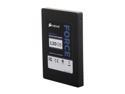
Corsair Force Series 3 2.5" 120GB SATA III Internal Solid State Drive (SSD) CSSD-F120GB3A-BK
Pros: I've had this for just over a month. It's VERY fast. Windows boots up, logs in, and finishes loading programs in 15 seconds total. BF3 maps, even with my old processor, load up in 20 seconds.
Cons: None so far. SSDs are expensive and I got a killer deal on this one on Newegg so I can't complain about the price too much. I do think SSDs aren't "quite there" in the reliability department yet but I've had no indication of trouble so far.
Overall Review: I'm happy with it. Can't complain.
4/19/2012See more detail
Works great. Install isn't THAT hard.
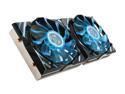
GELID Solutions GC-VGA02-01 1 Ball, 1 Sleeve VGA Cooler
Pros: Bought this for an EVGA superclocked 560 TI that was having fan/shroud issues (stock clock 900MHz). After install, was able to clock it up to 940MHz and it never goes above 70 degrees during gaming. It's pretty quiet
Cons: Kind of pricey, but not bad compared to other solutions. Install takes some time but it's really not so bad. Remove old heatsink and clean the card. Press the heatsinks to the RAM chips using the included stickers. Assemble the main heatsink with screws, put some thermal paste on your chip and screw it down.
Overall Review: I'm very happy with this cooler. It performs just as advertised and helped me out a LOT in terms of card temp and overclocking. The install takes some time but it's not that bad. There's some helpful youtube videos out there too.
4/19/2012See more detail