
Your Browsing History


Jesse G.
Joined on 12/15/06
0
0
product reviews
- 6
Premium AIO. A little rowdy but gets the job done.

Corsair Hydro Series, H100i RGB PLATINUM SE, 240mm Radiator, Dual LL120 RGB PWM Fans, Advanced RGB Lighting and Fan Control with Software, Liquid CPU Cooler. (CW-9060042-WW)
Pros: Very pretty product. I am not ashamed to admit that I got this AIO for the aesthetics. If your build has a white aesthetic, this is one that will match. Controllable RGB with iCue. I build my system around controlling with iCue and this AIO is the obvious choice for that scenario. The mounting mechanism for the AM4 socket is excellent. I really appreciate that I didn't have to remove the mounting bracket that came with my motherboard. It simply clamped on to the same mounting bracket that my motherboard came with. It's a very intelligent design and I wish more CPU coolers did something similar.
Cons: A bit loud. The fans work well but I wish they were quieter. When they get past 1500 RPM you can really hear them. USB cable plugs into the left side of the pump. There are plenty of cables to route with this pump, but it would be nice if they all routed from the upper right corner of the pump when it's mounted. The USB cable comes from the left side and it's not horrible but it would be better if it could be combined and wrapped with all the other cables coming from the upper right side. I wish the face of the pump came with some kind of LCD like the new NZXT Kraken. I would have paid more money for this cooler if I could get something more than just a Corsair logo. Don't get me wrong, I love Corsair, I just wish I could get something like the LCD on the Kraken.
Overall Review: There isn't a big variation in performance between all the top-brand AIOs, Corsair's is a great offering, but it could be better. I think iCue is a good piece of software and if you're basing your system around being controlled with iCue then this is a no-brainer. Even if not, this is a good choice. I fit this into a mid-atx case (Fractal Design Meshify-C), it was a snug fit, but it worked out well. Overall I'm very pleased with the product.
9/9/2020See more detail
Sapphire 4870x2
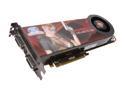
SAPPHIRE Radeon HD 4870 X2 2GB GDDR5 PCI Express 2.0 x16 CrossFireX Support Graphics Card 100251SR
Pros: Plays all current games at high resolutions and reasonable framerates for the cost.
Cons: ATI driver support has been pitiful for this card. I've had the card since August 2008. It was about 4 or 5 driver generations before the drivers were actually stable, and still some games performed poorly until the Catalyst 9 series came out. ATI didn't treat this card like their flagship product, as I expected they would, it was more like an afterthought for them. ATI support is bad. When you want to report a problem you have to go to their website and fill out a web form, from which you will never recieve any kind of reply or acknowlegment. They have a community forum also, but publicly state that the forum offers no official support for reported issues, and is basically defunct for all intents and purposes. Also, this card has a problem with the powerplay functionality. Sapphire has not released any bios update or acknowlegement of the problem. Changing between 2D and 3D modes (alt-tab) can cause your computer to hang. Not Crash, but hang indefinitely until hard reboot.
Overall Review: I will never understand why people who don't own a product, feel the need to rate it and comment on it. If you own a 3870x2 and you're commenting on a 4870x2, I'm sorry to break this to you but your opinion is irrelevent and shouldnt be clogging up this comment section. Also, to the poster who is having trouble with this card running hot after 8 months. I had the same problem and I fixed it. The problem is that the design of the intake fan and cooling system is such that it sucks a lot of crud into the heatsink of the first GPU, and after time, no air can flow through that heatsink because there is a wall of gunk on the heatsink facing the fan. Take your card apart and detail the heatsinks and get all the gunk off the first one, then re-assemble your card. You should see the temps become more reasonable. Unfortunately, because the card is designed this way, this will need to be done every 3 to 4 months, varying on how much lint and gunk your PC collects.
4/28/2009See more detail
A fine piece of equipment to manage your fans and other RGB elements
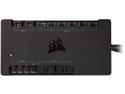
CORSAIR Commander PRO, CL-9011110-WW, Digital Fan and RGB Lighting Controller
Pros: I love that this has extra USB headers so that my Corsair AIO and RGB hub don't take up extra USB headers on my motherboard. I really like the included thermal probes. I don't really use them much because my CPU, motherboard, and Graphics card have their own internal sensors, but having more information is better than having less information I was worried that this would not fit between the back of my motherboard tray and the back panel of my PC, but it did and I really appreciate that I could bind it to the back of my motherboard tray and keep all of the attached cables out of the sight. This is a great system for minimizing the number of fans and other headers visible on your motherboard. The accompanying iCUE software is great. I committed to controlling everything with iCUE and this hub made it all possible. If you like the idea of using one software for controlling fans and RGB, you couldn't find a much better option.
Cons: This unit is pretty expensive. I think buying into the whole Corsair ecosystem will end up costing you quite a bit more than going with conventional options. It was worth it for me, but individual mileage may vary. If you want the aesthetics to all to be be controlled by iCUE then this is the way to go, but I can't see this being worth the money if you aren't all-in on that concept.
Overall Review: Overall I'm very pleased with the product. Corsair makes some great quality stuff and I think the accompanying software is top-notch. I would highly recommend to anyone who has the same goals in their build.
9/9/2020See more detail
Wasted potential
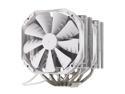
Phanteks PH-TC14PE 140mm UFB (Updraft Floating Balance) CPU Cooler
Pros: I can't give comments on operational quality because I wasn't able to install it. The design is nice which is why i bought it.
Cons: Because I got Corsair Dominator platinum ram modules I couldn't get this heatsink to fit in my build because it didn't clear the ram modules by a few millimeters. I like the concept of this design but the mounting engineering was unpleasant. To be sure I'm glad that I didn't end up installing this unit because I was unhappy with the mounting mechanism.
Overall Review: This would be a better solution for builds with low-profile ram, as others have mentioned.
9/20/2012See more detail
Good deal. Works well.
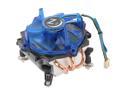
Rosewill RCX-Z2 7 blades 80mm reverse ball bearing fan CPU Cooler
Pros: The unit is small so it fit in a very compact case. It was easy to install, only took about 4 minutes to pop into place and secure. Keeps the C2D reasonably cool. As well as can be expected. This particular PC has an E6400 overclocked to 3.04 ghz and the CPU/heatsink combo doesn't have any trouble keeping it at 30c idle / 55c load.
Cons: The blue LED is dorky looking, but of course, that's a matter of personal taste.
Overall Review: This is the fan to get if you have a compact case and want a simple installation.
12/7/2007See more detail
Great Unit for the price
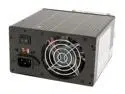
Broadway Com Corp P4-OKIA600-BLACK 600 W ATX Power Supply
Pros: Provides power without running very hot or loud. At the price, it is a great value.
Cons: Only comes with one Sata power plug, so if you get this unit, get enough Sata power adapters to cover your drives. It's a minor complaint, but it's a big inconvenience when you're putting a PC together on a schedule. I ended up splicing one from an older power supply. Not a big deal, but it's not pretty.
11/14/2007See more detail