

Your Browsing History


Jacob S.
Joined on 11/09/14
0
0
product reviews
- 3
A fantastic HDR monitor for the price
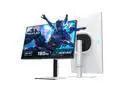
KTC QHD Mini LED Monitor 27 Inch , 1440P 180Hz Gaming PC Monitor, HDR 1400, HDMI2.0, DP1.4, USB, Swivel/Height/Pivot/Tilt Adjustable, VESA Wall Mount, White, M27T6
Overall Review: I'm very happy with how this monitor performs for the price. I'm definitely glad I chose to buy this over similarly priced HDR monitors. Watching videos and playing games is quite an experience. The colors really pop and the monitor gets so bright in HDR (especially with a mostly white screen), that it's almost too bright for my eyes to handle. Also as far as VA panels go, I don't really notice any VRR flicker or black smearing. It handles motion very well also. Another cool thing is I didn't really have to mess with any settings. As far as HDR settings go, all I did was set the monitor's brightness to 100, lowered the black equalizer setting to 20, and set the HDR mode to VESA Display HDR mode. The VESA Display HDR Mode for me is where it's at. The other HDR modes either feel a little muted or don't have as nearly as much HDR goodness. Finally, using this monitor in HDR mode for web browsing and other non-media consumption is just too much. The moment you pull up your web browser, the all white background will practically sear your eyeballs. You really need to switch back to SDR for everything non-media related. Luckily, there's a shortcut (Windows Key + Alt + B) that let's you easily switch between SDR and HDR mode in Windows 11 as part of the Game Bar App. All in all, i have absolutely zero regrets about my purchase and really like this monitor. I would have went with an OLED, but the lack of full screen brightness is by far the greatest weakness of current OLED monitors. With the advent of tandem OLED monitors, this issue won't be an issue anymore soon enough. However, until that type of monitor is readily available and affordable, this monitor will be more than adequate.
8/12/2025See more detail
A well built, quiet, low power draw GPU with great performance
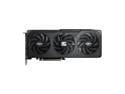
GIGABYTE Gaming Radeon RX 9060 XT 16GB GDDR6 PCI Express 5.0 x16 ATX Graphics Card GV-R9060XTGAMING OC-16GD RX 9060XT
Overall Review: I've had this card for a couple days now and so far I'm very happy with it. It performs very well and the highest power draw I saw after running a couple gaming benchmarks was around 176 watts at 100% GPU utilization. Also, this card runs very cool and quiet. The best part is the coil whine is basically inaudible, even when playing games at an unlocked framerate (which is usually when coil whine is the most noticeable). I thought about returning this card and upgrading to an RX 9070, but because of how quiet and power efficient it is, I'm very reluctant to return/replace it. Also, I have an SFF case (MSI MPG Trident), so I'm limited on what cards will fit in the case. I'm really looking forward to FSR 4 being implemented in more games. At this point in time, only RNDA 4 graphics cards currently support it (aka the AMD RX 9000 Series). If you watch some YouTube videos you'll see what a big improvement it is over FSR 3. If you're looking for a graphics card in this price bracket, I would totally recommend this card!
7/17/2025See more detail
MSI B85M GAMING - Great Motherboard
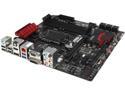
MSI B85M GAMING LGA 1150 Intel B85 HDMI USB 3.0 Micro ATX Intel Motherboard
Pros: Have only had this motherboard about a week but so far it's working great. Paired it with an i5-4590, 12gb of ram in dual channel occupying all 4 ram slots (crucial ballistix sport ddr3 1600) a radeon HD 7850 2gb and 256gb crucial ssd. Everything works great, can't wait to buy a better gpu for this setup. Hoping for an r9 390. You can't go wrong with this mobo!
Cons: None
Overall Review: There's a new bios version that just came out (10.3) for this motherboard, mine shipped with 10.2. It's very easy to flash the bios just make sure you have a flash drive you can download and extract the file to. If you need help youtube how to use msi M-Flash
6/23/2015See more detail