
Your Browsing History
 Holiday Shipping Details & Extended Holiday Returns Holiday Shipping Details & Extended Holiday Returns

Joined on 04/21/11
Overall a really nice performer!
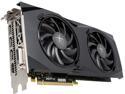
Pros: -Very smooth gameplay (no jitters or choppiness) -Factory overclocked and runs rock solid. -Colors are rich and vibrant -The Hard Swap feature is really neat -8-pin power connector instead of just a 6-pin -Back-plate pre-installed -Subtle but sleek aesthetics -Card temps are quite nice compared to reference, and even some third party, models. -No fan noise when doing things aside from gaming is nice.
Cons: -Still kinda warm. But, most AMD cards I've used in the past few generations have been. -Mine has some pretty bad coil whine. -Fans can be a little loud when under heavy load.
Overall Review: I currently have only played around with this card on Windows 10. I'll likely update my review after I take the time to play with it under Linux (specifically Arch and Debian). But, I was really curious how AMD has come along since I switched from an R9 280X (also an XFX, that ran BEAUTIFULLY under Windows (not so much on Linux, with the then current drivers)) to a GTX 970. Yes, this is more of a cross-grade than an upgrade, in terms of performance. But, I was too anxious to hold out for a higher model. Anyway... I'm quite liking the way it performs. Though not quite as high in frame rates as my 970, the games actually "feel" smoother. Which, I was quite surprised by. There were times when the 970 felt like it was sort of hanging while waiting for a part of the game to load. The 480 shows no signs of that, at all. Which, allows me to stay "in the zone" more freely. Also, my monitor looks more vibrant and less "washed out" than on my 970. I'm sure there are more things I could tinker with under Nvidia's settings. But, it's really nice that it just looks more alive at default settings. Do you REALLY need 8GB of VRAM??? Probably not... yet. Especially on a chip of this tier. However, there are times when my games have recognized and made use of it. For example, while playing around with the settings in Rise of the Tomb Raider, the game would happily fill up 6.5GB of the card's memory even while at 1080p and definitely at 1440p. Though, I'm sure the game would run just fine with the 4GB version, as well. Just nodding to the fact that some games do make use of it. Coil whine... Yes, this card has it. At least, mine does. When I have my case up on my desk and the side panel off, it's pretty annoying. Anything under 80fps is tolerable. With headphones, you probably wouldn't even notice it. Especially with the all the panels closed on a Define R5, as I have. But, once the frames start ramping higher than that, the squeal gets louder and louder. At the "credits" part on the Heaven and Valley benchmarks, when shutting down the program, and the frame rates spike to the thousands, it sounds like a tea kettle having a seizure. But, thankfully, it's rare that that scenario pops up. I don't personally know any other owners of this card to compare notes with. So, hopefully everyone else gets a nice and quiet one. BUT, as stated, under normal gameplay with a set of headphones and/or a "silent" case. it should be fine. Though, as it turns out, my 970 has some mild coil whine, too (different manufacturer, though). I just didn't notice it, till I was running benchmarks with my case open and sitting on my desk. So, I could just be complaining about something I'll rarely notice, under normal usage, anyway. Time will tell. ~shrugs~ The Hard Swap feature is a nice touch. Easy to change out the fans if one burns out, or if I feel like changing the accent theme of my build. I do have a set of the white LED fans, that look pretty snazzy with the black and white theme Fractal is known for. Plus, it'll be MUCH easier to clean the dust out of the heatsink fins, when I can just pop the fans out. So, definitely something to consider when shopping around and thinking about what you might like to do with your build, down the road. Overall, I do really like this card. It's not quite up there in the clouds with the GTX 1080. But, it's also half the price and still has plenty of power to keep up with anything you throw it at for a good while at 1080p/1440p. Sure, the coil whine is a bit of a nuisance. But, I'm banking on it being an isolated issue. Cause everything else about the card is really nice. May even grab a second to Crossfire, in the future, when I get a little more power hungry (wallet permitting).
Low tier, but functional.
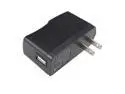
Pros: -Cheap -Decent image quality for given resolution -Has hdmi port
Cons: -No bluetooth (though that's already listed in the specs) -System lags... a LOT -Will occasionally lock up when coming out of stand-by -Randomly reboots -Apps force close frequently -Responsiveness slows down to a crawl when an app is updating -Plugging in/unplugging headphones will sometimes turn the tablet off -The digitizer isn't properly calibrated to the screen -Very short battery life
Overall Review: I bought this on a whim to replace an older Droid phone that I've been using as a make-shift tablet for a while (not connected to cell service). I was excited to find a quad core, and for so cheap. I wasn't expecting it to fly. But, being newer and theoretically more powerful than my old phone, I thought it would be a nice upgrade. Well, within the two weeks I've had it, it froze up or crashed more times than I could keep track of. My 3-4 year old Droid 2, is faster and more responsive than this tablet. Even after trying optimization apps and updating the firmware through the manufacturer's site. Also, the screen alignment is offset. The icons on the screen differ from where you actually have to touch to select them. I often have to touch either above or below the targeted spot by as much as 1/4 inch. Which doesn't sound like a lot. But, when you're on a webpage with a list of hotlinks, that can lead to a lot of backtracking to try and "click" the right one. It is good as an e-reader and for watching videos (when I can get headphones plugged in without it shutting off from whatever trigger is in the jack). But, aside from that, it's just a headache to deal with. If you want something cheap, and don't mind lag, go for it. But, if you're looking for something peppy that you can use without any hassle, spend the extra cash and get a more reputable brand/model.
Actually (surprisingly) made my computer quiter!
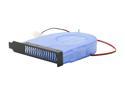
Pros: -easy/fast installation -brings case temps down -black plate matches case very nicely -is small enough to not feel like clutter -helps tame GPU fans (especially with non-blower-style coolers) -too cheap to not consider adding to your cart while ordering other stuff
Cons: -the shell is a little wide (almost touches PCI components in the nieghboring slots) -uses molex connector instead of mobo fan headers -no speed adjustment -wire may be a little short, depending on how you have your case laid out
Overall Review: I grabbed this PCI slot cooler in hopes that it would maybe help expel some of the hot air that my GPU kicks around the case, as it's not a blower type cooler that exhausts air out of the case much on its own. I was somewhat expecting it to add some extra fan noise to my system. But, for $6, I was eager to try it anyway. Surprisingly, it not only didn't add much noise on its own, it actually made my system -as a whole- run quieter. Set a couple slots away, it's helping enough that it keeps the GPU fans from ramping up as often or as high as they usually do. Also, holding my hand near the other case fans, they're each expelling a little less heat than before. So, I would consider this a great small-investment for those looking for extra cooling in that pocket around the add-on cards. I thought I already had a pretty good airflow setup. But, this little guy made a very noticeable difference. I'm definitely going to be getting more for some other towers I have. Side note: If anyone is looking for a blower fan that feeds from the bottom side, and only finding ones that feed from the top (pretty much everything listed on this site), the slot panel on this one can be pulled off and spun to change the intake direction. I was curious and tried it when I first pulled it out of the packaging.
Your eyes' new best friend.
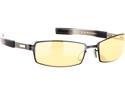
Pros: -Reduce eye fatigue -Fit comfortably -Increase the amount of time one can comfortably use a computer. -Nice styling
Cons: -They seem rather fragile. -They get dirty VERY easily. -They don't play well with all headsets.
Overall Review: I was very skeptical when I first head about these. But, my curiosity got the better of me and I decided to get a pair, when I saw that Newegg was carrying them and for a very good price. I am VERY glad I gave these a shot. Between gaming, audio editing, and just boredom, I tend to sit at the computer for very long periods of time. I instantly noticed that my eyes felt less dried out and strained while wearing these. The headaches that I would sometimes get after long sessions have significantly reduced. I also find that it's much easier to read on screen text. Whether it be searching for files, or reading long passages on a webpage or in a digital book. I can tell that the lenses are making a difference in the harshness of the light from the screen. As, anytime I take them off, I instantly squint. The tint does take a few days to fully get used to. But, it's not a drastic change. I hardly notice the change when I put them on, anymore. The frames do seem a bit flimsy. But, if you're not rough with them, there shouldn't be an issue. I've had them for almost a year, and they seem to be holding up quite well. The one thing that does REALLY bother me about these glasses is that they pick up dust and smudges like a magnet. Even if you just sat down from a shower, if you bump the lens with any part of your skin, there's GOING to be a smudge. So, you'll definitely want to keep a microfiber cloth handy. I clean mine, on average, 2 to 3 times a day. But, all in all, I'm very glad to have gotten these glasses. I highly recommend them to anyone who looks at a screen (computer, TV, etc.) for extended periods of time. They work equally well for editing, gaming, watching movies, web browsing, reading ebooks, etc.
Does what it should.
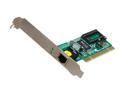
Pros: -Decent price -Easy install -Works great -Linux recognizes it without any issues.
Cons: None that I can think of.
Overall Review: I bought this to replace a temperamental ethernet port in an older Dell computer that my folks have. Popped it in and had it running within a few minutes. It works equally well under Windows and Linux (XP and Xubuntu dual boot).
Very reliable RAM for the money
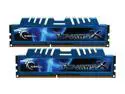
Pros: Decent price; runs well; very stable; hassle free since day one.
Cons: None that I can think of. You get exactly what you see listed.
Overall Review: I purchased a pack of these when I upgraded to a DDR3 board for my AMD Phenom II x4 (with intentions of upgrading the CPU, later on), around May 2012. Never had G.Skill RAM before. So, I was slightly nervous. But, the sticks are running great. Popped right in. Never had any issues. Doing some editing projects on the side, I figured I'd grab another set, about a month after, for a little more head room. Plus, for the price, why not? Only down side is the RAM only runs at 1333 speeds. But, that's because of the memory controller on the Phenom. Not the RAM's fault. That will be resolved on the next CPU upgrade. Overall, very happy with this RAM.