
Your Browsing History


Thomas B.
Joined on 07/16/08
0
0
product reviews
- 20
Good PSU
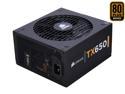
CORSAIR TX Series CMPSU-650TX 650 W ATX12V / EPS12V SLI Ready CrossFire Ready 80 PLUS BRONZE Certified Active PFC Compatible with Core i7 Power Supply & New 4th Gen CPU Certified Haswell Ready
Pros: Plenty of cables, long enough for any case, supports SLI or CrossFire, adaptable for almost any motherboard. Quality brand, quality packing, quality look. Cables are insulated. This is the nicest PSU I've bought. I notice a huge difference between this PSU and the generics.
Cons: Tons of cables-and long. If you don't have a big case with good cable management you'll be wishing you bought a modular PSU...
Overall Review: The case I bought (Antec P182) was huge and this PSU really was nice to have. I didn't have to buy any extensions. And, since the case had good cable management, the unused cables really weren't a problem. I'm glad I bought this PSU. It really did everthing I needed it to do.
7/29/2008See more detail
Not overly impressed, but not unimpressed
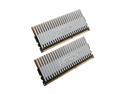
Patriot Viper 4GB (2 x 2GB) DDR3 1333 (PC3 10666) Dual Channel Kit Desktop Memory Model PVS34G1333LLK
Pros: It's stable, supposedly XMP ready, low latency, not relatively expensive, fast, lower voltage than DDR2
Cons: Won't POST if I enable XMP on my MSI X48 Platinum mobo no matter how much or how little RAM I install and in what slots. Won't POST if I set the latencies to 7-7-7-20 and voltage to 1.79 and CMD to 2T and frequency to 1333 with or without XMP enabled. All 8GB will POST at 1066MHz even if CAS is 6. I'm not sure if this is just my mobo or if it's the RAM. Other people have not had problems with it POSTing on an Intel DX48BT2... so with that be leary if you're buying an MSI X48.
Overall Review: Technical support is fast at responding, even though so far the issue hasn't been resolved. And, it may be my mobo. Overall, it is still fast. And 1066MHz with CAS=6 is almost as good as 1333MHz with CAS=7. But, then again what about DDR2 800MHz with CAS=5 and half the price? At the same time though, I could have paid twice as much as I did for the same product with a different name brand and may have the same result. So, I can't complain. At the end of the day, it's still wicked fast and stable as long as I let the mobo load the default settings. Don't know if I'd even notice the difference at 1333MHz and CAS=7.
7/29/2008See more detail
Great Processor
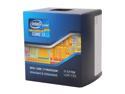
Intel Core i7-3770K - Core i7 3rd Gen Ivy Bridge Quad-Core 3.5GHz (3.9GHz Turbo) LGA 1155 77W Intel HD Graphics 4000 Desktop Processor - BX80637I73770K
Pros: Relatively inexpensive for the speed and being unlocked. Does what it says it will do.
Cons: None. I know other posters have complained about temperatures. Mine ran at 30 degrees with stock air cooling and not overclocking. It also ran at 30 degrees with water cooling overclocked to 4.0GHz. I really don't see an overheating issue unless you are doing something crazy with the processor
Overall Review: Easiest build and best build I have done to date: Asus Sabertooth Z-77 motherboard, Intel 3770K Ivy Bridge CPU, SeaSonic 650W PSU, Fractal Design Full ATX case, G Skill 2133MHZ DDR3 (32GB), XFX Radeon 8750, Crucial 512 GB SSD, Western Digital Velociraptor (500GB), 4 Hitachi 2 TB 7200RPM HDD SATA 3 (used an additional RAID controller card to get the additional SATA III ports), 2 Seagate 1 TB 7200 RPM HDD SATA 2, Antec water cooling (aftermarket air cooling is hard to fit on a Sabertooth :) ) Runs stabily with everything at recommended settings without a problem from the start.
6/5/2012See more detail
Roulette for Bloomfield Processor
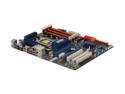
ASUS P6T LGA 1366 Intel X58 ATX Intel Motherboard
Pros: It POSTs with a Nehalem Processor
Cons: The three boards I had would not POST with a Bloomfield processor. So, I guess when ordering this board, it is like roulette if you're using a Bloomfield. Maybe you'll happen to get one with an updated BIOS. Sorry, but you can't update the BIOS with a Bloomfield processor in because it won't even start, unless you happen to have a spare Nehalem lying around like I did.
Overall Review: I posted an angry review yesterday about how my P6T would not POST with my Core i7 and Tech Support posted a response that the BIOS was not compatible with my processor. Why tech support never told me that when I called, I don't know. Why they advertise in the product tour this works with the Extreme Edition i7, I don't know either. So, I just happened to have a Nehalem i7-920 lying around and I tried it in, and they were right. It did POST. I wish tech support would have told me that when I first called. My new question: if Asus knew that they had this issue, whey didn't they either 1)recall all their boards and update BIOS or 2)Re-release the board with a different name and advertise this one only works with Nehalem? It would have saved me money and frustration and it would have saved their image. I'm not the only one who had this problem.
10/9/2009See more detail
It's like playing roulette--if you're lucky you might get one that works!
ASUS P6T LGA 1366 Intel X58 ATX Intel Motherboard
Pros: None. It is not a motherboard. It is useless. Just donate the money you would have spent on this board and RMA'ing it a bunch of times to charity. At least, then it would have gone to a good cause. This board does not work.
Cons: It doesn't work. RMA'd it a bunch of times and it makes the fans spin once--if that--and then dies. It is a worthless money sucking piece of garbage. Don't waste your time or money. It doesn't even deserve an egg. This board does not qualify as a board because it can't even POST. It won't even POST with just the CPU attached!
Overall Review: Took the same exact Core i7 975, 6GB Crucial DDR3-1333, Intel X25M SSD, Cooler Master V8, XFX Radeon 4850, Samsung DVD burner and put it on a different motherboard--the one recommended by Tom's Hardware--in the same Antec 1200 Case with the same Corsair 750W PSU and guess what? It POSTs first time with no problems. Put the same parts with another board by a different manufacturer, and it also POSTs. Use three different brand new Asus P6T's... and nothing. It coughs and dies. WORTHLESS! I have never had to RMA a motherboard... or anything else except a Seagate HDD a year ago and I buy tens of thousands of dollars worth of computer equipment from newegg... until this Asus board which I've RMA's multiple times with no success. DOA everytime. It's worked for some people. Maybe it's like playing roulette. If you get lucky, you get one that works. I think I'll stick with what worked for me straight out of the box next time.
10/7/2009See more detail
Excellent board
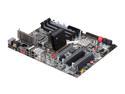
EVGA E758-A1 3-Way SLI (x16/x16/x8) LGA 1366 Intel X58 ATX Intel Motherboard
Pros: This is the most stable X58 board I've used. Cooling on Northbridge is good, which is a problem I've had with other boards. Plenty of SATA ports. Lots of extra add-ons. Well designed. BIOS is easy to use. Utilities that come with board are useful.
Cons: None.
Overall Review: EVGA E758, Core i7 970, Cooler Master V8, 12GB Crucial Ballistix DDR3-1600MHz, Intel X25M SSD, WD Velociraptor, Corsair 1000W Modular PSU, EVGA GTX 295, SB X-Fi Fatal1ty, NZXT Zero 2 case, Windows Vista 64-bit.
9/30/2009See more detail
seller reviews
- 1
Just don’t buy this
This is the worst case I ever bought. It’s so horrible two days later I bought a completely different case to replace it. The design is awful and it doesn’t even work. For example the plug for the PSU ends up being under the case so they have a plug that you plug into your power supply and connects to the back of your case so that you can connect the back of your case to an outlet... except that it didn’t work. I had to lay the case on its side to directly plug the PSU to the wall. Also the power button on the case did not work. I had to use the switch on the PSU to turn it on and off. It was all so stupid I bought a different case so I could have a normal computer. I didn’t even bother contacting customer support because I hated this case so much. I’ve used mini-ITX cases before and never had problems. In fact I don’t think I’ve ever even complained about a case before. I totally regret buying this case and would never recommend it to anyone.
On-time
Delivery
Product
Accuracy
Customer Service
Satisfactory
5/29/2019See more detail