
Your Browsing History


Adam H.
Joined on 10/20/03
0
0
product reviews
- 16
CFM Crazed
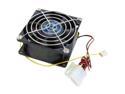
Vantec Tornado 80mm Double Ball Bearing High Air Flow Case Fan - Model TD8038H
Pros: I've used this fan in every aspect, and in every size, an every situation. It just seems like most common fans wont push the heat out of case like these normal case fans do. I look at CFM and this bad boy pushes out 84 CFM most common fans push 15 to 30 CFM. In my case if you want heat to go anywhere, that just wont cut it. These fans literally throw heat from your case, eliminating heat restrictions.
Cons: HAIR DRYER LOUD. Haha it honestly is, but what do you expect from 55.2 dBA. And well the obvious reason its also has a larger and thicker base(double ball bearing) than normal fans so make sure there enough room in your case.
Overall Review: Don't get me wrong the size an thickness doesn't generally matter, because in most cases it will fit in most towers with ease. Listen if i was anybody serious about heat reduction these are the best fans for the job, yes there loud, hair dryer loud, but there worth it, IF THERE BEHIND A FAN CONTROLLER, or you own sound proof earphones. Like some great person once said, its better to have more than less, and when you case is getting hot, and you start noticing a deference in speed/dropped frames, it's nice to be able to just, well, make it go away, haha.
3/21/2008See more detail
Simple

VANTEC 10" Silver ATA 66/100/133 IDE Round Cable, 2-Connector Model CBL100IDE10CS*2
Pros: Simple, easy to hook up. Less cabling better cooling, cleaner looking PC.
Cons: Very Small, I judge it from my LCD and I just was not prepared on how small it actually was. Agree with other comments, very delicate, poorly made.
Overall Review: Make sure there is a small distance from your HD to your IDE connector.
4/30/2008See more detail
Half an Half
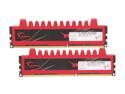
G.SKILL Ripjaws Series 8GB (2 x 4GB) 240-Pin PC RAM DDR3 1600 (PC3 12800) Desktop Memory Model F3-12800CL9D-8GBRL
Pros: When it works it works.
Cons: Received one DOA out of two sticks. You do the math. Had to RMA.
6/5/2014See more detail
Flaky Motherboard
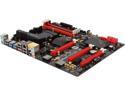
ASRock ASRock Fatal1ty Gaming Fatal1ty 990FX Killer AM3+/AM3 AMD 990FX + AMD SB950 USB 3.0 ATX AMD Gaming Motherboard
Pros: Where to list, it says it can do a lot of things. Aromatically overclocking, Fatality USB Optimized USB Port, it even allows you within the BIOs to download the driver for your motherboard WITHIN THE BIOS crazy right? I love it!
Cons: Ok so imagine all the pros I listed above not working, or literally having no use at all. Now you close to what I'm experiencing. When I press the power on, the machine turns on but the BIO's doesn't turn on. It just sits there. I power the machine off wait like 3 minuets try again it works! Sometimes pulling the power to the power supplies fixes my issues as well. Umm the awesome download feature in the bios forget that it great for show doesn't work. Umm oh, the automatic overclock, forget that, just doesn't work at all, computer just wont boot no matter what. Had to revert all setting back to default. So all in all I have it 3 eggs why? It works like a motherboard when it works, everything works on it, nothing special really. I just figured for the amount of money you spend on it, it should do a lot more. I've thought of taking it back, but I'm sure we all love RMA's >.<
6/5/2014See more detail
Eh.....

5.25" Touch Screen Fan Controller
Pros: Looks great.
Cons: For standard fans I'm sure this controller would work. But I put 90 cfm+ fans on this. It blew up immediately...
10/16/2011See more detail
Make sure to update firmware!
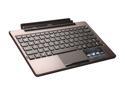
ASUS TF101 Docking Station with Keyboard and Built-in Battery for Transformer Tablet
Pros: Does as advertised. Amazing, great add on.
Cons: Just learned in like 4 month the releasing a quad core version of this pad..... story of my life.
9/30/2011See more detail