
Your Browsing History


Diosden R.
Joined on 04/24/06
0
0
product reviews
- 12
Don't Dismiss a Good AMD Chip
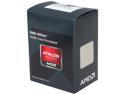
AMD Athlon X4 860K - Athlon X4 Kaveri Quad-Core 3.7 GHz Socket FM2+ 95W Desktop Processor (BLACK EDITION) - AD860KXBJABOX
Pros: Intel tends to be the big name for CPUs, but I find AMD to have a lot of value for its design. This processor gets the job done in my gaming machine and for the price, I cannot complain. It is easy to install and the heat sink does have a good layer of thermal paste already added, so you just stick that on the chip and lock it down. Viola! You're ready to go. The fan for the CPU is pretty quiet! Sometimes I have to peek in my case to make sure it is running. It is.
Cons: I cannot think of anything negative about this product. It does what it said it would do.
Overall Review: If you're like me who builds on a limited budget, you can't go wrong with this processor.
1/11/2016See more detail
Very Nice M.2 Performance!
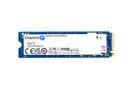
Kingston NV3 M.2 2280 1TB PCIe 4.0 x4 NVMe Internal Solid State Drive (SSD) SNV3S/1000G Up to 6000 MB/s
Pros: The Kingston M.2 ssd is fast and reliable, at a fraction of the price you would pay for the top tier Samsung and WD brands. This model does not come with a heat sink, since my motherboard has one built in, but I would recommend you use a heat sink with any M.2 you use that runs fast like this. Otherwise it does slow itself down on big transfers when it gets hot.
Cons: I cannot think of any Cons. It performs admirably. Color maybe?
Overall Review: Don't want to pay premium prices for a fast M.2? I would look here in this direction. Kingston is a good brand and makes a fine M.2 ssd.
12/22/2024See more detail
A Good Mid-Range Board for your Needs
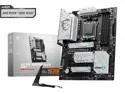
MSI X670E GAMING PLUS WIFI AM5 AMD Ryzen 7000 SATA 6Gb/s ATX DDR5 4x M.2 2.5Gbps LAN AMD Wi-Fi 6E Bluetooth Motherboards - AMD
Pros: MSI's X670E Gaming Plus Wifi does a lot of things pretty well. It has plenty of USB support for all your peripherals. I mean PLENTY. All my devices are USB and I am never in want for one more open port. The board itself has room for expansion, so yes, it has USB for days. There's four slots for M.2 ssds if you really want them. I only use two, and the primary slot supports Gen5 if you are looking towards the future. The board comes with heat sink plates to cover your M.2s, but you can do without them if you prefer using dedicated sinks with your M.2s (probably recommended on beefy ssds, but you have the option either way). The etherport is fast, it has Bluetooth and wifi support, the built-in sound is perfectly well-- it has all your basic modern board needs for AIO coolers, LED lighting strips, etc. It does everything "Good enough" making it a fine pick for what a mid-range board should have.
Cons: It is a bit heavy, so make sure you aren't using a cheap case. It doesn't stand out in any category, but that's why I think of it as a mid-range board. Like your classic Final Fantasy Red Mage, it does a bit of everything without excelling in anything specific. And that's fine for what it is. It'll support Ryzen 9000s, but you will want to update the Bios for one (really, you want an updated Bios in general, and it isn't hard to do on this board). Speaking of Bios, there's no printed instructions, so if you are new to this, you'll want to find instructions online on how to navigate the settings. They aren't difficult to learn however.
Overall Review: Overall I like what this board offers--a little bit of everything. If you want a mid-range AM5 board for your 7000 series CPU, this could find itself on your list. Pro tip-- go to MSI's website and look up the vendor support list for RAM. Not all RAM is made the same, and with any motherboard you buy from any company, you'll want to make sure the RAM you buy works with the board you pick. I got two 16Gb sticks from TGroup at 6000/CL30 and they work perfectly fine. Just a general tip for anyone who builds their own PCs.
12/22/2024See more detail
Affordable AM5 CPU for Everyday Workloads
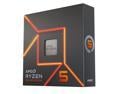
AMD Ryzen 5 7600X - Zen 4 6-Core 4.7 GHz - Socket AM5 - 105W Desktop Processor (100-100000593WOF)
Pros: The 7600X is pretty good for its budget and design. It'll handle your average daily routine of browsing the internet, watching movies, and playing any games that aren't the most modern Triple-A types (in other words, games that are a little older, like Fallout 4). Stick a good fan cooler on it and you should be fine temp-wise. I use a Coolmaster Peerless Assassin (which might be overkill honestly) and the CPU has never complained. I do a good bit of art, and the 7600X has been able to handle it. Runs fune with CSP and PS4. Might struggle if you're doing some heavy 3D work, but this CPU is not for that.
Cons: It's a budget CPU, so if you want to play some extreme AAA games or do Blender work, then the 7600X is probably not the CPU for you.
Overall Review: I think of this as an entry-level AM5 chip, and it's fine for the average user. It'll do most jobs without complaining and doesn't need a big AIO cooler either. If you're on a tight budget, this CPU might be an option for you.
12/22/2024See more detail
You Don't Need to be "Super" to be Great
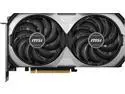
MSI Ventus GeForce RTX 4070 12GB GDDR6 PCI Express 4.0 ATX Graphics Card RTX 4070 VENTUS 2X E1 12G OC
Pros: I know that the 4070 Super came out at the beginning of this year (2024) and originally I wanted to get that card. However, I got this one on sale and I have to say it is a great second place choice if you're looking for gaming at 1440p. Big picture here, it isn't that much slower than the Super version. Sure, you can read and compare benchmarks, but raw numbers aren't everything. When you sit down and play the games yourself, you probably won't notice that 8-12% difference except maybe in rare situations (or if you really squint and pay attention, but come on, just relax and enjoy the experience). This card is still worth it-- MSI built it well and it can easily handle 1440p like its bigger sisters can. Powerwise, it uses your standard 8-pin connector, and not that weird 12-pin one a lot of the bigger cards have moved to. You can even get away with a 650 Watt PSU, though I personally recommend going with 750 Watts just to give your other components enough power to share, especially if you have a pretty hungry CPU. Plus: it is quiet! Are three fans better than two? I say neigh in this case-- the 2X version has a pair of huge fans that can handle the heat and do so without making a fuss. The 2070 may be the most affordable Nvidia card on the market right now, giving you the best price to FPS value, especially if you are going 1440. Can it handle 4k? It can! It may not be a Ti Super or a 4080, but with a few tweaks in your game settings, it can give you a playable experience. Oh, and the 4070 handles Nvidia's DLSS 3, which really helps with giving you steady frame rates on games that support the technology. I find it is a plus when you can utilize that.
Cons: Like many modern GPUs, watch the clearance in your case. It isn't as long as the three-fan version, but she is a thick gal, and so if you use an M.2 SSDs with a beefy heat sink, just be aware it might be a tight fit in that direction. Not a big deal, but just something to keep in mind.
Overall Review: If you are looking to upgrade from 1080p into 1440p, but don't want to spend a fortune, this is your card. MSI's 4070 is a fine workhorse and it'll handle what you want it to do. I was a little worried myself that it isn't a Super, but this GPU proved that you don't need to be Super to be Great.
12/22/2024See more detail
Beautiful and very Modular PSU!
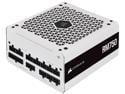
CORSAIR RM Series RM750 750 W ATX 80 PLUS GOLD Certified Full Modular Power Supply
Pros: The white aesthetic looks very nice if you are looking to build a PC with a specific color scheme. Even the cable sleeves are white, so Corsair did not cut corners on the looks. The fully modular cable system makes it easy to plug in just what you need and manage the cables around your case. And it fits most ATX towers, so I had no issues installing this into my setup. Best part-- it is very quiet and reliable, even when under the load of me playing a big game like Cyberpunk 2077 or Fallout 4 at 1440p.
Cons: I cannot think of anything significant about this product. The cables will feel a little stiff at first, but that is pretty normal across all PSUs.
Overall Review: Corsair is pretty consistent on quality and this PSU is among those good products. I would definitely recommend this.
12/22/2024See more detail
seller reviews
- 1
Hard to tell this is a referb unit.
The Acer monitor I purchased works great and looks fine. Hard to tell it's refurbished. Nice.
On-time
Delivery
Product
Accuracy
Customer Service
Satisfactory
7/3/2017See more detail