
Your Browsing History


Stephen H.
Joined on 02/19/03
0
0
product reviews
- 23
Lian Li B S-06 PCI Slot Case Cooler
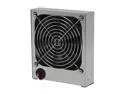
Lian li BS-06 140mm Case Fans
Pros: Large, quiet 140mm fan. Fan can be reversed to either push or pull air to/from the graphic card area. Incredibly easy to install ... didn't have to cut a crazy big hole in the side of the case to mount a 140mm fan in the graphic card area!!!
Cons: None
Overall Review: Gotta love the Egg!!! This unit (and the EX-33N) was not normally stocked. Made a product recommendation and then started looking for it at other E-tailers sites. Several competitors carried the item, but none had them in stock. I checked back with the Egg about a week after the recommendation and BINGO! They got some on the shelves. I quickly ordered both products and have been happy with the results. Funny thing is the when you go to review the product the review gets flagged for inappropriate content/language due to the proximity of the letter B to the letter S in the product title... so I added an extra space in the title to avoid the conflict!!!
1/19/2009See more detail
A-17B Review
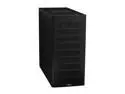
LIAN LI PC-A17B Black Aluminum ATX Mid Tower Computer Case
Pros: Good air flow, plenty of bays, 3 fans (120mm) that are pretty quiet, top mounted USB / audio panel, looks pretty!!!
Cons: There is a design flaw with the HD cage. The cage interferes with the screw holes for the bottom bay. The cage is pop riveted so you can't easily disassemble the cage, place the HD in and re-assemble the cage and place it into the case. I was unable to use the bottom bay which is why it doesn't get 5 stars from me. Also played around with this for longer than I care to admit and it just got the better of me. Maybe someone else has a simple solution, but I couldn't figure it out. I have to admit the price I paid was too much for this inconvenience. Also if you have a large card there may be cable interfernce between the HD and the back of the card especially if you're running multiple cards and drives (but this should be obvious if you check the measuments of the components so not a real flaw or loss of an egg but just kind of PITA). Other con is the price was steep when I made my purchase!!!!!
Overall Review: I tried contacting Lian Li for an additional cage (they have an attached fan and I'd like it for the additional GPU / CPU cooling) but have yet to hear back from them so that should cost them another egg. I have used Lian Li exclusively for my builds and for the computers that I build for others and I have to admit that I will now look at other manufacturers before I make a final decision whereas before I would just look at the LL stock and find something that fit my needs regardless of the price. New Rig = MoBo: GIGABYTE GA-EX58-UD5; CPU: Intel Core i7 920; Video Card: SAPPHIRE Radeon HD 4870 X2; Memory: 6GB CORSAIR DOMINATOR DDR3 1600; HD: VelociRaptor WD3000GLFS; Power Supply: ABS Tagan BZ900 900W; Optical Drive: LG Black 22X with LightScribe; O/S: Microsoft Windows Vista Ultimate 64-bit; Case: LIAN LI PC-A17B
12/27/2008See more detail
Lian Li EX-33N
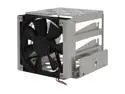
LIAN LI EX-33N HDD Mount Kit
Pros: Has a quiet 120mm fan, several bays for HDs and was easy enough to slip into the case.
Cons: The bottom bay isn't really a "vibration free" bay as you can't use the supplied thumbscrews and the vibration absorbing rubber grommets/mounting washers (they're inaccessible...just examine the product pics and you'll understand when you compare the upper bays to the bottom bay). The bottom bay will only allow a drive to be mounted by screwing directly through the middle section of the of EX-33N's bottom bay into the drive unit. This is a simple design flaw with a simple solution = Come on Lian Li!!! Also, if the unit wasn't pop riveted together you could disassemble, install the HD in the bottom bay with the thumbscrews /rubber grommets and reassemble the EX-33N.
Overall Review: I bought this unit as I had to relocate the original EX-33N that came with my Lian Li PC-A17B to a higher bay position in the case (the graphics card I bought is long, and there was too much cable interference for my liking). After moving the EX-33N up there wasn't really a lot of air flow towards the graphic card, so I thought that this would be a great option to get more air in the box. This is a pretty good unit, the fan can be changed out if you want something faster. I am happy with it. I would give this 5-eggs but that bottom bay issue just won't let me!!! I also bought a Lian li B S-06 with this purchase (140mm fan that can pull or push air right on the graphics card). MoBo: GIGABYTE GA-EX58-UD5; CPU: Intel Core i7 920; Video Card: SAPPHIRE Radeon HD 4870 X2; Memory: 6GB CORSAIR DOMINATOR DDR3 1600; HD: VelociRaptor WD3000GLFS; Power Supply: ABS Tagan BZ900 900W; Optical Drive: LG Black 22X with LightScribe; O/S: MS Vista Ultimate 64-bit;
1/19/2009See more detail
Sapphire 4870 X2 part-2
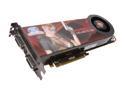
SAPPHIRE Radeon HD 4870 X2 2GB GDDR5 PCI Express 2.0 x16 CrossFireX Support Graphics Card 100251SR
Pros: Addendum to my earlier review.... Sapphire 4870 X2 Reviewed By: Hop on 1/16/2009 Games still look great Card is cooler now...
Cons: Increased fan noise level.
Overall Review: I added 2 more Lian Li fans to my case and only saw ~10°F decrease in sytem and GPU temps. I opened the Catalyst Control Center on "Advanced" & hit the "Unlock" feature, then the Auto-Tune feature & let the card optimize. There was a noticable change of pitch in the once silent GPU fan during the process (Hmmm...). After the optimization I selected "Enable Manual Fan Control" so that I could play with the GPU fan. I settled on 35% after several different adjustments (based on the noise level I'm willing to endure) & the temps really dropped. I gained a reduction of 30°F in both idle and game play settings (1.5-hrs of straight Crysis play @140-142°F). The stock speed of the GPU fan must be really, really low for the silent operation and is the cause for elevated temps. I thought this card would auto-adjust the fan speed based on the GPU temps but I never heard a pitch change prior to my adjustments so this might not be the case. So if your card is running hot, open that CCC!!!
1/18/2009See more detail
Sapphire 4870 X2
SAPPHIRE Radeon HD 4870 X2 2GB GDDR5 PCI Express 2.0 x16 CrossFireX Support Graphics Card 100251SR
Pros: Games look great...
Cons: Runs hot. Card is long (I had to move the HD above the card so the cables wouldn't interfere with each other). The card length I can live with, but the working temperature is going to cost this thing an egg!!!!
Overall Review: The other reviewers were not lying when they said this thing runs hot. I added two additional 1000-rpm fans to my box to reduce the temps but didn't see much of an improvement. This card hits temps of 177°F... and that seems high to me. It use to idle at 150°F but I was able to drop that slightly with the additional fans, and got it into the 140's. But in gaming I still am in the 170's :-( I probably should have just went with a two card solution (although I don't know if that would have produce cooler temps). System = MoBo: GIGABYTE GA-EX58-UD5; CPU: Intel Core i7 920; Memory: 6GB CORSAIR DOMINATOR DDR3 1600; HD: VelociRaptor WD3000GLFS; Power Supply: ABS Tagan BZ900 900W; Optical Drive: LG Black 22X with LightScribe; O/S: Microsoft Windows Vista Ultimate 64-bit; Case: LIAN LI PC-A17B
1/16/2009See more detail
GA-EX58-UD5 Review
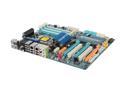
GIGABYTE GA-EX58-UD5 LGA 1366 Intel X58 ATX Intel Motherboard
Pros: Good layout, price is good in comparison to the other X58 boards at the time of purchase, Utilities seem easy enough to use to OC.
Cons: None so far (though, like the others wish the boards were a better bargin).
Overall Review: Cornerstone for the new rig. Everything went together well, and had no issues. I liked the layout. I quickly went through the Utilites (OC interface) but have not yet had a chance to OC this as of yet...busy with the holidaze. No issues with the build or compatibility. I did get a message on the first POST that let me know I didn't have the both power supply cables connected to the Vid card...DOOOH!!! Looking foward to OC'ing this thang. Upgraded from an Abit IC7-Max3 / P4 combo, and it's easy to note the difference :-) New Rig Specs... MoBo: GIGABYTE GA-EX58-UD5; CPU: Intel Core i7 920; Video Card: SAPPHIRE Radeon HD 4870 X2; Memory: 6GB CORSAIR DOMINATOR DDR3 1600; HD: VelociRaptor WD3000GLFS; Power Supply: ABS Tagan BZ900 900W; Optical Drive: LG Black 22X with LightScribe; O/S: Microsoft Windows Vista Ultimate 64-bit; Case: LIAN LI PC-A17B
12/27/2008See more detail