
Your Browsing History


Dennis G.
Joined on 03/02/03
0
0
product reviews
- 8
Very good cable
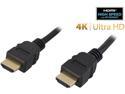
Nippon Labs HDMI-HS-10 10 ft. HDMI 2.0 Male to Male High Speed Cable with Ethernet Channel, Black
Pros: HDMI 1.3, 24 AWG, gold plated connectors, good shielding
Cons: A bit stiff, don't use if you need the cable to do a 90 at the connector.
Overall Review: While it is certainly true that the expensive cables like M*****r are a rip-off, on the other hand, not all HDMI cables are equal. HDMI 1.3 is important, as is the gauge, shielding, and connector quality. This cable is as good quality as you would need, no need to pay more. And better than the real cheapo cables that skimp; pay a couple dollars more for something dependable.
5/6/2010See more detail
Good but (uninformed) issues
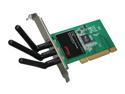
Rosewill RNX-N300X IEEE 802.11b/g, IEEE 802.11n Draft 2.0 (PCI Interface) Wireless Adapter (2T3R) Up to 300Mbps Wireless Download Data Rates 64/128-Bit WEP, WPA PSK and WPA2 PSK (TKIP and AES)
Pros: Appears stable; authenticates with WPA2-PSK/AES no issues (except Linux, see below). No problem with XP or even W2K. Driver CD lists Vista so is pre-W7 but expect that should work, too. The antenna are rather unwieldy off the back of the card, great that Newegg/Rosewill threw in the RNX-A2-EX which works great - even though only 3x2 dbi it outperforms my single stem 10 dbi. Inexpensive, but Rosewill seems to make good budget components.
Cons: The mgmt tool is rather crude, but it does provide data that Windows vanilla does not. If you are using Linux, you should before buying check your distro's kernel version and driver implementation. While you'll have no problem with WPA2-PSK, AES is an issue and w/o it you are limited to G's 54Mbps speed. You'll need wpa_supplicant and wext compiled in to get N. You can compile from the source at the Ralink site, but depending again on the distro that can have its own issues. If you need N and are not technically proficient, do the extra homework first or choose an adapter with a different chipset (this uses the rt2860).
Overall Review: For those struggling with 54Mbps or 150Mbps issues: To get above 54Mbps you must enable the Draft-N AES encryption, and of course the router must support it, too. Without that, you are using G. And to get above 150Mbps, your router must support 40Mhz channel-bonding; and be aware that the cost of that extra speed is a reduction in range, so at a distance you may actually get better signal and throughput using 20Mhz.
5/5/2010See more detail
Excellent + Extra Excellent
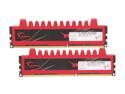
G.SKILL Ripjaws Series 8GB (2 x 4GB) 240-Pin PC RAM DDR3 1600 (PC3 12800) Desktop Memory Model F3-12800CL9D-8GBRL
Pros: Excellent: Perfectly stable at 1600 and stock timings with a 1090T overclocked to 3.9GHz on a M4A89TD Pro mobo. On an AM3 mobo be sure to check the GSkill forum sticky for easy instructions to get your clock. After many builds, can say GSkill is very reliable; if the rare defect occurs, they are quick to exchange. Lifetime warranty. And great flexibility for overclocking with right sticks.
Cons: Absolutely nada on the products. But wish the marketing wasn't so heavily slanted to Intel, lacking info re AMD.
Overall Review: Extra Excellent: Already had a 2x4 F3-16000CL9D-8GBRM; 4x4 wasn't yet avail. Now the 16000 is n/a. Didn't want to pay for a new 4x4, and anyway the cpu controller just couldn't handle my DDR2000 so I'd already under-clocked it to 1600. "Broke the rules" and gambled on mating F3-16000 with this F3-12800 at the 1600 clock & 12800's timings. Had to over-volt the 12800 by .5 for the 16000 to run, otherwise very easy install. Memtest 16 hours all 4 sticks, zero errors. Machine is a beast!
12/19/2011See more detail
Very good for the price
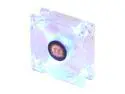
Thermaltake AF0029 80mm Blue LED Case cooler
Pros: At 21dBA & 27CFM, performs as well as the more expensive G***D. Excellent LED's. And a unusually long fully sleeved cable along with Molex adapter. So very good value for the money.
Cons: Sleeve bearing. Will probably last a third or less as long as the G***D or the N****a, so factor the TOC into your decision.
Overall Review: Frankly, I chose this fan over the above 2 alternatives solely for the blue LED's. The CFM is also true on this fan, unlike others which claim higher CFM (often along with lower dBA) than the fans actually have. A solid buy.
7/12/2011See more detail
Fantastic cable modem
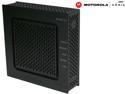
MOTOROLA SB6120 Cable Modem SURFboard eXtreme 160Mbps in DOCSIS mode and 195Mbps in EuroDOCSIS mode Ethernet Port DOCSIS 3.0
Pros: DOCSIS 3.0 compliant for future-proofing. Superb performance - my Charter 16Mbps line is consistently delivering ~20Mbps (and according to the tech, this is not that unusual). Extremely easy set up, both WAN side and router. Highly recommended.
Cons: A little more expensive, but IMO well worth it.
Overall Review: Interestingly, I am getting better web performance using Google's public DNS servers. And about the LED's, give me a break already with the complaints - mine is on the corner of my desk and is no bother at all. Just buy it.
5/6/2010See more detail
Excellent
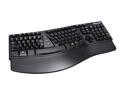
Microsoft Natural Keyboard Elite - Retail
Pros: Ergonomic layout. Decent key response. Solid build. Good value for the money.
Cons: The wrist support is hard plastic, same material as the keyboard frame. Some users may prefer the soft vinyl type on the 4000 model. But . . .
Overall Review: on the other hand, the 4000 has all those extraneous keys, a bit wider gull-wing (which I personally don't care for; this keyboard's layout is perfect), and that darned over-firm space bar. Bottom line, I recommend this as the best MS keyboard.
5/6/2010See more detail