

Your Browsing History


Matt F.
Joined on 11/21/12
0
0
product reviews
- 5
Great for the Price
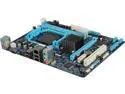
GIGABYTE GA-78LMT-S2 AM3+ AMD 760G + SB710 Micro ATX AMD Motherboard
Pros: The price. It's been working great I have a fx-4170 running in it just fine along with a gtx 560 ti. Also to clear things up this mobile does have a front panel connection its hard to see but it's located directly under the audio panel.
Cons: The Manuel that ships with it is only 4 pages and has no useful information on the header. When I put my fx-4170(4.1Ghz) into the mobo it undercooked it to 2.8Ghz. When the bios optimizes voltage on its own I was not enough for me so I had to manually set the voltage unfilled it was stable
Overall Review: All in all not bad for the price used this in a budget build beside the minor setbacks that I fixed its been working great. I HIGHLY RECOMMEND DOWNLOADING THE MANUEL FROM THERE WEBSITE as it's alot more detailed than the one that ships
12/8/2012See more detail
FIX FOR BLUE LEDS DOA !!!!!!!!
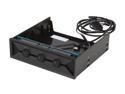
NZXT 5.25-Inch Hue RGB LED Color Changing Controller (AA-HUE30-01)
Pros: + Very bright it lights up my NZXT 810 + I love the mode that cycles through all the colors + Cable management was easy
Cons: I am not sure if i was in the instruction but i this unit seemed straight forward connect the connection to the sata power and the 4 pin to the LEDs, but when i went to tun it on only red and green worked. I can tell you that if only two colors work the brightness is a lot dimmer even if you just use full green or red. While messing with the colors i noticed that the knobs where controlling the opposite colors so i flipped the 4 pin connection so the arrow on the male end lined up with the + sign on the female end next thing you know the blue is working and the leds also seem brighter.
Overall Review: FIX: Flip the 4 pin so the arrow on the male end lines up with the + sign. hope this helps someone out and saves them the trouble of having to RMA a working product.
6/6/2013See more detail
Great board, but there are some downsides
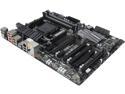
GIGABYTE GA-990FXA-UD3 AM3+ AMD 990FX + SB950 USB 3.0 ATX AMD Motherboard
Pros: - It is a good overclocker im stable on my fx-4170 @ 4.8 with a vcore of 1.48 or something close to that which is alot better than my old board that used 1.5 at only 4.6 - I like where all the connections are it works well my last board had the HD audio in a odd place, and the sata ports are side ways instead of vertical which helps with cable management. -The amount of sata cables it comes with is also nice so you can keep it all black if appearance matters to you.
Cons: - This board has its problems when overclocking with all the green stuff disable it will still throttle unless you enable hpc mode which for what ever reason fixed this problem for me and also you can use catalyst to disable apm as that option is not available in the bios as of version FC. - I also don't much care for the uefi bios and would like the option to use the old bios in earlier revisions. - For some odd reason after making bios changes it boots up fine can be on the computer for hours run stress test everything is fine then i shut down and when i turn the computer on again it will hang on the motherboard splash screen and i cannot enter bios or even boot up unless i unplug the system for a few seconds then replug but this only occurs after a bios change i will boot fine if i dont make anymore changes and this does not affect the setting i made they all stick so i don't know what the problem is.
Overall Review: NOTE: when you turn your computer it will come on for a second then shut off and come back on in about 5-10 seconds i don't know what is happening during that time but i know it is normal from talking to people on forums about this board. - Another thing if you get Master Boot Record error on your first boot try to disconnect all drives keeping only your drive with the OS connected only, if no luck booting try to plug it into ports 4 and 5 that are set to ide for some reason this help me boot then i was able to switch them back to ahci ports after. -Problem with graphics card not displaying but the whole system seems to work can be fixed by pluging and unpluging graphics card repeatedly until you get a picture or try the secondary pci-e x16 slot although i would just RMA - All in all it is a decent board that has some issues but there are some work arounds these are all things to consider before buying. For some reason i still like this board it looks great in my case and after working out some issues its working flawlessly.
4/30/2013See more detail
Works as advertised
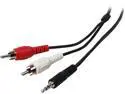
Tripp Lite P314-012 Audio Y Splitter Adapter 3.5MM Plug/2 RCA Plugs Male to Male
Pros: Works well with my brothers laptop he uses it to play music from his laptop to a aux in on a home theater system Not really much else to say.
Cons: None
3/27/2013See more detail
More than I expected
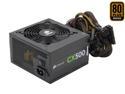
CORSAIR CX Series CX500 500W 80 PLUS BRONZE Active PFC ATX12V & EPS12V Power Supply
Pros: This is a great psu for the price I have really enjoyed using it and it has exceeded my expectations. I am currently running: Fx-4170 (O.C. 4.6 GHz) Gigabyte mobo 560 ti 448 (O.C. 950 MHz) 4 case fans Corsair H55 water cooler 3 hdd 1 external drive And 4 usb ports that are in use whenever my computer is on
Cons: None so far and I have owned for a couple months
Overall Review: By no means am I easy on this psu and it still keeps up. Would definitely use Corsair power supply in my next build although it would probably be a 800 watt or more. All in all a great price to performance ratio really did not expect it to power all my gear each time I added a new drive I was thinking it is going to be too much but it still booted up like a champ.
3/6/2013See more detail