
Your Browsing History


Brian S.
Joined on 10/10/01
0
0
product reviews
- 31
Amazing monitor for MacBook Pro, OK for Xbox One S
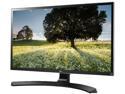
LG 27UD68P-B 27" FreeSync IPS LED Monitor 4K UHD 3840 x 2160 16:9 Widescreen On-Screen Control with Screen Split Game Mode & Black Stabilizer, VESA Mountable
Pros: Very noticeable upgrade from my Dell P2415Q 4K. Small fonts are easier to read. Image quality is outstanding in general. Having 1 DP plus 2 HDMI 2.0 ports is useful to me. The joystick control is very intuitive. The thin bezel invites adding one or two more monitors to your desk.
Cons: To do 2160p in HDMI you have to enable "HDMI ULTRA HD Deep Color", which is turned off by default. See page 28 in the manual. Whatever that is, it's not HDR. Xbox One S will do 4K but not HDR and only 8-bit color. I'm somewhat disappointed by this. Still looks very good.
11/20/2016See more detail
Has locked up twice in two weeks
D-Link DGS-2208 Unmanaged 8-Port Desktop Green Ethernet Switch
Pros: Cheap, low power
Cons: It's locked up twice in two weeks. Its 5 port D-Link predecessor only locked up once or twice over several years.
Overall Review: I've had good luck with D-Link until now. This is a Rev. D1 model. For light use it might be OK but I stream HDTV over my network, etc and while I wasn't expecting top-of-the-line throughput I can't live with lockups.
7/28/2010See more detail
Taichi keeps getting better
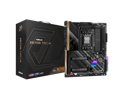
ASRock X670E Taichi AM5 EATX Motherboard. 4xDDR5 slots, 2 x PCIe 5.0 x16 Slots , AMD Cross Fire, Quad M.2 slots, 2.5GB LAN, WIFI-6E, 5,1 HD audio, HDMI 2.1, DP 1.4 ports, USB4 Type-C, 8 Layer PCB.
Pros: Pairs nicely with Noctua's NH-U12S chromax.Black Lighting is nicely done but can be disabled, which I did Barely larger than ATX, easily fits Fractal Define 6 Lots of ports, including 40Gb USB4 Boot time reasonable after BIOS update and a couple initial long autoconfiguration boots
Cons: No 10Gb Ethernet but I prefer SFP+ and fiber optics anyhow
Overall Review: Very solid, well balanced board. Nothing over-the-top, nothing weak. Heavy board, no skimping on materials here. First thing I did was update to BIOS 1.11. I cloned my old Windows 11 installation to a new 2TB SSD. Windows figured out the new hardware in short order. Windows licensing may be an issue if you do this but mine was already broken and I waited until upgrading to fix it. ASRock's software popped up and asked if I'd like to update drivers? Yes, yes I would. And that was that. I was concerned that it only has two PCIe slots but it leaves room for a triple-width video card plus my NIC, with the video card moved down a bit to give ginormous CPU coolers a bit more room. The primary M.2 slot sits between the CPU and first PCIe slot and the 120mm Noctua doesn't even overlap it. I'm rigged for power efficiency with my 7950X in 65W Eco mode via Ryzen Master and 64GB Crucial DDR5-4800 kit running stock 1.1V. I may upgrade the RAM later when faster speeds at stock voltage arrive. Worth paying the extra $10 for Noctua's chromax.Black to match this black beauty. No sticker on the RAM slots so ASRock got the message there. This is my third Taichi.
11/13/2022See more detail
Turned an old low profile i5 into a decent gaming rig
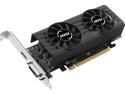
MSI Radeon RX 460 2GB GDDR5 PCI Express 3.0 x16 CrossFireX Support Low Profile Graphics Card Radeon RX 460 2GT LP
Pros: Low profile Works in mass-market PCs with weak power supplies Decent 1080p performance Fairly quiet under load Only low-profile RX 460 I'm aware of
Cons: Included brackets weren't quite right but workable Silly rebate
Overall Review: I've been waiting for someone to build a low-profile RX 460 and MSI delivered. I put this in an old HP Compaq Pro 6300 SFF i5-3470. So far all I've run is the Heaven benchmark but that ran nicely. The dual fans do a surprisingly good job of keeping the card cool with a modest amount of noise. No hair dryer effect here. Only two complaints: the included brackets appear to be for a different card. The full-size bracket had an opening for a VGA port that the card doesn't have and the low-profile bracket's HDMI opening was a little off, making plugging in the HDMI cable slightly difficult. Nothing show-stopping, just odd. Second complaint is having to mess with a rebate. Seriously, rebates annoy me. Especially when I'm buying this card for someone else. But the card itself is excellent for low-profile, low-wattage PCs and earns a solid recommendation.
3/13/2017See more detail
Perfect for SFF PCs
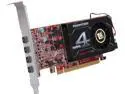
PowerColor Radeon R7 250 2GB GDDR5 PCI Express 3.0 CrossFireX Support Low Profile Ready Graphics Card AXR7 250 2GBD5-4DL
Pros: Works in Dell Optiplex SFF PCs 4 monitors! Includes 2 DP and 2 DVI adapters
Cons: Be careful to check if you'll need more adapters or miniDP to DP cables.
Overall Review: We're running 3 1080p monitors with these. Switch to the included low-profile bracket, drop in the card, install drivers from amd.com, everything just works. Now I just need a business case for a 4th monitor and a 3+1 monitor mounting bracket.
8/7/2014See more detail
Awesome keychain flash drive
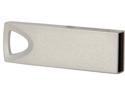
Team C125 64GB USB 2.0 Flash Drive TC12564GB01
Pros: Very compact, durable, convenient, inexpensive, easy to carry with you on a keychain.
Cons: Fraction of the speed of a Team X101 full-size drive.
Overall Review: These are excellent everyday carry drives. I have the 32GB model as well. Install YUMI on it, copy every diagnostic tool and installation image you can think of and still have room left over. You can fit multiple drives on your keychain easily.
3/28/2013See more detail