
Your Browsing History


Terry W.
Joined on 10/02/06
0
0
100%
100%
product reviews
- 113
Cable Mngt, Follow-up
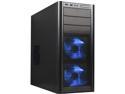
Antec Three Hundred Illusion Black Steel ATX Mid Tower Computer Case
Pros: The Antec 300, including its Illusion version, is designed as a low cost, high quality, strong, mid-size case. In this regard, many of the cons mentioned by others... although true... should not be cons whatsoever. The major issue many people are talking about is cable management. This case is not as wide or long as a full tower ATX case that cost $100 or more. As a result, it doesn't have a removable MB tray, rubber lined holed in the MB tray for cable mgnt, etc. Despite this, there is plenty of room (with proper cabling) for a high end air cooled 2 card SLI/CF rig. See other thoughts...
Cons: 1. A bit dated design, considering they have been being produced for a few years. The addition of a USB 3.0 front header (for 2 ports, to be placed alongside the 2 USB 2.0 ports) would alleviate this concern. (Simply update the port bay and keep the case design the same.) 2. Including 4 4 pin Molex to 3 pin MB fan headers with the case would fix the problem that users with high-end MBs face. (Wanting to use the MB's fan controls, via a program such as SpeedFan or the board's own UEFI, for fan control.)
Overall Review: 1. For setups using a MB with an onboard audio header located above the first PCI-E (usually x1) slot, run the case's cable under the motherboard and up at this slot. (How many MBs can actually use the topmost slot, due to the "northbridge" heatsink, anyway?) 2. For MBs with USB 2.0 headers along the middle of the bottom edge of the board, run the case's USB header under the MB. 3. MB fan headers in the wrong spot for easy cabling? Again... under the MB. 4. Long video cards will most likely block the use of the hard drive bays directly behind them. (Plan according.) You can easily fit 2 high end single GPU cards and 3 drives in the case. (If motivated, buy a 5.25" bay adapter and put a 4th drive in the upper area.) 5. You can use non-modularly cabled power supplies in the case. (As long as you don't use the bottom disk drive spot.) Simply properly tie the extra cables together and put them in the bottom... out of the way. Most people don't need a full tower case.
9/23/2011See more detail
Good: for Basic User; Bad: for Advanced User
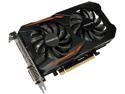
GIGABYTE GeForce GTX 1050 Ti 4GB GDDR5 PCI Express 3.0 x16 ATX Graphics Card GV-N105TOC-4GD
Pros: With clock speeds that are the same to similar to other similarly priced GTX 1050 TIs at the same price range, this card is a good card for your basic user that is simply upgrading the video card in their gaming or "larger" home theater PC.
Cons: I have purchased three of these cards in the past several months for various builds. After many hours of troubleshooting 2 of the 3, the conclusion is that they have no "head room" for further, user, overclocking (via programs such as MSI Afterburner). The first card, purchased late last year, slightly overclocked the same as 2 other end user (non Gigabyte branded) 1050 TIs I installed for users. The second and third cards, however, CANNOT be memory overclocked AT ALL. (This is with and without slight power increases.) Doing so causes a card internal hardware fault that requires you to reboot to regain "normal" performance.
Overall Review: Summary: If you are a basic user, you want to upgrade your video card, you don't intend to use overclocking software, and this card (for its boost clock numbers) is priced competitively with other manufacturers' cards, then buy it. It is a quiet card that runs well. However, if you intend on trying to gain any additional performance from the card via software, AVOID IT. This may be an overclocked card, but I believe Gigabyte has binned the gpu and ram on this card to the top of what said parts are capable of.
3/16/2018See more detail
Works well (First and Second reviews)
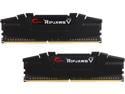
G.SKILL Ripjaws V Series 32GB (2 x 16GB) 288-Pin PC RAM DDR4 3600 (PC4 28800) Desktop Memory Model F4-3600C16D-32GVKC
Pros: I'm running a MSI x570-a Pro MB with a Ryzen 5 2600 cpu. Due to (a) the system board's lower power management ability (see online reviews) and (b) the Zen+ Ryzen cpu's lower ram speed threshold (when compared to a Zen 2 such as a Ryzen 5 3600); I was able to, using the Ryzen Dram calculator, run 1 set (2 sticks) of this memory at 3200 Mhz with 1.35 volts at tCL 14, (tRCD)WR/RD 15/17, tRP 18, tRAS 30, & tRC 44. (Various other subtimings changed as well.) It could run with even tighter manual timings, based on the calculator, but I chose to stick with this middle ground between "SAFE" & "FAST". No stability issues. Based on the above, I bought another set of the ram, for 64 GBs total, and am successfully running the ram (at the same timings) at a reduced speed of 2933 Mhz. (The system wasn't stable at 3200 Mhz.) Continued subtiming tweaks will be applied and tested in the coming weeks. I do not fault the ram for the speed limitation, as the system board & Zen+ memory controller are the likely culprits. The ram is highly likely to meet its stated speed and timings on an AMD Zen 2 cpu using manual timing, speed, and power input. (Never trust XMP to do the best job, especially on an AMD platform.)
Cons: None as of this review.
Overall Review: For this system build, after suffering a disappointment with a competitor's memory, I purchased this 3600 Mhz kit, paired with the 570 chipset platform, to (in two years or so) upgrade to a Zen 2+/Zen 3 Ryzen 5 4600 (or similar). As such, with the likely increased official memory support speed increase from 3200 Mhz to 3600 Mhz (or similar), this purchase (a) has fixed the issue I had with the competitor's memory, (b) allowed the upgrade to 64 GB (maxing out the system for its life), and (c) will allow me to upgrade the cpu in the future, change the speed and timings, and already have my system setup for several more years of life. You got to love the AM4 socket.
3/14/2020See more detail
Worked well, both stock and XMP Profile 1 & 2 <Four month update>
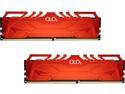
OLOy 32GB (2 x 16GB) DDR4 3200 (PC4 25600) Desktop Memory Model MD4U163216CFDA
Pros: Stock and XMP Profiles, 1 & 2, worked correctly in my purchased MSI X570 & MSI B450 system boards when two modules (one kit) in total is used. Note: For the curious, the red and black heatsink variants of this ram (as of Dec 2019) report the exact same within CPU-Z. It is highly likely that the heatsink color is the only difference between the sets. I have, in the B450 board, manually set the 3200 speed, and 16-18-18-36 timings, manually.
Cons: 1. Between 11/14/19 and 1/12/20 two revisions of this ram already exist. (Revision C & D) 2. Neither of my MSI boards (a) have this ram (or any OLOy) ram in their QVL lists and (b) can operate four sticks (two kits) of this ram... even at default 2133 speeds. In short, I wouldn't recommend the purchase of this ram if you; A. Ever intend on expanding your ram to 2 kits, 4 total modules, for a total of 64 GB of ram. B. Are building your computer on MSI boards. (Even though one kit is seemingly stable at listed timings and the 3200 speed, ... one board, with the latest UEFI, still has to be powered on... then reset... before it will boot. This is using the XMP profiles, manually set settings, or... even the default JDEC 2133.)
Overall Review: x570 Build: Ryzen 5 2600 (stock with stock cooler) MSI X570-A Pro OLOy 32GB (2x16GB) 3200 16-18-18-36 (removed and replaced with)... GSkill F4-3600C16D-32GVKC B450 Build: Ryzen 5 1600 AF (stock with stock cooler) MSI PRO B450-A PRO MAX OLOy 32GB (2x16GB) 3200 16-18-18-36 (And, ... one "spare" set of ram that I have no use for as of this review.)
3/7/2020See more detail
Good, but beware UEFI updates
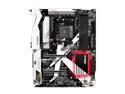
ASRock X370 Killer SLI/ac AM4 AMD Promontory X370 ATX AMD Motherboard
Pros: 1. Have two of them, running stable since 12/30/17, running Ryzen 5 1600 AE CPUs. 2. Several different single and dual channel memory configurations (2133 and 2400 Mhz) kits have gone through the boards during their life as altcoin (Nicehash) mining machines. (With five GPUs connected to each of them.) Completely, and totally, stable. 3. (Notes) I cannot comment on most of the board's components. (Audio ports, most USB ports, system board software raid, or wireless). On the latter, the boards have been Gb wired networked the entire time.
Cons: Late last year, during regular system maintenance, I updated to the latest version of Windows 10, updated the drivers, etc. with no issues. However, the last UEFI update that was applied to the boards didn't go well. In short, it appears that the update applied... but I can no longer access the UEFI on either board. (And, before ASRock comments... I followed the "upgrade to this version, then this version, then this version... that the site stated to do.) As such, the boards are now locked out of potential Ryzen 3xxx upgrades for potential said upgrades and gifting to friends/family down the road. (I can, at least, upgrade them to Ryzen 2xxx.)
Overall Review: Reliable, near 24/7 operation, for the first year of their life, and since then... they've continued said operation for the colder months of the year. However, be careful when you are updating the UEFI (even if you follow ASRock's instructions).
3/7/2020See more detail
Works well (Initial review)
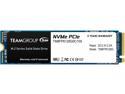
Team Group MP33 M.2 2280 128GB PCIe 3.0 x4 with NVMe 1.3 3D NAND Internal Solid State Drive (SSD) TM8FP6128G0C101
Pros: No issues during install and initial boot up in the secondary M.2 NVMe slot of my board.
Cons: (This is not a fault with the product itself, but a limitation of two software solutions I was going to use. Information presented here, however, for reference.) I initially purchased the product to work as a AMD StoreMI cache drive for my 2x6 TB raid 1 storage array (using Microsoft's Storage Spaces). However, this product cannot be used, as a single product, for this purpose. (The StoreMI software detects the Storage Spaces array as a raid array and disables the drive from being used.) In order to get around this, per other online sources, you must purchase two SSDs and two mechanical drives. Use StoreMI, first, to tier a single SSD to a single spinning drive within StoreMI. Then, using Storage Spaces, 'raid 1' the two drives together. (I will not be doing this during this system rebuild, as my array is already built.)
Overall Review: Nov-Dec 2019 Re-Build: Ryzen 5 2600 (stock with stock cooler) MSI X570-A Pro OLOy 32GB (2x16GB) 3200 16-18-18-36 Nvidia GTX 1080 (primary) Nvidia GTX 1060 6GB (secondary) 2x 27” 1080P 4ms 60hz monitors (one DVI, one HDMI) ADATA Premier SP550 240GB SATA SSD (OS/Primary Apps) 2x WD Red 6TB 5400k SATA drives (in Storage Spaces raid 1 array) Antec 300 Mid-tower (3x 120mm input, 1x 120 mm & 1x 140mm output) Seasonic Prime Ultra 1000w 80+ Gold 1x SATA DVD Burner and 1 x SATA Blu-ray player
12/14/2019See more detail