




 here!
here!
I’m your shopping assistant for PC builds, upgrades, and everything tech.
Got questions? Ask away!
Start a conversation
here!
I’m your shopping assistant for PC builds, upgrades, and everything tech.
Got questions? Ask away!
Start a conversation

Joined on 09/20/05
Works exactly as it should - just overpriced.
Overall Review: Nice, probably needed. Just pricey.
Works, once you get it sorted. 3 1/2 eggs.

Pros: 100+ mb/s connection over two stories in multiple rooms. Pass-through outlet. 2 enet ports(?) Getting combo pack w/ an 8-port GigE switch was cheaper than without it... Energy saving mode
Cons: Energy saving mode makes setup tricky if you're not aware of it. You need that pass-through outlet, because the top of the case blocks any 3-prong plug above it. Management software is Windows x64 only, clunky and doesn't like Windows 10. (Oh, and the installer blows.)
Overall Review: It's in the documentation, but not very prominent: *THE UNITS MUST SEE NETWORK TRAFFIC TO STAY AWAKE*. Which is kinda a problem when you're first plugging in the second unit in different outlets trying to get it to make connection, thinking you have lots of different circuits or something, when the issue is you just didn't do it quick enough. Solution: Have a helper unplug/plug when you yell at them, race down the stairs after you plug in the first, or connect laptop/switch/something with enet to keep the dang thing "awake". (Would not be a problem if you could just wake them up by quickly pressing the reset/encrypt button.) Once I figured that out, the second one connects in about 8 seconds after plugging into the wall. The software(see below) reported download speeds of over 100mb/s, upload around 60. (I haven't gotten to iperf yet or anything.) 10 year old house, new to me, no idea what circuits/electrical systems it's fighting through. As mentioned, management software is Windows 64-bit only, but only supported/listed up to Windows 8. In Windows 10 on first launch, app processes just hung in background, and couldn't even terminate them. Set compatibility mode to Win 8, rebooted, then they worked okay. (Installer has 3 or 4 layers of compression, and includes WinPCAP and full .NET)
Pretty. Simple. One major irritating flaw.

Pros: Cooling works great. (Tested on an Ryzen 5 9600X w/ PBO enable) Looks nice, blinkenlights are pretty. Fairly simple to install.
Cons: Has a noticeable hum/whine at a specific speed/range. (right around ~1700 RPM) Instruction booklet too small / a bit difficult to decipher.
Overall Review: I don't know if it's common to all or just the luck of the draw, but if I can't mitigate/fix/work-around the whine, will have to return.
Drives are apparently SMR, and not advertised as such!

Pros: They did give me an RMA without much hassle when one died. (Within warranty period)
Cons: Replacement failed - at least enough for ZFS to reject it. Discovered how slow writes get while resilvering the replacement in a zfs pool. 28% complete, write speed dropped from ~90M/s to currently 32M/s
Overall Review: Only if you know it's SMR and what those trade-offs mean.
Very quiet, but size and design present some issues.

Pros: Does what is says on the tin. (It's quiet!)
Cons: Size makes physical compatibility not assumed. Fiddly to assemble.
Overall Review: The fan clips don't latch on nearly as easily as the videos look. I ended up bending several of the fins getting them to attach. (The fins are very thin and bend easily) Once assembled it works great! Very quiet and cool on a 12700k. (I don't have temps handy, sorry) But once I went to add second bank of (low profile!) ram, the top of the heatsink pushes against the heatpipe just enough to make it sketchy, at best. Check compatibility on https://www.bequiet.com/en/motherboardcheck before purchase!
Cheap ultra-wide Freesync monitor: Does what is says on the tin.
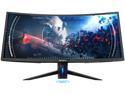
Pros: Good price for the specs. No bad pixels for me. Controls are physical buttons. So much horizontal space. Curve isn't too extreme for 2d.
Cons: Controls (including the button feel) are bad. Overall cheap quality: Design UI Build quality Stand doesn't swivel. HDR or freesync, pick one. Pointless "GAMER" gimmick junk.
Overall Review: This could have been a really good value monitor, but the design choices have me considering sending it back: Assembling this thing is a right pain in the ___. Attaching the base arm was difficult/finicky, but I felt the quality was an acceptable tradeoff. What is not acceptable is there is no earthly way to access the ports underneath without either laying the whole giant thing down, or moving it to the edge of desk and sticking your head under upside-down and backwards. Screen does tilt back, but only a little. Since you can't rotate the screen, or swivel the stand. Navigating the UI is not great. It would be "okay" if the buttons weren't so mushy, and the stand more secure. As is, the whole giant thing wobbles while you push the buttons. Power button is right next to all the others, so it's all too easy to hit it accidentally, while trying to figure out which button is the one you want. OSD won't come on if there's no signal detected from one of the ports. Powering on is slow. This makes troubleshooting when you don't have a picture more difficult. I can't figure out if it's possible to make the screen not stretch out non-native input. Getting games that don't support 21:9, even after adjusting in the videocard control panel, is flaky. Included displayport cable is very short. Turns out there's lighting on the back, which I can't even see when it's a dark room. I really wish that cost was put toward something else.
Performed as expected.
I ordered stuff, they charged my card and shipped it and it arrived.


