
Your Browsing History


Gregory P.
Joined on 11/26/10
0
0
product reviews
- 4
Good quality value priced case - not a ATX Mid though
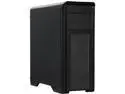
DIYPC D480-BK Black Dual USB 3.0 ATX Mid Tower Computer Case with Build-in 5 x White Fans (2 x 120mm Fan x Front, 1 x 120mm Fan x Rear, 2 x 120mm Fan x Top), Fan Controller
Pros: * Good cable management. * Tons of Space * 5x 120mm fans included. * All around pretty solid, didn't see any flex during assembly. * Filter screen for the top of the case & PSU * Room to mount water cooling both front and top * 2x USB 3.0 and 2x USB 2.0 (and comes with dust caps for the USB ports, which is great since they are top mounted) * Nicely finished interior.
Cons: My biggest gripe is the front fan intake on this thing. They made the front of the case filter dust by adding another mesh behind the mesh you see on the front. But with a slight smaller hole pattern with the holes closer together so they are slightly offset (I hope this makes sense). While this does reduce dust entering the case, there is no way to clean it 100%. You can wipe the front down with a cloth but you still get dust between the two layers of mesh, which is pretty annoying and noticeable on a black case. Going to have to get a couple cans of air to clean this out from time to time. Smaller then average screw threads. Doesn't use the typical 6-32 thread in a few locations it's something ... smaller. The side panel thumbscrew and top of the mobo standoff are the two locations I can think of off the top of my head. Could be a big issue if I ever lose a thumbscrew. I have a glass desk surface with a metal and it transfers a lot of sound to the glass. I was getting a hum that may be from my PSU. I have a temporary solution right now, just a couple of folded up microfiber cloths sitting under the feet at each end. But, I'm going to have to find a more permanent solution; either buy some type of rubber padding, or buy a new power supply. This could be an issue with my power supply, so not everyone will have this issue. Chassis wires could be just slightly longer (power switch, hdd LED, reset switch. I couldn't quite route them how I wanted. Not everyone will have my issue since the motherboard connector is different on every brand. Like another reviewer brought up, the finish on the front plastic cover is a little rough.
Overall Review: I came from an older case with no wire management. After this build was done I was really impressed with how clean everything looks, it makes me wish I had opted for the acrylic side. Even though the product description says this is an ATX mid, it probably should be classified as an ATX full. The size doesn't bother me at all, but if your looking for something compact, look elsewhere. On the plus side, there is a ton of space, you're not going to have any issues fitting a Titan into this case If I could do half egg's on the review this would be a solid 4.5 egg's but a couple small features keep this from being a 5 egg review. Even with my minor issues I would probably buy this case again given it's price. It's a great value when you compare it to other cases in this price range. A few things could make this case best in class: - If the manufacturer could fix the issue with the front mesh by adding a filter or removable mesh like they did on the top of the case. - Better rubber feet
1/24/2016See more detail
Lasted a year and 3 months
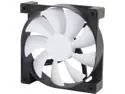
NZXT 2nd Generation FNv2 Case Fan Series 120mm
Pros: The white and black worked well with my rig.
Cons: Purchased in March of 2016. By summer of 2017 they were starting to get noisy. Now they are super loud for the first 10 minutes after boot, then they settle back down to reasonable sound levels. This wasn't even a continuous duty machine, only saw a few hours a day of use.
Overall Review: It looks like these are no longer being sold on Newegg, but I wanted to leave a review just in case they are ever sold again. I would say avoid if your looking for something that lasts long term.
12/27/2017See more detail
Don't listen to Randall C. I'm running 7 cards.
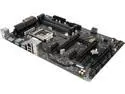
GIGABYTE GA-Z270P-D3 (rev. 1.0) LGA 1151 Intel Z270 HDMI USB 3.1 ATX Motherboards - Intel
Pros: Of all my mining rigs the GA Z270p-D3 are some of my most stable. However it does require that you download and flash the mining specific BIOS for the board from the Gigabyte website. Once you do, you have all the options you need for setting this mobo up in a mining rig. Using an M.2 to PCIe adapter, I've been able to run 7 video cards off this board without issue, in both Windows 10 and SMOS.
Cons: No the best looking board, but it's not in my gaming rig, so who cares. Only one M.2 slot, it would be nice to have two.
Overall Review: Props to Gigabyte for supporting the mining community with it's mining specific BIOS. It's easy enough to find, just google "https://www.newegg.com/Product/Product.aspx?Item=N82E16814126133" and it's one of the first results. The BIOS downloads are at the bottom of the page.
1/11/2018See more detail
Solid construction - Horrible Software.
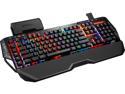
G.SKILL RIPJAWS KM780 RGB Mechanical Gaming Keyboard - Cherry MX Brown with Gaming Keycaps
Pros: Horrible Software! Wow, where to start with this one. In my opinion the software shouldn't even be considered Beta, it's more like an alpha or pre-alpha. I think it took me roughly 5-6 tries before I could even get the software to open up in Windows. I tried everything I could think of, unplugged and plugged back in. Tried different USB ports, rebooting Windows, deleting the drivers then reboot. The first time I booted installed the keyboard was solid red, during the second (or third) attempt the keyboard when black the lighting came back on a few seconds later as the rainbow color you see in the product photos; At this point I still couldn't get the software to open though. The final solution: ran the install as an administrator. Even then I couldn't just "open" the program, you still have to run the installed software as an administrator every time you want to use it. Every time I reboot, I have to go into task manager and kill the process, since it auto starts on boot-up, before it will run. Once you're in the software the UX is horrible, confusing and doesn't do what you need. I was finally able to get something similar to what I was looking for color wise by using the mode export function. I was able to edit the XML file in notepad++ for the color layout and effects I was looking for then upload that XML file back into the profile, but it still doesn't quite function as I would like. My roommate has the Corsair K70, which as a whole lot more options for editing the lighting effects. Some of the other reviewers here call out the bad software, but I feel like they're just glossing over how bad it really is. The actual keyboard: The size is a little big, I have a keyboard tray and I need to slide the left of the keyboard over to where it's slightlyhanging off the edge of the tray so I have enough room to mouse. I know this isn't a big issue for a lot of people who don't use a keyboard tray, so I wouldn't knock any points off of the rating for this reason. Just something to call out for those who do use a tray. The function and media control button lighting is always on and and always red. It would be nice to customize the color on these or at least be able to turn them off so they don't clash with the rest of the lighting. The keyboard also has a "Volume Indicator" LED's but they don't quite seem to sync to what the actual volume level is in windows. You can resolve this by turning the volume all the way up or all the way down. But it resets every time you reboot.
Cons: Horrible Software! Wow, where to start with this one. In my opinion the software shouldn't even be considered Beta, it's more like an alpha or pre-alpha. I think it took me roughly 5-6 tries before I could even get the software to open up in Windows. I tried everything I could think of, unplugged and plugged back in. Tried different USB ports, rebooting Windows, deleting the drivers then reboot. The first time I booted installed the keyboard was solid red, during the second (or third) attempt the keyboard when black the lighting came back on a few seconds later as the rainbow color you see in the product photos; At this point I still couldn't get the software to open though. The final solution: ran the install as an administrator. Even then I couldn't just "open" the program, you still have to run the installed software as an administrator every time you want to use it. Every time I reboot, I have to go into task manager and kill the process, since it auto starts on boot-up, before it will run. Once you're in the software the UX is horrible, confusing and doesn't do what you need. I was finally able to get something similar to what I was looking for color wise by using the mode export function. I was able to edit the XML file in notepad++ for the color layout and effects I was looking for then upload that XML file back into the profile, but it still doesn't quite function as I would like. My roommate has the Corsair K70, which as a whole lot more options for editing the lighting effects. Some of the other reviewers here call out the bad software, but I feel like they're just glossing over how bad it is.
Overall Review: When I bought this keyboard I was looking for 3 key features: -Mechanical full size keyboard with brown switches. -Customizable RGB lighting. -Solid build quality and design. I went with the G.Skill mostly because of the USB/audio pass-through, the added programmable buttons included on the left side, the unique design, and the extra keys & attachable storage box. So I figured I would give it a shot. But as far as I'm concerned this keyboard fails on the customizable RGB lighting & programmable keys just because the software just isn't ready for prime time. If you're looking for a solid mechanical RGB keyboard would go with the Corsair K70 RGB or K95 RGB. I've used the K70 and it's also a pretty solid keyboard. With the Corsair there is a lot more options for controlling the look and effects of the LED's. I know the Corsair has it's own share of problems, but it's been out a lot longer and has more time to work through them. If the RGB lighting isn't a big deal for you I would go with the non-RGB version of this keyboard (the KM780 MX) as the keyboard itself is pretty solid, it just fails on the software side. Honestly this could be a 4-5 egg review had the software not been so bad. Some advice to G.Skill if you're reading this review. Your software isn't ready for prime time, but if you want to keep your customers, you need to communicate what your plans are with this product since it's really not ready for prime time. It's pretty clear to me that G.Skill was trying to directly compete with the Corsair keyboard because the price point is just about identical. But, if you're going to try to compete with the market leader you need to be as good or better. At this point I have two options: keep the keyboard and hope that G.Skill improves the software or just return it and go with another option. It's currently Thanksgiving weekend so I have 4 days before I decide what I'm going to do. If I keep the keyboard and they improve the software, I'll come back and write a new review.
11/26/2015See more detail