

Your Browsing History


Nate F.
Joined on 11/25/08
0
0
Mountain living Network and CyberSec Engineer


product reviews
- 37
Good, but its a cable
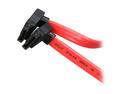
Nippon Labs Premium 0.5M (1.64 ft.) SATA Cable with 2 Right Angle Connectors for SATA I and SATA II Hard Drive 1.64ft Model SATA-0.5RR 1.64 feet
Pros: Nice cable, rubber outside is soft. Had caps on the end of the line.
Cons: to expensive for a SATA cable, not realy worth the money, i bought it cause it had free shipping
Overall Review: not realy worth it
4/12/2010See more detail
Essentially new - works great
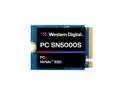
WD PC SN5000S 512GB NVMe PCIe Gen4x4 M.2 2230 SSD High-Performance Internal Solid State Drive OEM Western Digital
Pros: small, great boot disk
Overall Review: I was worried this would come used like the first review on this sellers product, mine came in with basically zero usage. I power cycled it like 3 times myself and maybe 2 hours so it looks like someone might have just slapped this in a machine to verify it still is working before they sold it or something. I've attached the SMART details for proof. Very happy with the purchase.
10/23/2025See more detail
Great case, minor bit picky issues
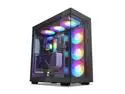
DeepCool CH780 ATX+ Panoramic case, Dual Chamber Configuration, Vertical Mount and Gen 4 Riser Cable, Tempered Glass Panels, Trinity 140mm ARGB Fans, Type-C, 4x USB 3.0, Black
Pros: Perfect for showing off the interior. Case fan setup is nice, 3 fans all contained in one plastic frame. Great front IO in terms of USB and Type C. Easy access into case, real class panels, shipping support for - well moving and shipping. Fantastic design for whatever air flow you want to run. Big fan of how the PSU mount is placed - youll want to read my con section in terms of the actual PSU cage though.
Cons: Plastic pressure clips holding panels together are a bit brittle, broke one off simply taking the top panel off. Thankfully you get a few spares for that happening. PSU cage holding tabs for my PSU was too small as you can see in the attached pictures. Took a pair of side cuts (no pliers on me) and had to slightly bend the tabs for the PSU to fit properly. Probably a one off issue related to the cooling fins on the ASUS 1200 platinum PSU. Ships with PCI 4 cable, figured itd come with 5 so had to buy one from NZXT. Cables a smidge too short on my MOBO (ASUS RoG Strix z790 e-gaming WiFi II) so had to move the vertical cage to the top bracket - which makes the fit very tight to slide in. Cable management is kinda bleh, youve got tons of room but no slot tab things popping out you can loop Velcro through to help hold cable down outside of the 3 holding the case IO. Thankfully plenty of room around HDS cage and PSU cage so just gunna use a lot of extra Velcro. Very high maintenance gripe - wish there were holes to run soft tube through to the outside of the case. Itd make the water chiller hookup a lot easier. Ended up buying the EKWB PCI adapter to do the job though so not super huge issue obviously. Also note if DeepCool actually reads this, itd be nice to have some sort of race way on the bottom to hide any tube or lazy exposed cables for fans/RGB/etc - really like the fan setup on the bottom though, basic and simple to do what you want with. Also gripe thats not a big deal, adding some sort of pump mount into the case would be great. Ended up buying the 120mm adapter from EKWB to mount it but obviously be pretty cool if the case had an option of vertical or horizontal mounts. UPDATED FIND: The bottom rear plate isn't actually usable, there's no hole for any PCI cards to slide into, it's purely for looks unless you're okay with cutting off the holding tab at the end of the PCI faceplate.
Overall Review: Overall Im EXTREMELY pleased with the case and its features and layout. Im very happy I picked this case over a few others with the same type of front and side glass panels. The inside is massive so plenty of room to add whatever you want. Definitely read my cons if youre picky about small things. Great case though, excited for the rest of my loop and cable parts to come in to complete the build.
4/10/2024See more detail
Love the board, small gripe though
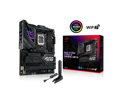
ASUS ROG Strix Z790-E Gaming WiFi II LGA 1700(Intel 14th, Intel 13th & 12th Gen) DDR5 ATX gaming motherboard(PCIe 5.0 NVMe SSD slot with M.2 Combo-Sink,18+1+2 ower stages,2.5 Gb LAN
Pros: Tons of M.2 options and all have integrated cooling with thermal pads. Tons of rear IO out of the box. Obviously looks dope, PCI 5 is also a big plus. Big fan of the AIO pump header and plenty of fan headers if youre trying to run a wind tunnel with few splitters/controllers.
Cons: Only one USB 3.0 header - this is on me for not paying attention but my case has 2 3.x for the front IO so I can only run a single 3.x plug and Im hoping to use the 2.x headers to atleast get power (and throughput) to the others so theyre not completely dead. Attached a pic of the 2.x headers for reference if anyone cares.
Overall Review: Overall great Mobo, plenty of options and newer tech. Still bummed its only rocking a single 3.x header but I guess in the real of RoG boards this isnt that high on the fancy side. (Besides RGB and M.2)
4/4/2024See more detail
Perfect for the price
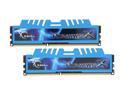
G.SKILL Ripjaws X Series 8GB (2 x 4GB) DDR3 1866 (PC3 14900) Desktop Memory Model F3-14900CL8D-8GBXM
Pros: Cheap, fast, and it's G.Skill so why not. It memorized alot so far. Good to overclock with.
Cons: My mobo didnt run it as 1866 when i first installed it, but i had to bump up the voltage by .15V so no big deal. Had to scoot my evo 212 dual fan cooler fan up a little to make room for the heat sink on the memory. Once again, not a big deal to me, still stays cold.
5/11/2016See more detail
Good keyboard
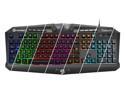
UtechSmart Saturn Saturn 7 Colors Backlit USB Multimedia Gaming Keyboard
Pros: I can type letters with it. It feels nice, has some ok color style/combo's. Its cheap. Windows lock which is superrrrr sweet.
Cons: The enter key is a little annoying to get use to. the keyboard doesnt angle up as much as i'd like it to.
Overall Review: it works well overall.
5/5/2016See more detail