
Your Browsing History


Louis G.
Joined on 10/29/06
0
0
product reviews
- 13
7930 with a bad name
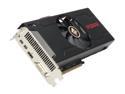
PowerColor PCS+ Radeon HD 7870 MYST. Edition (Tahiti LE) 2GB GDDR5 PCI Express 3.0 x16 CrossFireX Support Graphics Card AX7870 2GBD5-2DHPPV3E
Pros: First off, this is NOT a 7870, it's a 7930 with a horrible name (based on same Tahiti die as the 7950 and 7970, check online reviews for details). When it comes to overclocking you're always rolling the dice as you never know what potential your specific item will have compared to the next guys but in my case I got super lucky. Whereas my previous 5870 would barely take a 50mhz bump this card is stable at 1270 (from 975 stock boost*) for over a 30% gain without changing voltage. With fan speed at around 40% it maintained temperatures from 62-64C during a stress test/burn-in. I am currently CPU limited but for comparison my 3DMark 11 score went from around 5400 at stock speeds to 7300 with the overclock (I conservatively took the ram from 1500 to 1575 as well). My 5870 score on the same system was around 4400. In summary, this card is a steal; it's a 7900 series at a 7870 price point. Even at mild overclocks it matches or outpaces the more expensive 7950.
Cons: Some reviews have said that this card draws a lot of power, more than a 7950 at times, which is weird, but I did not notice any heat or power issues w/my Antec 750w. If you're a gamer and/or into overclocking then power is probably not a concern. AMD's "Boost" feature actually has the opposite effect it would imply, robbing your card of performance. See my thoughts below for details. It's a horrible driver feature that you'll have to work to defeat and unlock the true performance potential of this card.
Overall Review: AMD has outsmarted themselves and poorly implemented a feature that is supposed to change the core speed on demand. From factory that would be from 925 to 975 during 3D workloads (at rest on the desktop it idles down to 500). In practice this just doesn't work at all. If you use CCC to overclock normally and set the core up to say 1100 what will happen is that the card will actually run at 925 during actual gaming. Ironically I noticed that the card would jump to my overclock setting when a 3DMark benchmark was loading but then drop down to 925 once it was actually running. This was evident based on monitoring tools as well as resulting scores. The fix is to create profiles in CCC which will put xml files in the user profile AppData area (e.g. c:\users\*username*\AppData\Local\ATI\ACE\Profiles\). Create one profile with default settings and name it Default. Create another profile with overclocked settings and call it something else, like "gaming". Find the "gaming" xml file in the profiles area and look for "want_0" and "want_1" keys. Near the top you'll find entries related to the core clock speed. Make "want_0" match "want_1" and save the file but beware the settings for voltage, ram, etc, do all this AT YOUR OWN RISK. **When selecting the profile you just made in CCC make sure to click the profile name TWICE. The result should be that the bottom value displayed on the CCC panel matches your "want_0" value. This will force your overclock speed during 3D workload which you will see the result of in monitoring tools as well as frame rates and benchmarks.
2/18/2013See more detail
Do Not Buy, Not Worth Owning
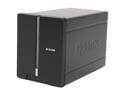
D-Link DNS-321 Diskless System 2-Bay Network Storage Enclosure
Pros: Cheap, so far no data loss.
Cons: SLOOOOOOWWWWWWWWW. Gigabit is a joke. Apparently the gigabit adapter was added to the product later in the manufacturing process as a marketing ploy/lie. You won't notice too much on 100mb network but on gigabit it will push 10-14MB/s if you are lucky. Over wireless N it might push 6MB/s. Software is clunky. Could not get security to work at all and had to use anonymous access. Firmware hasn't been updated in over a year. D-Link does not care about this product.
Overall Review: SLOOOOOOOOOWWWWWWWWWWW. It's underpowered and deceiving. Device does not live up to expectations it trys to set, does not even come close. Research this device yourself and you'll see everyone says the same thing. There are no good reviews. No one has had a good experience with it. If you're going to spend any money on a NAS at all, spend a little more and get a respectable device. I regret that at some point I'll have to spend more money to buy a NAS that will work well but wish I had known more the first time.
11/30/2010See more detail
So far so good
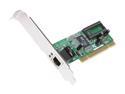
ENCORE ENLGA-1320 Ethernet Card 10/100/1000Mbps PCI 1 x RJ45
Pros: I literally just got this card for my Windows Home Server that is running on an old motherboard with a bad NIC. On first boot it immediately detected the Encore card and loaded drivers. I then got an updated driver from Windows Update and that was that. Tested copies are consistent at 53MB/s which is halfish of the theoretical max on a gigabit connection but way faster than the 8-9MB/s I was getting on the 100Mbit card I was using until this one arrived.
Cons: As long as it doesn't fail I don't see any.
Overall Review: Very cheap way to get a decent home network connection. I didn't expect 100MB/s transfers and if you want that you should probably just buy a different class of product.
6/21/2012See more detail
Fantastic Drive
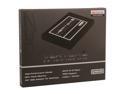
OCZ Vertex 4 2.5" 128GB SATA III MLC Internal Solid State Drive (SSD) VTX4-25SAT3-128G
Pros: Fast, fast and fast. OCZ delivered the new 1.4RC firmware the day my drive showed up in the mail so I did an immediate benchmark with the stock 1.3 and then the 1.4 and writes jumped way up, almost on par with reads. The drive is essentially maxing out my SATA2 port. Access times are very low. Benchmarks are what they are so you may not care about those however I can say that even though I was running on a SSD before I can still tell that my system is faster with the Vertex 4. Looking forward to even better performance from future firmware too.
Cons: There's a lot of "new" about this drive which means a little unknown so there could be some quirks or issues. Not really a con I guess but it's a bit of a risk. The firmware update to 1.4 will wipe the drive clean which should not be an issue for most considering how new it is but be warned. Most likely the incremental update to an official 1.4 I am told will not be destructive.
Overall Review: Right now this drive is my new system drive on a fresh Windows 7 install and my old SSD (after a secure erase) is a dedicated Steam/games drive with a 500GB mirror for my data. Even though my motherboard and proc are over 2 years old at this point I can't imagine feeling the need for a major upgrade for quite awhile based on the overall speed of the system.
5/10/2012See more detail
Solid, Stable, Reliable
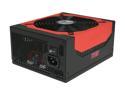
Antec High Current Gamer Series HCG-750 750W ATX12V v2.3 / EPS12V v2.91 SLI Certified CrossFire Certified 80 PLUS BRONZE Certified Active PFC Power Supply - Intel Haswell Fully Compatible
Pros: Waited for the right model at the right price to replace the old 500w supply I had before. This was on a good sale when it was new and I jumped on it. Plenty enough power to grow with for awhile and Antec reliability.
Cons: None.
Overall Review: When I powered the PC on the very first time after installation the power supply made a weird noise and something on my motherboard snapped and smoked! Yanked the power immediately. After the smoke cleared I plugged it all back in and it has been fine ever since. Whatever it was must not have been important.
1/26/2012See more detail
Wow!!!
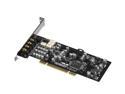
ASUS Xonar D1 7.1 Channels 24-bit 192KHz PCI Interface Sound Card
Pros: The sound produced by this card compared to my old soundblaster or onboard audio is like the difference between black and white uhf tv and 1080p blu-ray. I am floored by the sound quality and features. Still need to read the manual and learn more about what I can do.
Cons: none
Overall Review: I only wish I had bought one sooner.
9/6/2011See more detail