

Your Browsing History


Linas V.
Joined on 12/23/09
0
0
product reviews
- 12
Works!
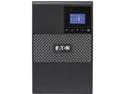
Eaton 5P750, 750 VA 600 Watts Tower UPS
Pros: Short story, it works! Purchased about a year ago. Couple of weeks ago, mains power bounced up and down 4 times in 60 seconds, then went out for good for a few hours. UPS seems to have about 20 minutes of power at a 250 watt draw, or thereabouts. When UPS battery got to 50%, I had it trigger shutdown of the CPU. That all triggered very nicely, got a clean shutdown, everything worked as expected. Yay! BTW -- this is with Linux, Debian Stable, using a USB cable between CPU and computer. On the UPS, I mostly left everything at factory defaults, so my app is simple, undemanding.
Cons: None.
11/1/2018See more detail
Problems within 48 hours of use.

Seagate BarraCuda ST4000DM004 4TB 5400 RPM 256MB Cache SATA 6.0Gb/s 3.5" Hard Drives Bare Drive - OEM
Pros: Seemed to work great for 24 hours. Part of RAID-mirror array. RAID reconstruction ran at about 150MBytes/sec which is more-or-less the spec'ed performance. So that means all 4TBytes of the disk got written to on the first day of install.
Cons: Day two: Symptoms: system randomly freezes for 3-20 seconds at a time, but otherwise normal when not frozen. No tell-tale messages in `syslog`. Looking at `iostat -x` reports that the new disk is taking 1-7 seconds!! to perform a single write! Yow! OK, so that explains the freezes. Removing it from the RAID gets system to behave normally. `smartctl` shows `188 Command_Timeout 65538` which parses out to be two timeouts, one greater than 5 seconds: this is a symptom of impending drive failure. See backblaze report on `SMART 188 Command_Timeout` Just in case: halt system, reset the SATA cable, resent the power connector. Reboot. Works great for 5 minutes, reconstructing the RAID array. Slower than before. At 100MBytes/sec ten minutes later, running at 50MBytes/sec Half-hour later, bouncing between 8MB/sec and 60MB/sec maybe averaging 25. As I write this review: perf dropped to 300KBytes/sec, response times (the `await` column) to 2-3 seconds per write! Yikes! I'm ordering a new hard drive in about 5 minutes. Just a different brand.
Overall Review: Did not survive 48 hours of use.
3/16/2019See more detail
First one died after 13 months. Second one lasted 22
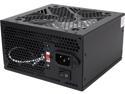
RAIDMAX XT series RX-300XT 300 W ATX12V / EPS12V Power Supply
Pros: I was looking for something cheap for a low-end box. Cheap has always worked great in the past.
Cons: Bought new in 10 June 2021 died early July 2022 -- so it lasted 13 months. Not impressed by that. Seems that I accidentally bought a second one while not paying attention. The second one lasted 22 months: July 2022 (new) to May 2024. Would have been cheaper to pay three times as much to get something better.
Overall Review: Even if it's cheap .. I expect it to last 5+ years.
12/4/2024See more detail
Lasted (only) two years
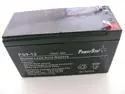
PowerStar® IBM UPS750THV, UPS750TLV, 90P4827 UPS Battery 12V 9AH
Pros: Reasonable price.
Cons: I read online: "lead-acid UPS batteries should last 4 years under ideal conditions, and 3 years under high-temperature/heavy load conditions. I'm running a home PC on this. We loose power no more than 4-6 times a year, usually for no more than a few seconds. Given this light-duty application, I expected the battery to last much much longer. I've had lead-acid automotive (car) batteries last ten years. Those get shaken around on potholes, endure summer heat and winter snow. I don't understand why a battery sitting on the floor in an air-conditioned room only lasts 2 years.
Overall Review: I assume the short lifetime was due to low-quality materials used in manufacture. The hassle of dealing with this is not worth it. For the price, I'm thinking I should buy a car battery and jerry-rig it. Car batteries last a decade. I've heard that Lithium-ion are available for UPS, have not looked at price or durability, but I've had laptop batteries that last a decade, so ....
12/4/2024See more detail
Hardware: Great! Linux drivers: Bzzt! Ouch!
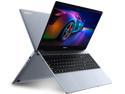
IPASON Maxbook - P1X IPS 15.6" Laptop FHD Intel J4125 4 Core up to 2.7GHz 12GB DDR4 RAM 256GB SSD Windows 10 pro Notebook Computer Ultra Thin and Light Notebook Business Office Student Ultrabook
Pros: * Great Hardware Specs! * Great battery life!
Cons: * Linux drivers in pitiful state. Vendor needs to work with Linux people and fix this!
Overall Review: I wanted a cheap cheap cheap laptop with lots of RAM and a fast CPU and great battery, and this was it! Nothing else came even close! So I ordered this with confidence, and I think I'm happy with it. I guess. ... there are some glitches. About 5 minutes of booting it and using Windows, I was ready to flash Linux on it. (I hate Windows; I know Linux upside-down and inside-out. For my work, Linux is a non-negotiable must-have.) And this is where the problems started. In historic order: * Just sticking in a Linux bootstick is not enough; it boots to Windows. Need to get into BIOS to tell it to boot from USB stick. * The BIOS boot screen is carefully hidden, but half-a-dozen reboots while poking F1, F2, F12 and/or DEL got me into BIOS. * BIOS is ... weird. Like really weird, nothing like anything I'd seen before. * Designating the boot device was .. really weird. Figured it out, but it was ... weird. * Installed. But WIFI doesn't work. Why? Need to have the latest and greatest Linux kernel to get working WIFI (I'm running 5.18.15 right now) Driver is `rtw_8821ce` * The only distro with a Linux kernel that is new enough is Debian Testing. Which is great, but more bleeding-edge than most will tolerate. * With working WIFI, the rest of the install can be completed. Everything works great, except for a few teeny-weeny issues: * Wifi won't resume after being suspended (by closing the lid) Need to reboot to get it to work. I will work with LKML to fix this, but it will take months. * Sound does not work. So no youtube. I don't know why. I assume its a bad device driver. Haven't figured it out yet. Will need quality LKML time, too. Other than that, it works great: * Got 6-8 hours of battery on a very long airplane flight with no electric outlets on the plane. * Camera works great; did multiple multi-hour zoom meetings (using cell phone for audio) * Fanless! I hate fans! I love laptops that don't make noise! * Fast! It's actually slightly faster than a 7-year-old beefy server that I have. * Used it all day, every day, for 6 weeks straight, doing development and also browsing. No issues Annoyance/possible problem(?): * Runs really hot. I'm not used to having laptops run this hot. My last one had a dinky CPU that never got hot (and it was fanless, too). Is this going to be a problem? Will it burn out early? I plan to keep this laptop for 6-8 years; I don't want it to die after only two years. See https://bugs.debian.org/cgi-bin/bugreport.cgi?bug=1016395 for more info
9/12/2022See more detail
Misleading temperature in BIOS; cannot disable graphics (cannot use as server)
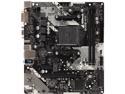
ASRock B450M-HDV R4.0 AM4 AMD Promontory B450 Micro ATX AMD Motherboard
Pros: Great value! It does what I want it to, i.e. runs with the latest fast AMD Ryzen CPU's and fast RAM.
Cons: Two issues: misleading temp reading in BIOS, and no way to run this without a graphics card or APU (can't run it as a headless server, sitting in some closet). First: the BIOS temp issue, since it bites lots of users who then say bad things about AMD CPU's. It's not the CPU, its the BIOS! So.. the long story: This motherboard has a bunch of sensors on it: temp, fan speed, voltages, etc. I can see all of them in the OS (Linux) and most but not all of them in BIOS. After a cold boot, BIOS reports an alarmingly high CPU temp of 64 degrees; after a reboot, it rockets up to 73 degrees: surely this is a sign of imminent failure; other people have noticed and are complaining. ... well, its not true. The OS shows that there are several sensors. After a cold boot, the OS reports a CPU temp of 40 degrees- perfectly normal! It also reports some *other* sensor, called ` k10temp-pci-00c3` which shows that alarmingly high temperature. If I run some heavy compute jobs, the CPU temp rises to 65 degrees (expected and normal) while the mystery temp crawls even higher. I conclude: the BIOS is incorrectly reporting this mystery temp as the CPU temp. Second issue: graphics. The board will not POST unless you have either a GPU w/APU or if you have a graphics card. If you have neither, it will never boot, which makes it 100% useless as a server. This is a serious failing: you have to pop extra $$$ for some nasty used cheap graphics card. Which is going to draw electricity and generate a lot heat even though no monitor is attache to it. All I needed was some dirt-simple 640x480 VGA display. Which would have cost ASrock maybe ten cents to install. But no. Now I have to go shopping for the worlds cheapest graphics card. Which is really annoying cause its just one more thing that can fail.
Overall Review: Failure to POST and boot when the graphics card is missing is unacceptable. Misleading CPU temperatures is causing a lot of people to panic. (Read some of the CPU reviews) I can live with this, now that I know what the problem is, but I had to waste many hours worrying about this. I really really dislike wasting my time because someone else messed up!
6/18/2021See more detail