




 here!
here!
I’m your shopping assistant for PC builds, upgrades, and everything tech.
Got questions? Ask away!
Start a conversation
here!
I’m your shopping assistant for PC builds, upgrades, and everything tech.
Got questions? Ask away!
Start a conversation

Joined on 01/27/05
Great for FreeNAS
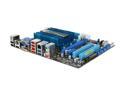
Pros: I bought this for a FreeNAS build and it works great. The CPU is a bit of a bottleneck but I am using ZFS and a SAMBA share. Having 5 SATAIII ports was the clincher for me as well as having the 3 extra expansion ports which put it above the other versions of this board. I think Intel has come catching up to do in the SATAIII department.
Cons: I wish Asus had a version of this board with the 4 expansion slots and 6 SATAIII ports vs the 5 internal + 1 External.
Overall Review: I had come across a review that mentioned they had trouble booting form a USB stick; I had no such trouble even with the HDD's installed.
Has speed issues
Pros: Cheap, 16GB, and advertised as Class 10. I plugged it in and Windows 7 immediately offered to use it as a ready boost drive. Worked well for a few days.
Cons: I bought this to use as a ready boost drive in my work laptop and in less than two days the transfer rates were below 2MB/s. I tried reformatting thinking that might help. I also tried different file systems and block sizes to no avail. I tested the reader withn an old 1GB micro SD card I had laying around, it was well over 3MB/s so I'm pretty sure it's the card.
Overall Review: Even though it won't work for ready boost like I wanted I still have a 16GB SD card that I'll use in my camera so it's not a total loss I guess.
Good for me, good for you.
![Dell OptiPlex 755 [Microsoft Authorized Recertified] Tower Desktop PC with Intel Core 2 Duo E8500 (3.16GHz), 4GB Memory, 160GB HDD, DVDRW, Windows 7 Pro 64Bit](https://c1.neweggimages.com/ProductImageCompressAll125/83-156-568-02.jpg)
Pros: Price - Even I can't build a secondary machine for this price using new parts. Build quality is standard Dell enterprise. Pretty robust, 100% tool-less. Was nice and clean inside so these got some kind of reconditioning. Nice to have another Windows x64 license around the house (not that I activated it yet).
Cons: PSU is only mid 300 Watts and has ONLY 1 extra sata connector for a second HDD. Some scratches as one would expect but nothing structurally wrong with it.
Overall Review: Mine came with 2 DVD drives, 1 was a burner other was not. Even with that still enough SATA ports for a second HDD and e-SATA port I added. Integrated Intel NIC is plenty speedy (300Mb/s). Ram is 4 GB, 2 x 1GB sticks and 1 x 2GB stick leaving 1 slot still open for another 2GB stick to get it back to a balanced config but it runs fine for me as-is. I bought this to run Windows 10 for testing which it does amazingly well. Note: Mine needed some BIOS settings changed: enabled performance mode, turned off PXE boot, stuff like that. Over all I'm very happy with this machine though it would have been awesome if Dell had 1 6-pin power so I could add a video card but oh well, I always planned on running this head-less anyway.
Good for the price, a few minor annoyances
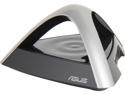
Pros: I like the style and it's nice that the GUI and interface match my ASUS router. Price: If I had paid $99 at a brick-and-mortar store I would have returned it by now but for the refurb. price it is a good deal.
Cons: Setting up instructions could be a bit more clearer, then again I used it as an AP extender and not as a repeater. Third time was the charm after it got itself back into DHCP mode and caused a conflict on my network. I seem to have to reboot the unit every other week or so.
Overall Review: I have two of these, one at each end of my house and they are hard wired back to my main router. They are all on the same SSID so I can roam between them, or that was the plan. My devices are more "sticky" than I thought so I have to cycle my tabets wireless connection to get it to re connect. I turned down the power to better isolate the each one so the signal doesn't overlap as much and that also seems to have helped the need to reboot them. Giving it 4 starts because for the price they do exactly what I wanted and rebooting them isn't a major issue though it would be nice if it got fixed. I suspect it is a software issue cause it seems to happen more frequently if I use my phone which can push far more bandwidth than my old tablet.
Fiber's best friend
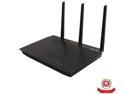
Pros: Super fast WAN to LAN speed according to smallnetbuilder.com >800Mbps. Tom's hardware had this pretty much destroying the competition for wireless performance as well. No need for DDWRT, Asus seems to have thrown every feature and the kitchen sink in here. Their cloud sync is pretty neat, for now I'm just using the DDNS and NAS functions.
Cons: 1st gen firmware had known bugs which seems to be the cause for all the early-bird, low reviews.
Overall Review: I bought this to go with my new fiber connection as my WTR54g could only do 20Mbps WAN to LAN, with this I can push 10x that. At these speeds I think the rest of my computer has become the bottleneck which is a good problem to have in my opinion.
Best sub $100 case in my opinion
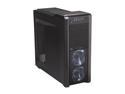
Pros: After pouring over just about ever case around the $100 mark here on NewEgg I decided on this because of the air filters and HDD mounts. I wasn't 100% sure I was gonna like them as I've had trouble with tool-free mounts before but these work really well. They have rubber o-rings to cushion the drives and I like that.
Cons: The sides of the case can buckle in if you press against them too hard. It surprised me I went to grab it and the left side caved in. It popped right back out and didn't crease so no big deal. The case does have a nice handle at the top so I should probably just use that.
Overall Review: I bought this case to use for a FreeNAS build but I could easily fit a full PC build in this with plenty of room for video cards, a high end PSU and a convenient place to put a water radiator right at the top. In all likelyhood when I do build my next PC I will get another of these or possibly the 500R.


