
Your Browsing History


Benjamin H.
Joined on 08/17/08
0
0
product reviews
- 5
Excellent Adapter
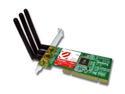
ENCORE ENLWI-N Wireless Adapter IEEE 802.11b/g, IEEE 802.11n Draft 2.0 PCI 2.3 Up to 300Mbps Wireless Data Rates
Pros: I would say this wireless adapter is one of the best at a low price I have ever owned. The N capability makes this adapter a much have. Of course for distance wise, it all depends on your location. In the High Dessert I am able to pick of signals around 200+ feet away. I use this product with the Linksys WRT54GL. As for my download, upload speed they seem to not change any. For gaming, my ping seems to normally be around 20-60, and occasionally it will be near 130, with the rare 1-2 sec freeze up. I am using the ralink driver for this adapter which works 100% with no problems. I tested it on different floors and rooms, not noticing much change. For those 64 bit users trying to find an adapter compatible with your computer, this adapter works on XP 64 bit. 3 antennas allow the maximum connection possible.
Cons: The only con I might be able to see here is that using the ralink driver. But the driver performs 100%. Here is the link to the driver I used for the product: http://www.ralinktech.com.tw/data/drivers/IS_AP_STA_RT2860_D-1.4.2.0_VA-2.3.2.0_RU-2.2.3.0_VA-2.2.8.0_AU_2.1.3.0_VA-2.1.3.0_040209_1.0.9.0_Free.exe Install the adapter into your motherboard, turn on computer , when windows ask about them finding the stuff, ignore it, then run the exe. I recommend installing just the driver, then using windows to locate your connect, rather then the ralink software.
Overall Review: I am a steam user, I play Left 4 Dead, Team Fortress 2, Counter Strike Source, and much more. As I stated above, my ping is low, and the network will rarely have a 1-2 sec freeze happening maybe once or twice in an hour period. I think it is more just lag from the particular server, because some servers I never have it happen. This product works great, if you are complaining about not getting enough speed, It more then likely may just be your wireless router or the location of the adapter. Make sure you point the antennas directly to the router, even when wall is there. I did not use the driver on the cd, just because some 64 bit users seemed to have trouble with it. I am able to pick up an unsecure linksys router, so yea. >=]
4/28/2009See more detail
Not recommended for gaming
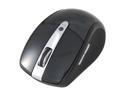
Rosewill RKM-1600RF Slim Wireless Multimedia Keyboard and Laser Mouse Combo
Pros: Its wireless. it works. I have yet to change the batteries in the keyboard, due to it auto shuts off after a while of inactivity. The mouse works on almost every surface including on top of the keyboard, just to give you an idea, or on my bed.
Cons: Using the high DPI setting can affect how often you change your batteries. The mouse can be glitchy, I can't notice it while just browsing my harddrive or web. When gaming you can notice it majorly. I will have 23 ping, and yet my cursor will lag around. I have changed my ingame settings, and even battery but still notice the glitchy movement.
Overall Review: Always had mouse on High DPI. Change my batteries about 3 times already. When I have the money I will be upgrading the mouse, but not the keyboard. No driver to help with glitchy movement. Recommend for average users, not gamers.
8/5/2011See more detail
Great Case For Price
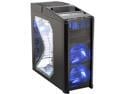
Antec Nine Hundred Black Steel ATX Mid Tower Computer Case with Upgraded USB 3.0
Pros: I've owned this case since August of 2008. It is a great case. The fans have always kept my tower cool and running at optimal performance.Having as many fans as the case does its still more quiet then other cases I have been around. Can constantly upgrade my Tower without having to worry about something not fitting.
Cons: After almost 6 years of owning this case. The front top 120mm TriCool blue LED fan no longer functions properly. The LED stays on but no motor function within the fan itself. It is an easy fix to replace. Not enough room for cable management. The hdd drive bays are a pain to get in if the MB is still in the case.
Overall Review: Would of rated 5 eggs, but my fan broke T_T
7/31/2014See more detail
Addition to "Excellent Adapter"
ENCORE ENLWI-N Wireless Adapter IEEE 802.11b/g, IEEE 802.11n Draft 2.0 PCI 2.3 Up to 300Mbps Wireless Data Rates
Pros: See "Excellent Adapter"
Cons: See "Excellent Adapter"
Overall Review: See "Excellent Adapter" It seems that after a while that the windows zero program that comes with every OS, will keep trying to connect/reconnect every 30+ seconds generating much lag. For gaming my ping would be at 600-2000. For internet, websites will take longer to load then when you first started using the adapter. For firefox you will get pages wont load, when thye should have. An easy fix for this is to use the configuration program that came with the driver at the website or a third party program. Below is a link that comes with the most up to date driver, as well as their configuration tool, that enabled my connection to get back to normal. http://www.encore-usa.com/download/driver/ENLWI-N_ENPWI-N_Win_Driver.zip I hope this helps anyone with such a problem. So basically, to know you are using the other program and not windows when you go to your wireless network connection, and click view wireless networks, it should prompt you saying, "Windows cannot
4/30/2009See more detail
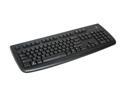
Logitech Deluxe 250 Black 104 Normal Keys USB Wired Standard Keyboard
Pros: It was a great idea to add the 'Ctrl' shortcuts. An overall great keyboard. Simple. Basic. Gets the job done. Great price for a standard keyboard.
Cons: None.
8/21/2008See more detail