
Your Browsing History


Christopher L.
Joined on 03/17/06
0
0
product reviews
- 10
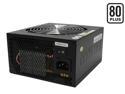
ZALMAN ZM750-HP 750W Continuous @ 45°C
(Maximum Continuous Peak: 850W) ATX12V V2.2 / EPS12V V2.91 SLI Certified CrossFire Ready 80 PLUS Certified Modular Active PFC Modular LED Heatpipe-Cooled SLI Power Supply
Pros: Blue led, modular, quiet, more than enough sleeved cables to suit most builds and it's efficient to boot.
Cons: Needed an extension in order for the cpu cable to reach, but that's no biggie. I expected it since I have a P180 case and the power supply is on the bottom.
4/6/2008See more detail
Nice Asthetic and Specs, but...
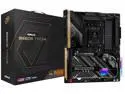
ASRock B650E TAICHI AM5 EATX Motherboard, 4 slots DDR5, PCIE 5.0 x16, 3 M.2 slots, 2.5Gb Lan,WIFI 6E, HDMI 2.1 port, 5.1 audio ALC4082, 2 USB4 Thunderbolt Type-C 24+2+1 Power Phase, 8 layer PCB
Pros: Power delivery, looks, 3 M.2 drive slots, 4 Sata ports, Clear CMOS button on I/O panel, lots of fan headers and ability to run WAN & LAN at the same time. MB had every feature I needed and has run mostly stable except for one detail.
Cons: SaTA A1 & A2 won't stay active. Worked for initial set up and then both drives plugged in to these ports disappeared. Updated the BIOS and the drives returned until PC was shut down, then drives were gone again on the next start up. Found another user complaining of the same issue on line, but no resolution to the problem. Trouble shooted for a while and decided to plug the two drives into B1 & B2 rather than go through the headache of taking PC apart, returning and having to wait for replacement MB.
Overall Review: If all of the SATA ports worked, I'd recommend this board, but now I'm a little concerned I made the wrong decision to keep it as something else may fail down the road.
8/24/2024See more detail
Decent Entry into 32" 4K 144hz Monitor Field
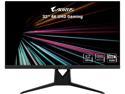
AORUS FI32U 32" (31.5" Viewable) 4K SS IPS Exclusive Built-in ANC, 3840x2160 144Hz 1ms GTG, DP 1.4, HDMI 2.1, 2x USB 3.0, KVM w/ USB Type-C, AMD FreeSync Premium Pro Height Adjust Gaming Monitor
Pros: - 32" 144hz 4K Freesync is finally a reality - No defects detected (dead pixels, IPS glow, back light bleed, etc.) - Nice color - Stand works well once assembled -Center joystick for OSD is nice - ESS Sabre DAC works well enough and friends said the mike was clear
Cons: - RGB cycles on and off randomly when monitor is asleep even when RGB is turned off. Tried the software, but that didn't offer additional control to stop this behavior. Only way to stop the RGB flashing while asleep is to turn the monitor off completely. - RGB software not that great and installs several additional elements and folders which I don't care for. I ended up uninstalling the software plus the extras. - Stand was harder to assemble than others of the same design. For some reason it didn't want to lock the two clips in place. Might be the electrical contacts used for the RGB elements adding extra resistance. - OSD is slow to load, but works fine.
Overall Review: I would recommend this monitor if 32" is your sweat spot for a 144hz 4K monitor and you don't need all of the other gimmicky stuff. I didn't try the console related features, KVM switch, or picture in picture so can't say how well any of that stuff will function and I hope they offer a firmware update to fix the RGB flashing as I don't really care for my room lighting up like a lighthouse all night long.
7/18/2021See more detail
Almost Perfect
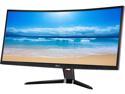
BenQ XR3501 35" Ultra Wide Curved VA Gaming Monitor, 2560 x 1080, 144Hz, Black eQualizer, Color Vibrance, 2000R, Super Resolution, 20M:1 DCR, Low Blue Light, PIP, VESA Ready
Pros: 35 inch screen, 21:9, 144 hz is awesome for gaming. Nice black level, fine build quality, no dead pixels, not much in the way of blead out and decent colors. I'm not sure the curve is necessary but it's grown on me over time.
Cons: Price is high enough that this thing could be 1440P. In fact that's really the one con. While not perfect you can use DSR to simulate higher resolutions in games.
Overall Review: Whenever a 34-35 inch 21:9 120 hz 1440P monitor hits retail I'll probably regret jumping on this monitor, but for now it's gaming bliss.
8/16/2015See more detail
WOW!
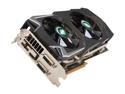
SAPPHIRE Toxic Radeon HD 7970 GHz Edition 6GB GDDR5 PCI Express 3.0 x16 CrossFireX Support Graphics Card 100351TXSR
Pros: Fast! Coolest card! GPU and VRM stays cooler than any other 7970. Metro 2033 may be the only game this card can't run 60 plus fps. Has a little headroom for overclocking beyond the 1200 gpu, 6400 mem speeds offered by the lethal boost. No issues thus far using 12.8 whql drivers and the Trixx software works fine as well. Back plate is awesome. 6gb of ram is cool for those with Eyefinity or high res monitors.
Cons: 1 egg subtracted for noise. It will get loud while gaming so beware if you need a silent machine. The tone of the fans isn't that bad but it will be loader than any other component in your case. If Sapphire could have used something like the Accelero extreme fans for less noise this card would be the best thing ever. Price is steep.
Overall Review: It would have been nice to see the none toxic 6 gb version up for sale as well for price comparison.
9/1/2012See more detail
Gigabyte's Got a Winner Here!
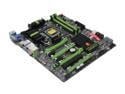
GIGABYTE G1 Gaming G1.Sniper 3 LGA 1155 Intel Z77 HDMI USB 3.0 Extended ATX Intel Motherboard
Pros: 1. PCI-E slots are well spaced for triple slot cards in crossfire. 2. PLX chip, Bigfoot Killer NIC, dual BIOS, and price. 3. Runs cooler than previous board (UD5H). 4. Bundle is pretty good. 5. Overclocks well and F5 bios is stable. 6. Recon 3D sound has headphone amp. 7. PCI-E power connector for extra power to board for crossfire configurations.
Cons: 1. Creative recon 3D sounds better than expected but has a lot of bleed through noise. Can here slight hiss during quite times and can hear hd activity through headphones. 2. Bios doesn't include new Intel Raid Rom for trim in raid.
Overall Review: Fantastic board and priced better than competitors. Probably the best gaming board I've ever used.
9/1/2012See more detail
seller reviews
- 4
Best Freesync Range
Pros: 30 - 144hz freesync range, IPS, 1440P. Colors were pretty good after a little adjustment and games ran very smooth. Cons: The stand is a rather cheap knockoff on the predator stands-mine doesn't go perpendicular to the desk so it is always slightly tilted towards the ceiling. OSD is weak compared to the competition, but works ok. Summary: Very nice gaming monitor is you opt for the static stand and use a riser or your own stand.
On-time
Delivery
Product
Accuracy
Customer Service
Satisfactory
9/5/2017See more detail
Pretty Good Board
My first Prime board died after 3 weeks while playing Mass Effect so I was a little leery of getting another AM4 board. Considered cutting my losses and going back to my intel setup because I never had a board die before, but so far I'm glad I didn't. Pros: This board looks better in person than in pictures if which is a plus, arrived on time, and in good condition. Posted first time and hasn't given me any trouble in 5 days of testing. Bios features are a little lacking at the moment, but I think that is true of all but the high end boards right now. CPU 3950 mhz Mem 2933 mhz Cons: M.2 drive is under the top video card slot which is probably the hottest place on the board and may be an issue (so far haven't noticed any throttling). Can't use manual voltage and still have it drop during idle. Have to wait for microcode update.
On-time
Delivery
Product
Accuracy
Customer Service
Satisfactory
4/3/2017See more detail
Mostly Good
They seemed like pretty high quality cables until I had to remove them from my system to install a different motherboard and then the clip broke of on the 8 pin cpu connector. Luckily there were 2 cpu power cables in the kit and I only needed 1 so I just swapped them. Otherwise it's a very nice looking set with nice packaging.
On-time
Delivery
Product
Accuracy
Customer Service
Satisfactory
3/13/2017See more detail