
Your Browsing History


Brian S.
Joined on 08/22/02
0
0
product reviews
- 21
Magnificient Chip
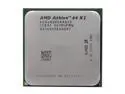
AMD Athlon 64 X2 4800+ - Athlon 64 X2 Windsor Dual-Core 2.4 GHz Socket AM2 Processor - ADA4800IAA6CS
Pros: Excellent chip for the price. They are hard to get a hold of, but get a good heatsink and this chip will run extremely fast and cool. The 1 MB cache in each core helps speed up things like Punkbuster.
Cons: None.
Overall Review: Newegg shipped the chips in a somewhat flimsy package, and about 3 pins were bent when they arrived on one chip. I was able to bend them back with an exacto knife and all works perfectly.
12/6/2006See more detail
Card is OK but MSI doesn't care about support.
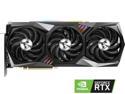
MSI Gaming GeForce RTX 3090 24GB GDDR6X PCI Express 4.0 SLI Support Graphics Card RTX 3090 GAMING X TRIO 24G
Pros: - Fast card.
Cons: - Runs hotter than the surface of the sun. - No recent BIOS updates or support - Somewhat unstable at higher temperatures, lots of screen flickering as it re-negotiates resolutions.
Overall Review: While the card runs OK, it lacks decent BIOS update support for the card's vBIOS from MSI. They've changed their VBIOS support to either have to use their terrible bloaty system software or forcing you to contact support for VBIOS updates. After contacting support I got a biolerplate response of "Have you re-seated the card and tried driver updates", etc. Yes. Even stated that I'm looking for the newest VBIOS since I knew there was one, and they stopped responding to me altogether, even after trying to get their attention for 2-3 months afterwards. I had the opportunity to buy the same card, only through EVGA (3090 FTW3), plugged it in, updated it's VBIOS and everything runs amazingly. So this card is sadly sitting in a box after 3-4 months of use and it'll be the last non-motherboard I'll buy from MSI.
5/15/2022See more detail
Solid board, feels heavy and high quality.
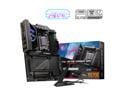
MSI MPG X870E CARBON AM5 ATX Gaming Motherboard, 4x SATA 6Gb/s, AMD Wi-Fi 7,USB 4.0
Pros: - Good solid heat sinks. Board is sleek but chonky. - LOVE the EZ-PCIe Release button and screwless M.2 design. - Excellent stability overall. 7200 MT/s RAM POSTed with a 9800x3d with no issues.
Cons: - Missing the MEG trim this cycle. - MCI center/Mystic Light still clunky, but far better than it used to be. - Missing printed manual. I knew this was inevitable, but...
Overall Review: This review is for the MSI Review Rebate Program. Overall, this board is great. There's a reason I buy MSI - Quality at the price point is definitely better than others. Overall, good cooling and protection on the board itself. Lots of power phases and VRMs with heat dissipation to keep the board nice and cool. I'm not doing massive overclocking, just want a little extra bang for the buck, and want stability and performance in my gaming and production work. I wish this had 10Gb networking onboard as I'm doing a lot of file transfers and light video editing, but you can't have everything. The 5Gb is nice, and with a 2.5Gb backup or for a separate bridge to another internal network for testing stuff I appreciate the options. Not sure what the "key" included with the mainboard is for. It's a hex wrench?
11/23/2024See more detail
Buy the Pros.
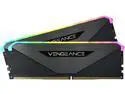
CORSAIR Vengeance RGB RT 64GB (2 x 32GB) 288-Pin DDR4 SDRAM DDR4 3600 (PC4 28800) AMD Optimized Desktop Memory Model CMN64GX4M2Z3600C18
Pros: - Fast and Efficient. - Nice RGB - Stable
Cons: - RGB isn't as nice as the Pros - Seems a little more "mass market"
Overall Review: These aren't bad RAM modules at all. I bought them for use in a transcoding server and they work fine. After running them for a few days I plan on running them through some Memtest86 cycles to see if anything else comes up. I don't expect it will have any issues. If you're getting them for your desktop and RGB matters to you, go with the Pros (which I have in my desktop machine). The RGB seems just a little sharper and smoother, not quite as blurred by the cover. Otherwise, they're great, solid RAM and A good purchase.
5/15/2022See more detail
Good drives with solid performance.
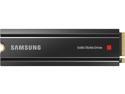
SAMSUNG 980 PRO SSD with Heatsink 2TB, PCIe 4.0 M.2 2280, Speeds Up-to 7,000MB/s, Best for High End Computing, Workstations and Compatible with Playstation5 (MZ-V8P2T0CW)
Pros: - Super fast. Samsung 980 Pros. Great sequential read speeds.
Cons: - Still fast, but not as impressive 4k and other non-sequential speeds. - Heatsink can't be removed without voiding the warranty.
Overall Review: TL;DR: Buy the non-heatsink variety. I knocked one star off for the issue with removing the heat sinks. I am using these in a RAID0 array in a PC. One is underneath my graphics card and the other is on top. I had purchased the heat sink variety with plans to remove them and use my mainboards built-in heatsinks since I was moving from two 1tb 980 Pros to 2tb versions. While I never had head issues with my 980's using my mainboard heatsinks, these ones that came with the heatsinks pre-installed need air circulation, particularly the one above my graphics card that I keep getting warnings is running in the 60 degree range. Still in spec (they are specced up to 70) but getting into the throttling range. Dropping a small fan pointing at them that sits on top of my video card helps. The one under my video card, that's actually right next to the video card's heat sinks, has fine temperatures due to the air circulation from the graphics card itself. The heat sink is low enough that the graphics card sits on top of it without issue. At any rate, if you have mainboard heatsinks, buy the non heatsink variety to save some money and get the same temperatures.
5/15/2022See more detail
Noisy but excellent!
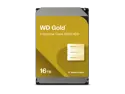
WD Gold 16TB Enterprise Class Hard Disk Drive - 7200 RPM Class SATA 6Gb/s 512MB Cache 3.5 Inch - NE-WD161KRYZ
Pros: - Tons of space - Fast - Extra warranty, extra duty cycle.
Cons: - Noisy (but not all that bad inside of a case) - Gets hot.
Overall Review: I would definitely recommend these drives, but they DO make some pretty loud noises occasionally. Almost like a head crash but seems that's just normal operating/initialization noise. Once they get going they're not all that bad and not much noisier than other drives. They just weren't made for silent operation. I had them in a drive carrier that stacks them in 4's while waiting for them to validate outside of a case, and started getting temperature warnings (60 degrees), but put a nearby fan on them just to get some air circulation and that solved the problem. Make sure to have circulation. Otherwise, they've gotten built into a home array with parity, and are currently loading up with data. Highly recommended.
5/15/2022See more detail
seller reviews
- 1
Good job.
Delivered what was promised, an unused, working AMD Wraith Prism CPU cooler.
On-time
Delivery
Product
Accuracy
Customer Service
Satisfactory
11/14/2022See more detail