

Your Browsing History


Travis P.
Joined on 06/21/15
0
0
product reviews
- 3
Gigabyte's flagship is a beast!
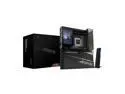
GIGABYTE X870E AORUS XTREME X3D AI TOP AMD AM5 LGA 1718, E-ATX, Supports AMD Ryzen 9000/8000/7000 Series Processors, DDR5, 24+2+2 Total Power Phase, 5x M.2, PCIe 5.0, USB4 Type-C, WIFI7, Dual 10GbE, PCIe EZ-Latch+ Duo, 5-Year Warranty
Pros: Exceptional build quality Excellent BIOS So far, annoyance and glitch-free Very cool innovations in cooling (Thermal Matrix, RAM Wind Shroud) Flawless PCIE lane assignment in PCI-dense configuration Awesome cable management options
Cons: 5" screen is beautiful, but can't (currently) be customized Packaging large enough to be viewed from orbit. Impossible to hide from wife.
Overall Review: I've got an extremely hardware-dense PC that probably should have been built on a Threadripper board. I run dual RTX 5090s, a PCIE5 system SSD and three PCIE4 8TB data SSDs that I build a storage space on. PCIE lanes are at a premium for me, and MSI's Godlike has been a nightmare from the get-go. I saw this offering from Gigabyte and jumped on it out of an abundance of frustration with my current board, and what a difference it has made! PCIE lanes auto-assign perfecftly after every reboot, board runs noticeably cooler, memory training is faster, I can choose which GPU to display BIOS screen on, and my keyboard and mouse both always work in BIOS mode. Other than the lack of a customizeable screen, particularly one as vibrant and beautiful as this one, I can't find a thing to complain about with this board technically. The armored PCIE and DDR5 slots feel industrial-grade, and the board layout is intuitive: All headers are at either the top or front of the board, with none hanging off the bottom. After a year of playing whack-a-mole on MSI in hopes that the next reboot would bring my system SSD up with all four PCIE5 lanes assigned, every reboot on this board has bifurcated components without a single failure to date. It's bit, expensive, overengineered, and covered with magnetic armor pieces that work overtime to hide the PCB beneath as much as possible. It arrives in a box the size of the case you likely plan to install it in, and then buries you in swag like a Gigabyte sippy cup and a wine opener. But man, if it doesn't do what a motherboard is supposed to: Transparently facilitate whatever components you've installed working together without fuss or conflict. I applied all of my negative CO values and Curve Shaper values over from my old motherboard and my system has run fine without complaint hitting all-core clocks of 5500mHz on my 9950X3D during multithreaded workloads. This is my third Gigabyte motherboard, and has certainly delivered on all fronts.
3/12/2026See more detail
Best AM4 MB in Concept, Questionable execution, and terrible support.
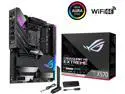
ASUS ROG Crosshair VIII Extreme AMD AM4 X570S EATX Gaming Motherboard (PCIe 4.0, Passive PCH Heatsink, 18+2 Power Stages, 5 x M.2 Slots, Wi-Fi 6E, 2" LiveDash OLED, USB 3.2 Gen 2x2 Front-panel Connector with PD 3.0 60W, 10Gb & 2.5Gb LAN)
Pros: -Supports 3x M.2 drives without stealing PCIE lanes from GPU. -Solid build quality. Very heavy duty. -Feature rich. -Intelligent layout
Cons: -Failed after less than a year with no warranty support from Asus. -As a premium board, BIOS updates frequently lagged mainstream. -Accessing some board components through "armor" was cumbersome once installed.
Overall Review: First off, I specifically ordered this product because of its ability to support 3x M.2 drives without impacting PCIE lanes for GPU. Nobody else was doing this without stepping up to a Threadripper, so it was a no brainer for my budget. One year in, the board failed. I run clean power through a UPS system and have overprovisioned my system with a 1600w PSU, but I still had a capacitor failure. I reached out to Asus for support and they declined my warranty claim since the motherboard was offered through Newegg by Vooyit. The claim was the warranty only applied to citizens of Mainland China since that's where the board was initial sold wholesale. While the board performed wonderfully until its failure, the combination of Asus support and low MTBF for this purchase forces a lower rating than I'd otherwise give it. Caveat Emptor: (Buyer beware!) I have a long and happy history with Newegg, when they are the original seller. Their third party sellers may void your warranty. It did for me.
3/28/2024See more detail
Truly an evolution...

Acer Predator X34 bmiphz Black 34" IPS 4ms (GTG) 60Hz/100Hz, 3440 x 1440 21:9, NVIDIA G-SYNC Ultra-wide Curved Gaming Monitor, ZeroFrame Design, Predator GameView Technology, VESA Mountable, Tilt/Height Adjustable, 2 x 7w Speakers
Pros: -Vibrant colors, brilliant whites, acceptable IPS glow and very light backlight bleed. -OC'd to 100hz flawlessly. -No dead or stuck pixels -No coil whine @ 100hz
Cons: -Build quality seems a little on the cheap side for a $1300 monitor. So far, no impact on performance, but coming from a Dell U3011, one kind of becomes accustomed to the commercial quality materials one usually enjoys once the "consumer level" is left behind. -Moreso than SLI, QHD gaming isn't for novices. Some games, even recent ones (I'm looking at YOU Fallout 4) don't natively support ultrawide, and it can take some patience getting it to work right. That said, once you do, you will likely not want to go back.
Overall Review: So, I'll be frank...I already had a fairly beastly monitor when I ordered this one, but I've also had it for several years. The Predator models aren't easily purchasable locally for me, so I figured I'd try one out and if I wasn't amazed, I'd return it. I was pretty skeptical, and figured the odds of going from a 20-30-20 16:10 setup to a single 34" with lower vertical resolution and liking it were slim. When I got this set up, the difference in fidelity was just stunning. The colors popped, I turned off antialiasing and didn't miss it, and this was all at 60hz without Gsync enabled. Once I got the monitor OC'd to 100hz and rebooted for Gsync detection, I was sold. U3011 is on wife's desk, and this is staying firmly on mine. The curve is subtle and isn't distracting or annoying for me.
3/23/2016See more detail