
Your Browsing History


Jason M.
Joined on 04/15/04
0
0
product reviews
- 18
Good, Stable, but probably not worth going to X48 for the cost
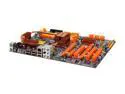
DFI LANPARTY DK X48-T2RS LGA 775 Intel X48 ATX Intel Motherboard
Pros: As of the 1st week of May, a lower priced X48 than competitors. Tons of memory timing options as expected. Reset and Power switches on motherboard are great for testing before installing it in case. Limited information in user's manual - refer to website for memory timing and advanced setup. Worked great with 8GB Corsair TWIN2X4096-6400C5 R. Didn't require any tweaks to BIOS - just read SPD values and ran at specified timings. Tested with Server 2008x64, Vista x64/x32, and WinXP_SP3 and no issues. Irregardless, never had stability issues and PATA drives seem to work fine.
Cons: No 1394 connector or external jack. Very bare bones kit: only 2 SATA cables, 1 FDD cable, 1 PATA cable. As other reviewer stated, they're not very flexible. The SATA ports pointing towards the front of the case are annoying and difficult to use. To insert the SATA cable i had to remove the HDD bay out of the Antec P182, then it was easy. No conceivable benefit over X38 chipsets. JMB368 driver is on floppy, but didn't always install well with Vista/Server 2008. Most video cards and definitely double width video cards will block the PCI-E X4 slot, so you most likely won't be able to use it. HD Audio jack is also poorly positioned by PCI slots. Two empty USB headers without any additional cables/external PCI covers provides so plan on having some on-hand or buying them if you need more USB ports. If your case can use all three you're covered as well. The P182 only uses one.
Overall Review: Zalman CNPS9500A fit horizontally and the push buckle just barely touches the heatpipe one the side towards the front of the case. It's pretty much the only direction it will go without issues. E8400 works fine with it. Have NOT tried on-board RAID, but it's the tried and true ICH9R chipset so I wouldn't expect issues.
5/6/2008See more detail
Wouldn't buy again
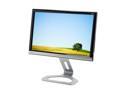
Gateway FHD2400 Black-Silver 24" 3ms HDMI Widescreen LCD Monitor w/ 4-port USB Hub and Height & Pivot Adjustments 400 cd/m2 1000:1
Pros: Acceptable price for size and image quality. Zero dead pixels.
Cons: Terrible dark banding that appears at top of screen as you move your head down. Eyes level with the topmost part of the monitor seems to be the sweet spot. If you go any lower the dark band grows larger and darker. In other words, poor vertical viewing angle. Horizontal is fine. Oftentimes tries to display Vista desktop in portrait mode rather than the standard landscape mode. Takes seconds to correct itself. Annoying. Stand looks cheap but works fine and has decent vertical adjustment.
Overall Review: The banding would preclude me from recommending this product to anyone else. It may be endemic of this type of panel. I have not tried any input besides DVI-D.
6/26/2008See more detail
Failed
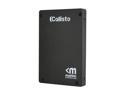
Mushkin Enhanced Callisto Deluxe 2.5" 240GB SATA II MLC Internal Solid State Drive (SSD) MKNSSDCL240GB-DX
Pros: Fast like nearly all SSDs of this generation.
Cons: Failed after 9 months of average desktop PC usage. BIOS failed to recognize drive. Returned to Mushkin for replacement and the RMA process was easy enough and the replacement arrived quickly.
Overall Review: The listed MTBF values aren't worth the e-ink they're posted in. I've had two 1st generation SSDs fail with Indilinx controllers (by a different manufacturer) and now this one with a 2nd generation SandForce. That's 3 out of 3 SSDs fail that I own. In comparison, I have 17 rotational drives running nearly 24x7 and one has failed in the past three years. Use SSDs for their speed, but plan on them dying by having a good backup plan and a spare computer to use while you wait for an RMA replacement.
2/8/2012See more detail
1st generation garbage
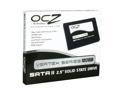
OCZ Vertex Series 2.5" 120GB SATA II MLC Internal Solid State Drive (SSD) OCZSSD2-1VTX120G
Pros: Was fast in RAID-0 when it wasn't plagued with bad sectors.
Cons: Out of the two drives I won one is now completely dead and the other has intermittent bad sectors which means it too will die before long. There have been some random Win7 BSODs along the way, and now I'm sure these drives are the culprit.
Overall Review: Don't believe the MTBF estimates that you read. Yes, SSDs do not have moving parts but the technology is still maturing and manufacturing quality varies between the brands. The only good garbage collection that works on these drives is when you throw them into the waste receptacle. It lasted 1 year and 5 months. The OCZ RMA process is slow and unresponsive.
2/20/2011See more detail
Great PS for dual CPU motherboard!
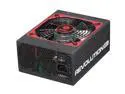
ENERMAX REVOLUTION85+ ERV950EWT 950W ATX12V / EPS12V SLI Ready CrossFire Certified 80 PLUS SILVER Certified Compatible w/Core i7 Modular Active PFC Power Supply
Pros: Huge fan. Moves large amount of air at silent speeds. Has 2-wire fan lead to report fan speed to motherboard. Build quality is great and I love how it comes with 12x SATA power plugs - enough for my 12 port Adaptec RAID card. Modular cables for only the accessories is great. Had 24 pin and 2x 8-pin EPS12V plugs to run my dual processor Tyan S7025AGM2NR which requires this. There are few power suppplies that offer this, and I wouldn't consider any of the other manufacturers when compared to Enermax.
Cons: It's longer than other power supplies I've owned, but that's to be expected of a 950W power supply. I kinda wish the PCI-E power cables were modular too. When used with a server motherboard, it comes with onboard video, and I will never use a PCI-E plug for video cards. Would clean up the case, but I figure they probably did it for tighter tolerances with those power hungry video cards.
Overall Review: I've always been happy with Enermax power supplies. They are very efficient, very quiet, and are dependable. It depends what you plug in of course, but for dual E5520's, 12 hard drives, and two RAID cards, this is more than powerful enough.
12/30/2009See more detail
Good alternative to overpriced OEM cables by other manufacturers
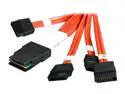
3ware CBL-SFF8087OCF-06M 1 Unit of 0.6M Multi-lane Internal (SFF-8087) Serial ATA Breakout Cable
Pros: Works fine on my LSI 9211-8i HBA controller and a lot cheaper than LSI's. Plugs right into the HBA and my SATA hard drives. This "forward" breakout cable is what you need.
Cons: None
Overall Review: Pay attention to Forward vs. Reverse cables when selecting cheaper alternatives to OEM overpriced models. For a neater case, order the shortest cables possible.
12/14/2009See more detail