
Your Browsing History


Christopher E.
Joined on 11/07/04
0
0
product reviews
- 9
Complicated RAID setup
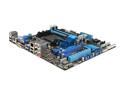
ASUS M5A88-M AM3+ AMD 880G USB 3.0 HDMI Micro ATX AMD Motherboard
Pros: The usual ASUS high quality, features and sensible layout
Cons: Why no e-SATA port? Why only one case fan connector? No way to install all the drivers at once without also installing the bloatware - most deviously Norton. Come on ASUS!
Overall Review: If you’re setting up drives in RAID or AHCI you need to download the AMD RAID/AHCI driver from the Asus website. In my latest rig I installed a 128G SSD for W7 and documents, and two 1 TB drives in RAID1 for music and photos. The SATA ports on the mobo are set as follows: 1-4 form a group and 5-6 are a separate group. Approach: Plug your hard drives into slots 1-4 and your optical drives into 5-6. Download the AMD RAID/AHCI driver onto a flash drive. Plug the flash drive into a USB port on the back of the mobo. Go into BIOS and in SATA Configuration change 1-4 to the desired setup (use RAID even if some of the drives aren’t going to be in RAID). Restore 5-6 to IDE so you can install Windows from a DVD. When you try to install W7 it will say it can’t find any hard drives. Direct the driver-seeker to the appropriate file on the flash drive; tell W7 to install on the SSD. Once W7 installs, go back to the RAID setup (ctrl-F on post) and set up the RAID drives. In Disk Management get the new RAID array recognized by Windows. NOTE: IF you install W7 with all the SATA ports in IDE you can't subsequently change back to RAID - you have to completely re-install Windows.
11/8/2012See more detail
Avoid!
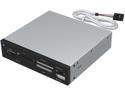
Sabrent 7 Slot USB 2.0 Internal Memory Card Reader & Writer (CRW-UINB)
Pros: N/A
Cons: Internal card slots out of alignment with openings in case so cards could not be inserted. After connecting USB cable to motherboard, computer a) hung up on reboot or b) bluescreened.
Overall Review: Try another brand - Rosewill seems to have the best and most numerous reviews.
6/24/2008See more detail
First rate u-ATX case for patient builders
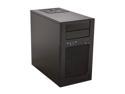
SilverStone Temjin Series TJ08B-E Black Aluminum front panel, steel body Micro ATX Mini Tower Computer Case
Pros: High end case, well designed, lots of well-thought out and convenient features, very compact but with room for multiple hard drives, excellent airflow and a very quiet 140mm fan. Perfect for a low power, almost-silent desktop.
Cons: Some disappointments on fit and finish - some dented or bumped parts inside, some screws not inserted perfectly. Hence 4 instead of 5 eggs for an otherwise excellent design. Fortunately the outside of the case was perfectly intact.
Overall Review: My build, intended to be as quiet as possible and moderately priced: i3-3225 with HD 4000 video – 55W ASUS P8Z77-M PRO Z77 micro-ATX board SeaSonic X series SS-400FL Fanless 400W PSU Cooler Master Hyper 212 EVO - CPU Cooler Corsair Vengance 2x4GB low profile RAM OCZ 128GB Vertex 4 SSD 2) 1 TB WD Green HDD ASUS 24X DVD Burner Rosewill RDCR-11003 74-in-1 USB3.0 3.5" card reader Note that the fanless PSU must be positioned "right side up" and its top grill mates with the grill on top of this case. I used the i3 instead of i5 because I didn't need the extra power and wanted lower wattage. I had to reverse the orientation of the fan on the cooler to the "pull" orientation (fortunately easy with this model) because there's no room for it in the "push" orientation. The CPU still runs very very cool. Although you can mount a 120mm fan on the rear panel I chose not to because the CPU fan was very close to the grill and the large holes allow plenty of circulation. NOTE: Small as it is, this case has very very tight clearances and it's difficult to snake the wiring around all the obstructions. Silverstone tries to make it easier by offering lots of tie-downs and tracks for the cables to follow. Nonetheless this build took me more than twice as long as usual. I would recommend this case only for those committed to having a very compact, elegant looking, high-end case and willing to backtrack a few times to find the best solution; otherwise a somewhat bigger case might avoid frustration! p.s. In my case, I'm really happy with how things turned out. Worth the extra work.
11/1/2012See more detail
Great value case
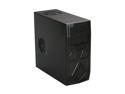
Antec Two Hundred Black ATX Mid Tower Computer Case
Pros: for fifty dollars you get a lot. Case is solidly built, fans are quiet (with convenient lo-hi controls on back); it's well made and looks good. I was swayed by the hard drive dock in the front - allows a spare drive to be used for mirror backup for all those music and photo folders that are way too big for Mozy to be stored offsite - just in case!
Cons: with the front ports at the very top of the case, the audio cable didn't extend all the way to the connector on my ATX board. There is no sound deadening in a case at this price, and while the fans are very reasonably quiet, the hard drive noise is amplified by the case. Hard drive read/write is audible in a quiet room. But compared to the chainsaw fan noise of my old Dell, this is nothing!!
Overall Review: This case compares _very_ favorably to other cases in this price range. I wanted to be sure I would have plenty of ventilation for a high-end processor, and this is certainly well vented, with options for multiple additional fans. If sound deadening had been my priority, I would have purchased an Antec Solo, which I've used before and is the optimal combination of quality, silence and price that I've found.
11/5/2009See more detail
great value
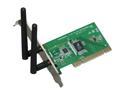
Rosewill RNX-N300 Wireless N Adapter IEEE 802.11b/g/n PCI (1T2R) Up to 300Mbps download and 150 Mbps upload Data Rates/ WPA/WPA2 (AES, 64,128-WEP with shared-key authentication) Cisco CCS V1.0, V2.0 and V3.0 compliant/ Vista/ Win7
Pros: software installed easily on a Vista machine; worked right out of the box, picked up signal from router perfectly
Cons: none
Overall Review: for $20 how can you go wrong?
4/9/2009See more detail
worked great on a legacy laptop
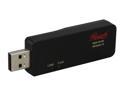
Rosewill RNX-N100 IEEE 802.11b/g/n USB2.0 Wireless-N 2.0 Dongle (1T2R) Up to 300Mbps download and 150 Mbps upload Data Rates/ WPA/WPA2 (AES, 64,128-WEP with shared-key authentication) Cisco CCS V1.0, V2.0 and V3.0 compliant/ Vista/Win7/ MAC
Pros: Have a 10-year old thinkpad 600x. Have never been able to get it to work with linksys or d-link wireless devices. Installed the software, plugged in the dongle, worked immediately and without hassle.
Cons: none
Overall Review: This device is half the cost of the name brand equipment and worked perfectly out of the box. Great combination of function and value
4/9/2009See more detail